How dispatchers can tell whether a GPS position is out of date

AuthorAndrew M., VP of Data and Solutions

AuthorAlex S., Senior Data Engineer

When a GPS tracker loses connectivity or cannot determine its position, a dispatcher may mistake an old location for the vehicle’s current whereabouts. On routes with patchy mobile coverage or satellite navigation interference, that can lead to a wrong update: the customer gets an arrival notification even though the truck has already left.
Our recommendation is to check position age and fix status before confirming arrival: when did the tracker record the position, and did it obtain a new location fix? Here is a delivery example.
The message arrives after the truck has left
At 10:00, the driver pulls up to the warehouse. The tracker records the position, but mobile connectivity drops and the message stays in the device’s memory. The driver cannot enter the unloading area. At 10:05, the truck moves to a waiting area outside the warehouse.
At 10:20, connectivity returns and the tracker starts sending its stored data. The first position the dispatcher receives is the one recorded at the warehouse at 10:00. Just then, the customer asks, “Is the truck there yet?”
Looking at the coordinate alone, it is tempting to say yes. But it shows where the truck was twenty minutes ago. Answering a question about its current location requires more recent data.
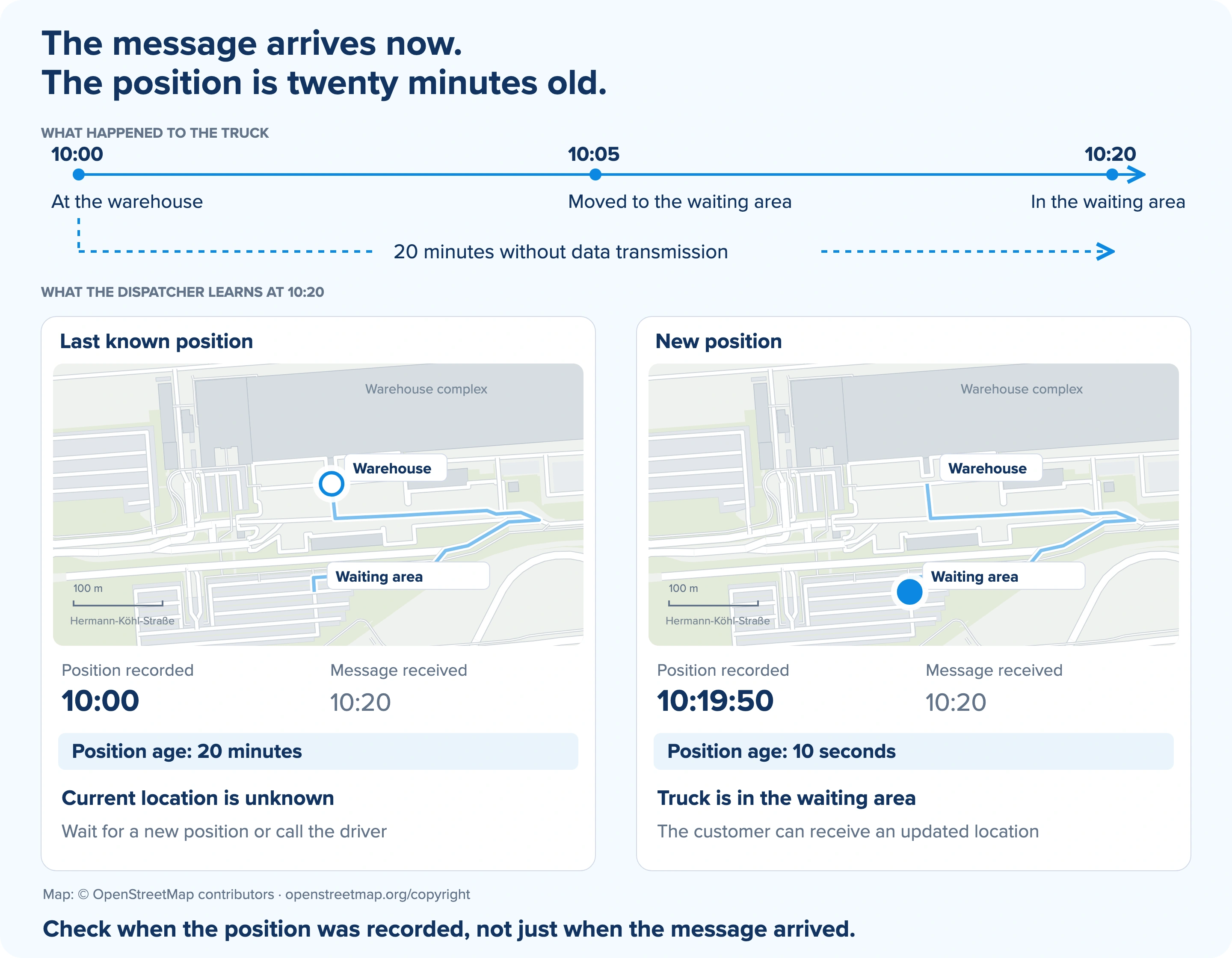
The hollow marker shows the last known position; the blue marker shows the new one. Map data: © OpenStreetMap contributors.
Check position age and fix status before confirming arrival
First, look at when the position was recorded: 10:00 in this example. The message receipt time, 10:20, only tells you when the data reached the server. A twenty-minute delay does not make the coordinate wrong. It is still useful for the trip history, but it no longer confirms that the truck is at the warehouse now.
Next, check the position fix status. A tracker can reconnect and send fresh sensor readings while still using its last known coordinate. A recent message therefore does not necessarily mean that the vehicle’s position has been updated.
Navixy data provides separate fields for these checks: msg_time is the time the point was recorded, server_time is the time the message was received, and gps_fix_type is the position fix status. The raw data documentation explains the values. The status reflects the tracker’s own assessment: valid, invalid, last known position, or unknown.
Now the dispatcher can give a current location
Another point in the batch was recorded at 10:19:50. The tracker marks it as valid, and the coordinate places the truck in the waiting area. The dispatcher can now tell the customer, “The truck reached the warehouse and is now in the waiting area. I’m checking with the driver when it can enter.”
If there is no recent position, or its status is unknown, the dispatcher checks the vehicle’s whereabouts with the driver. An old coordinate alone is too little to confirm that the truck is at the warehouse now.
Applying the check in Navixy
Start with one route with connectivity gaps, in your own fleet or a customer’s fleet. Review a few deliveries: which positions and statuses did the system receive, how late did they arrive, and which notifications went to the customer? This will show where old data may have influenced an arrival decision.
For an automated check, choose a maximum position age that fits the tracker’s update frequency and your operational needs. Confirm that the device reports its position fix status and that the rule checks it alongside the recording time. IoT Logic can process incoming data in Navixy; the specific condition depends on the attributes your device provides and your notification setup.
Test the rule against trip history before enabling it. In this example, it should retain the warehouse visit at 10:00 without treating it as evidence that the truck is still there at 10:20.