Prevent fleet fines with automated air quality alerts in Navixy

AuthorAdrian M., Technical Solution Engineer

In the Mexico City Metropolitan Area, an air quality contingency can change the next day's vehicle availability with little notice. For a fleet, that can mean reassigning vehicles, adjusting delivery schedules, changing departure times, and informing multiple drivers before the next shift.
The practical answer is to turn changing air quality into time to act. With Navixy IoT Logic, a fleet can combine vehicle location with third-party environmental data and trigger preventive mobile alerts when pollutant values cross configured thresholds. The official decision always rests with CAMe; the alert tells drivers and dispatchers to check official sources and prepare for potential restrictions under Doble Hoy No Circula.
Consider the overnight scenario. Air quality deteriorates, and CAMe later declares an Environmental Contingency that changes the restrictions for the following day. Drivers who do not check the announcement before bed may discover the change only after starting their trip. A fleet-wide workflow creates an earlier decision window: dispatchers can identify potentially affected operations, confirm the official measures, and adapt the plan before vehicles leave.
How the two restriction regimes differ
Hoy No Circula is the standing program that limits vehicle circulation in Mexico City according to criteria such as the emissions verification hologram, the final digit of the license plate, and the registration sticker color. Its purpose is to prevent, minimize, and control emissions from mobile sources.
Doble Hoy No Circula is the common name for extraordinary restrictions added when CAMe declares a Phase I Environmental Contingency. It is not a separate permanent program. During a contingency, restrictions can expand to vehicles that may normally be exempt from daily limits and can also affect commercial operations. Official measures may include restrictions for local and federal cargo vehicles, directly affecting vehicle availability and logistics schedules.
For an individual driver, a late update may mean changing the next day's plans. For a fleet, the same update can require several coordinated actions:
- reassigning trips to eligible vehicles
- changing departure or delivery times
- notifying drivers and customers
- revising routes and shift plans
- checking whether cargo-vehicle measures apply to the operation
The useful distinction is operational: the standing program determines the normal baseline, while a CAMe declaration can temporarily change that baseline.
What CAMe considers before declaring a contingency
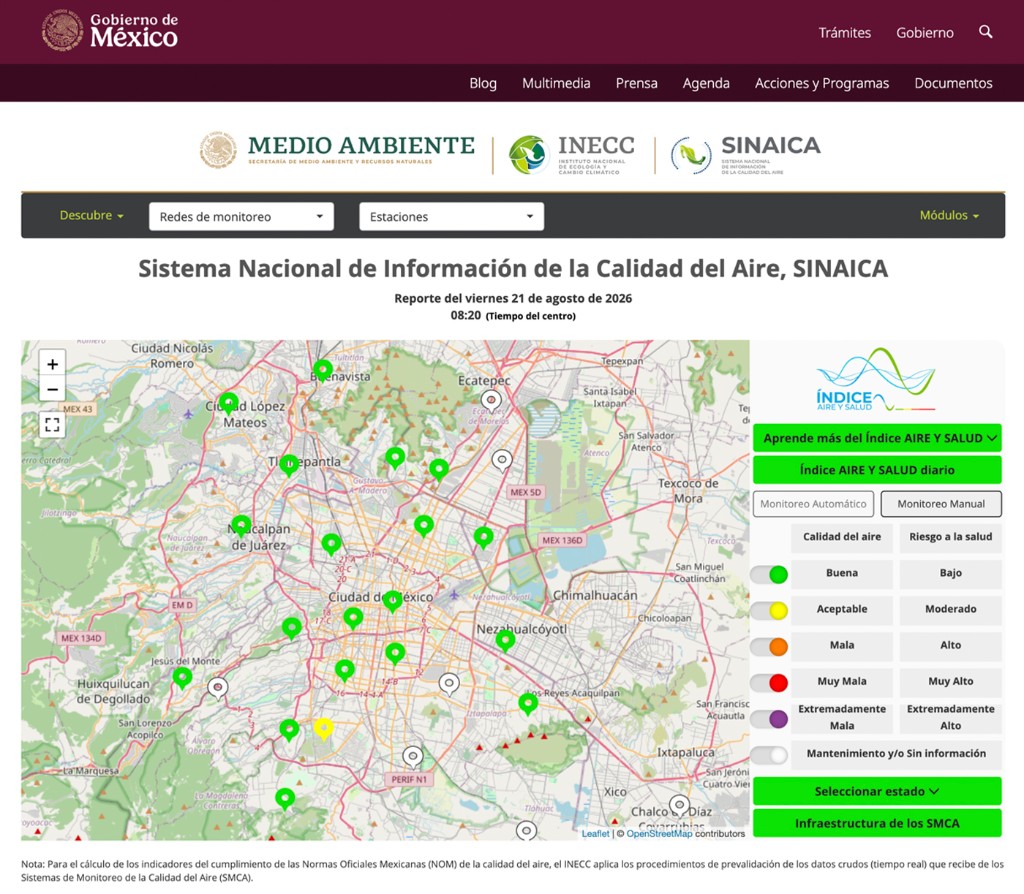
The decision is based on continuous monitoring across the Mexico City Metropolitan Area. Stations in the Atmospheric Monitoring System record pollutant concentrations and meteorological variables. The National Air Quality Information System, SINAICA, collects data from air quality monitoring systems across Mexico and provides public access to real-time raw measurements, air quality indicators, and validated historical data.
The principal inputs relevant to this use case include:
- Ozone (O₃): a pollutant that often increases during warm periods with strong solar radiation
- PM2.5: fine particulate matter capable of penetrating deep into the respiratory system
- PM10: larger suspended particles associated with dust, industrial processes, and vehicle emissions
- Meteorological conditions: temperature, wind speed and direction, relative humidity, and solar radiation, which influence how pollutants disperse or accumulate
The official Phase I activation references published for the metropolitan area are:
| Pollutant | Phase I activation reference |
|---|---|
| Ozone (O₃) | More than 150 points on the AIRE y Salud Index, equivalent to more than 154 ppb |
| PM10 | More than 150 points, equivalent to more than 214 µg/m³ |
| PM2.5 | More than 150 points, equivalent to more than 97.4 µg/m³ |
When a monitored pollutant crosses one of these references, CAMe evaluates the measurements together with pollutant trends, meteorological conditions, and the likely evolution over the following hours. Exceeding a threshold does not itself activate Doble Hoy No Circula. CAMe must issue the official declaration and publish the measures that apply.
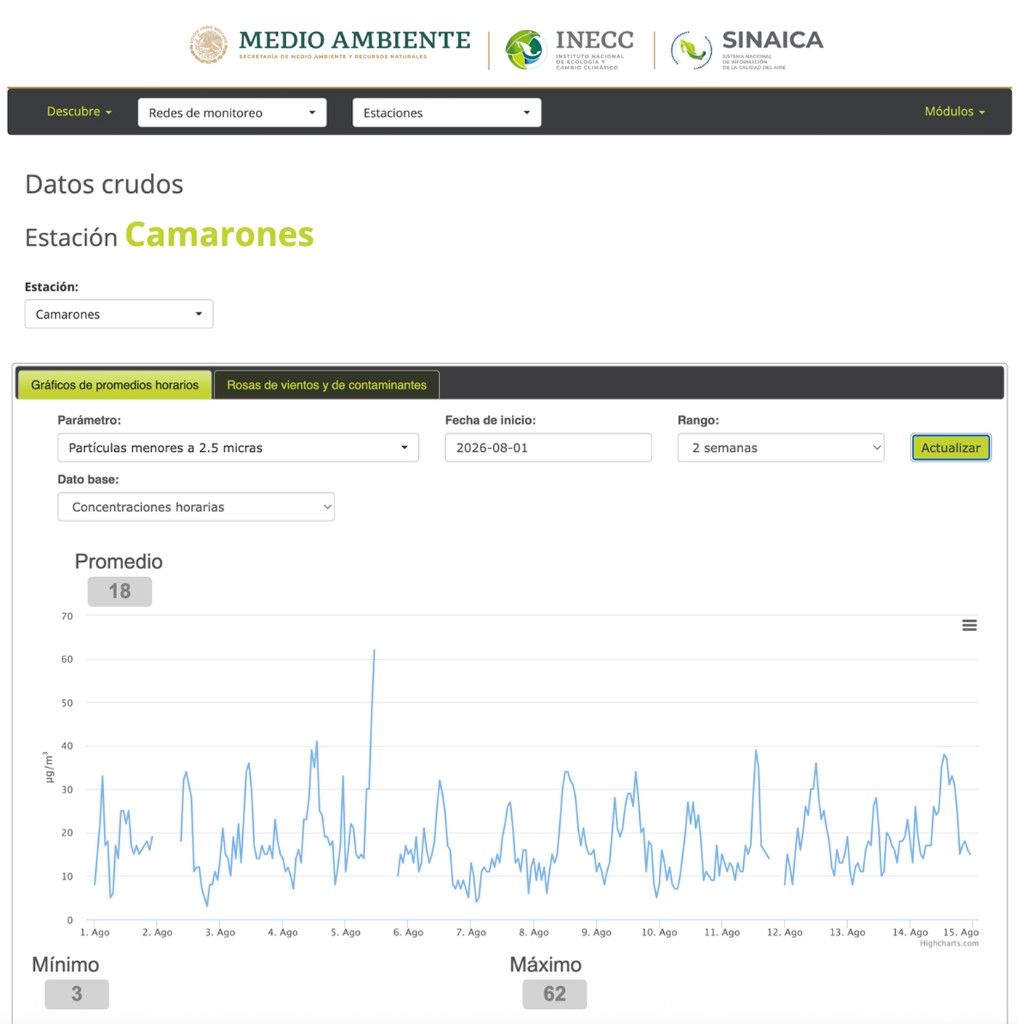
Environmental readings are therefore an early-warning input, not proof that restrictions are active. Drivers and fleet managers should always confirm the current measures through official CAMe and Mexico City sources.
From environmental data to a preventive fleet alert
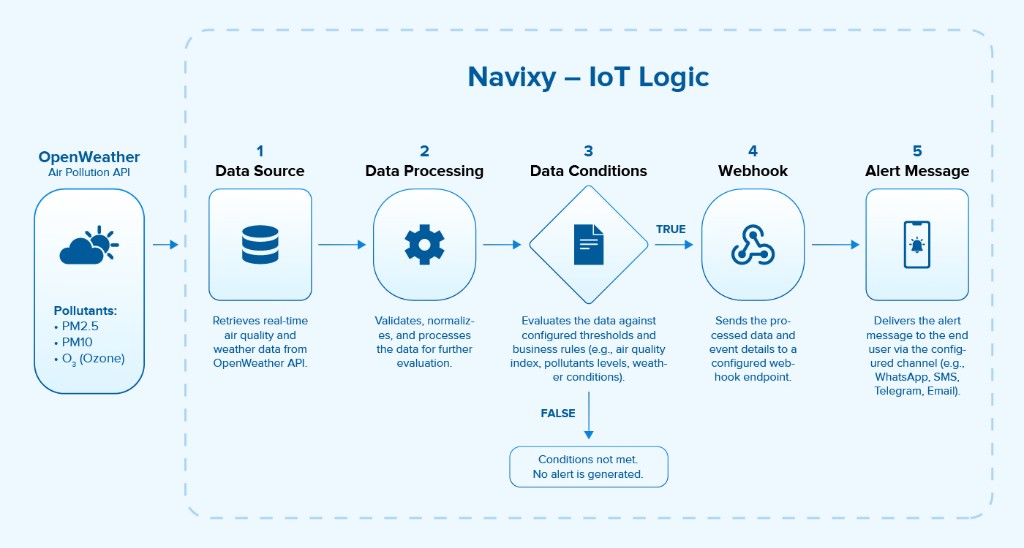
Public air quality information is useful, but it is distributed across services and normally requires someone to check it. IoT Logic automates that monitoring process by combining an object's telematics data, a third-party environmental source, conversion logic, conditions, and a notification webhook in one workflow.
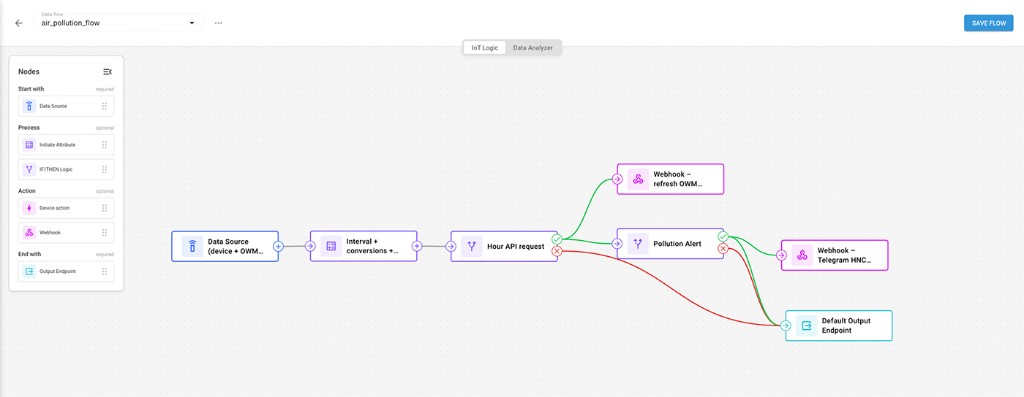
The workflow follows five steps:
- Locate the vehicle. Retrieve the latest latitude and longitude reported by the telematics device.
- Request environmental data. Send the coordinates to a service that queries the OpenWeather Air Pollution API for the vehicle's current location.
- Normalize the values. Convert units where required and expose the pollutant values as IoT Logic attributes.
- Evaluate conditions. Compare ozone, PM2.5, and PM10 with the configured preventive thresholds.
- Deliver the alert. When a condition is true, send the event and context to a URL-accessible messaging service through a webhook.
Using the current coordinates rather than one fixed monitoring point makes the environmental query follow the vehicle. The result is still an approximation tied to the third-party data source and its spatial coverage, but it is operationally more relevant than checking one static city value for every vehicle.
Data returned by the air pollution service
The OpenWeather Air Pollution API can return an Air Quality Index plus pollutant concentrations for:
- carbon monoxide (CO)
- nitric oxide (NO)
- nitrogen dioxide (NO₂)
- ozone (O₃)
- sulfur dioxide (SO₂)
- particulate matter PM2.5
- particulate matter PM10
- ammonia (NH₃)
For this workflow, the condition logic focuses on ozone, PM2.5, and PM10 because those are the pollutants connected to the Phase I contingency references described above.
Converting ozone from µg/m³ to ppb
OpenWeather reports pollutant concentrations in micrograms per cubic meter (µg/m³). The official ozone reference is expressed in parts per billion (ppb), so the workflow converts ozone before comparison.
At 25 °C and 1 atmosphere, the conversion used in the example is:
ppb = gas concentration (µg/m³) × 24.45 / molecular weight
The molecular weight of ozone is 48 g/mol. IoT Logic applies the expression to the returned O₃ value, producing a ppb attribute that can be compared with the 154 ppb reference. The same expression can convert other gases by substituting the appropriate molecular weight, although those gases are not used as contingency conditions in this example.
PM2.5 and PM10 are already reported in µg/m³, so their values can remain in the units used by the official particulate-matter references.
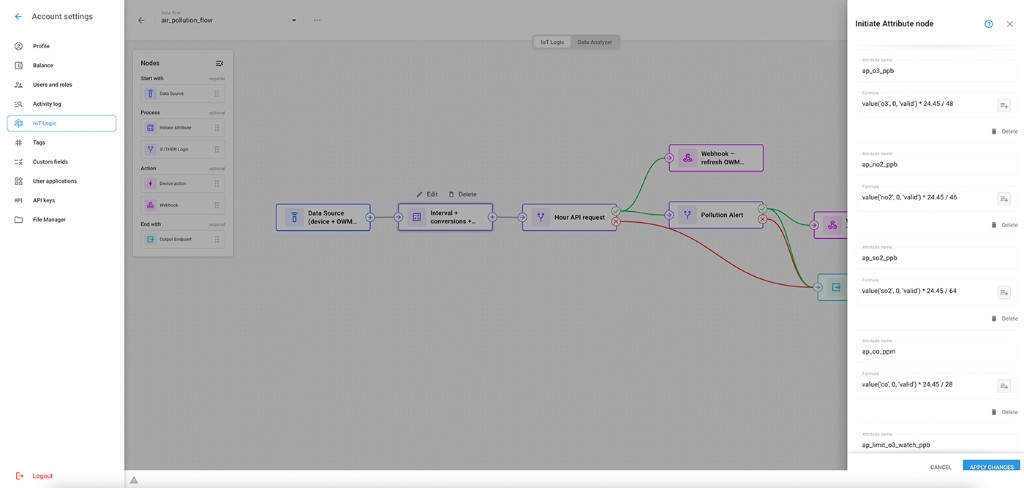
This conversion is part of the comparison logic, not an official air quality determination. Temperature and pressure affect gas conversion, and CAMe relies on its monitoring system and procedures when making a declaration.
Automating environmental monitoring with IoT Logic
The example consists of two operating loops: retrieve fresh environmental information, then create an alert when the configured condition is met.
1. Set the monitoring cadence
The workflow is initiated periodically. In this example, it runs once per hour because the environmental source updates on approximately that cadence. An implementation may query more frequently, but the useful frequency also depends on how recently the GPS device has reported its position and on the limits of the external data service.
Each run retrieves the latest vehicle coordinates and sends them to the air quality service. The response returns the pollutant values associated with that location.
2. Normalize the response
Attribute nodes extract the required fields, perform the ozone unit conversion, and make the normalized values available to the next node. This keeps the condition readable: the branch compares like units rather than embedding conversion details into every threshold expression.
3. Evaluate the preventive conditions
A logic node checks whether ozone, PM2.5, or PM10 exceeds its configured limit. These conditions are deliberately framed as preventive triggers. They indicate that measured values have reached a level associated with a Phase I reference; they do not state that CAMe has declared a contingency.
The distinction should also be explicit in the message. Good alert copy says that pollution levels warrant checking the current official restrictions. It should not say that Doble Hoy No Circula is active unless that fact comes from an official declaration source.
4. Deliver context through a webhook
When a condition is true, IoT Logic triggers a webhook. The receiving service can route the message through Telegram, WhatsApp, email, or another channel that accepts a URL-based integration.
The notification can include:
- vehicle name and associated device
- latitude and longitude
- event date and time
- O₃, PM2.5, and PM10 values
- which configured condition was met
- links to official CAMe, Mexico City, or SINAICA sources
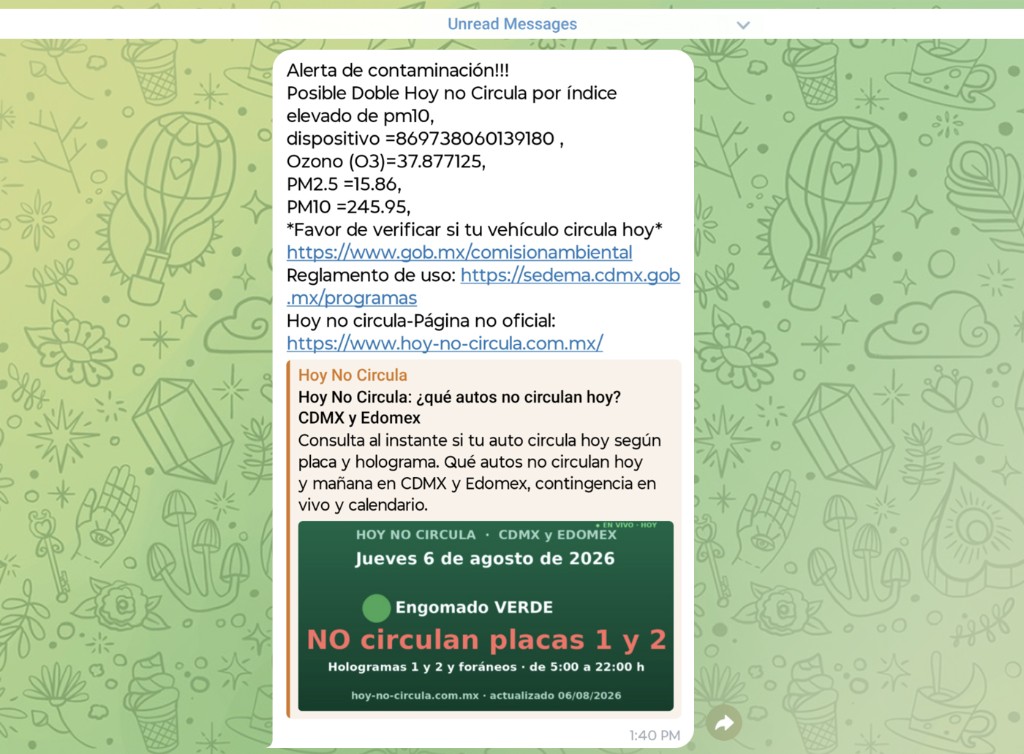
This is where one workflow can prepare dispatchers and drivers together. Instead of relying on every driver to monitor several sources independently, the fleet can route one consistent warning to the people responsible for the next operational decision.
Turn the alert into preventive fleet action
An alert is valuable only if it changes the plan before the restriction changes the route. A dispatcher can use the notification to open the official announcement, identify which vehicles and time windows are affected, and decide whether to reassign work.
A practical response sequence is:
- Check the official declaration. Confirm whether CAMe has activated a contingency and read the measures for the relevant date.
- Identify affected vehicles. Compare the official criteria with fleet records, including plate ending and verification status.
- Protect the schedule. Reassign trips, change departure times, or update routes before dispatch.
- Notify the operation. Give drivers and customers a consistent update tied to the official source.
- Record the decision. Preserve the alert, source link, and dispatch change for later operational review.
This use case shows how telematics can move beyond traditional vehicle monitoring. Vehicle location supplies context, the environmental service supplies an external signal, and IoT Logic turns the two into a trigger that an operations team can use.
The same pattern applies wherever an external condition changes fleet operations: weather warnings, access restrictions, wildfire zones, port status, or local road rules. The external authority remains authoritative; the automation reduces the delay between a changing signal and a fleet response.
Contact the Navixy team to explore how trigger automation and fleet process automation can turn your data into timely alerts and support more effective fleet operations.