Meet Navixy Console: one place for products, users, and billing
AuthorEvgenii Romanov, Product owner, Operations team
Managing telematics involves much more than tracking vehicles on a map. You also need to manage organizations, users, access permissions, products, and billing. And if you're a telematics provider working with multiple customers, or a company running several operations, things can get even more complicated. When all of this is managed through separate tools, even simple tasks can mean switching between accounts, navigating multiple interfaces, and wasting time on routine administration.
Navixy Console brings all these administrative tasks together in one place. For new customers, it's where everything starts: create an organization, set up workspaces, invite users, manage access, enable products, and handle billing. Once everything is set up, you can open any enabled product and get straight to work.
You can try it right away: sign up for Navixy Console and create your organization.
How to set up Navixy Console
When you sign up for Navixy, Console is where you start. Here's how the structure works.
An organization represents your company in Navixy. It brings together your users, their roles, and your workspaces.
A workspace is where you manage your business data, including devices, assets, and geo objects, as well as the products available to your team. Each workspace has its own set of products and data, kept separate from other workspaces within the same organization.
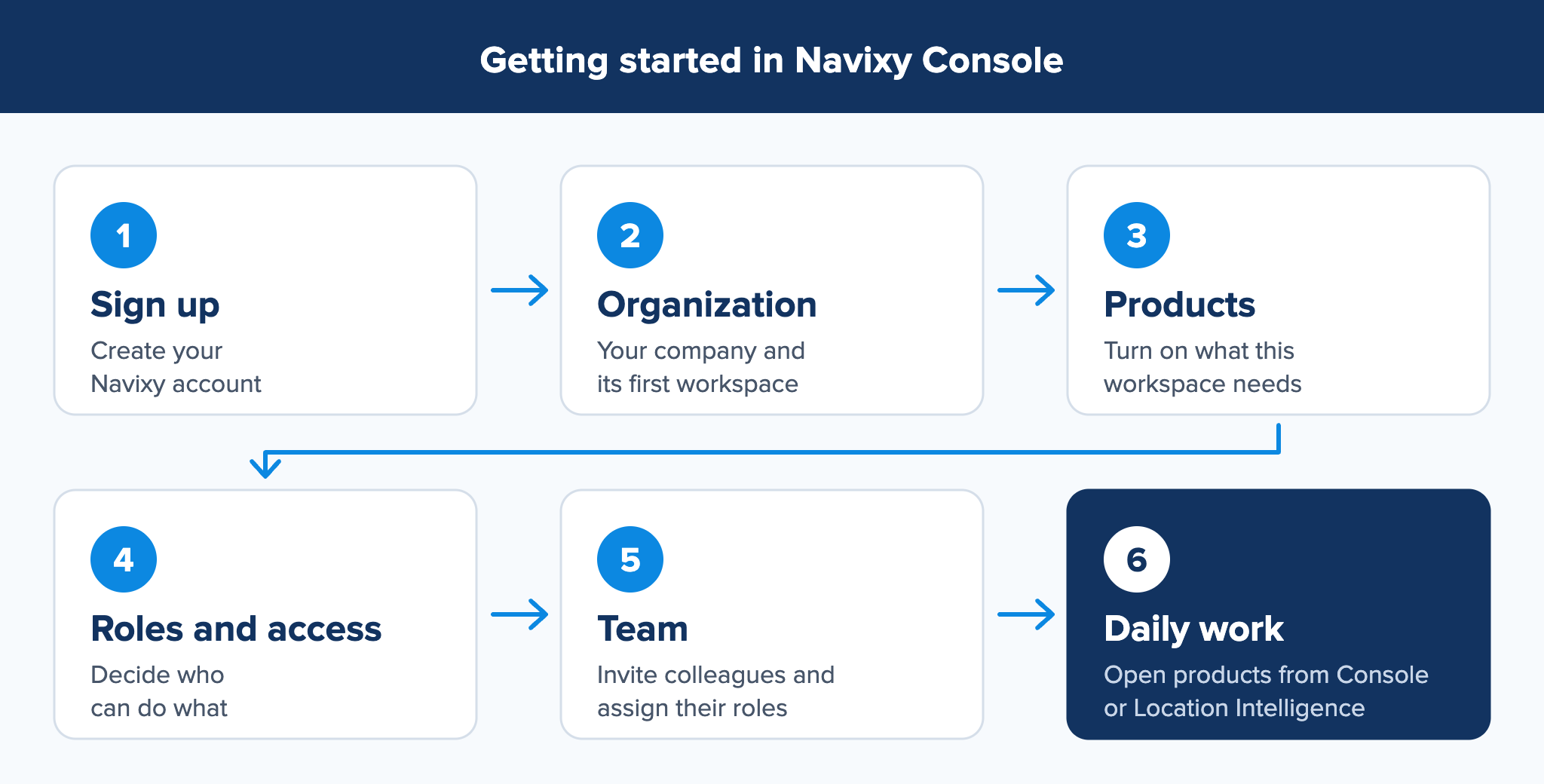
The diagram above shows the path for a company that signs up and sets up its own organization. Telematics providers follow the same initial steps: they create an organization and workspace, invite their team, add data, and start using the products. To manage their own customers through Console, they need to contact Navixy, obtain a dealer license, and agree on the terms of cooperation. Once that's in place, they can create and manage separate organizations for their customers (child organizations) directly in Console.
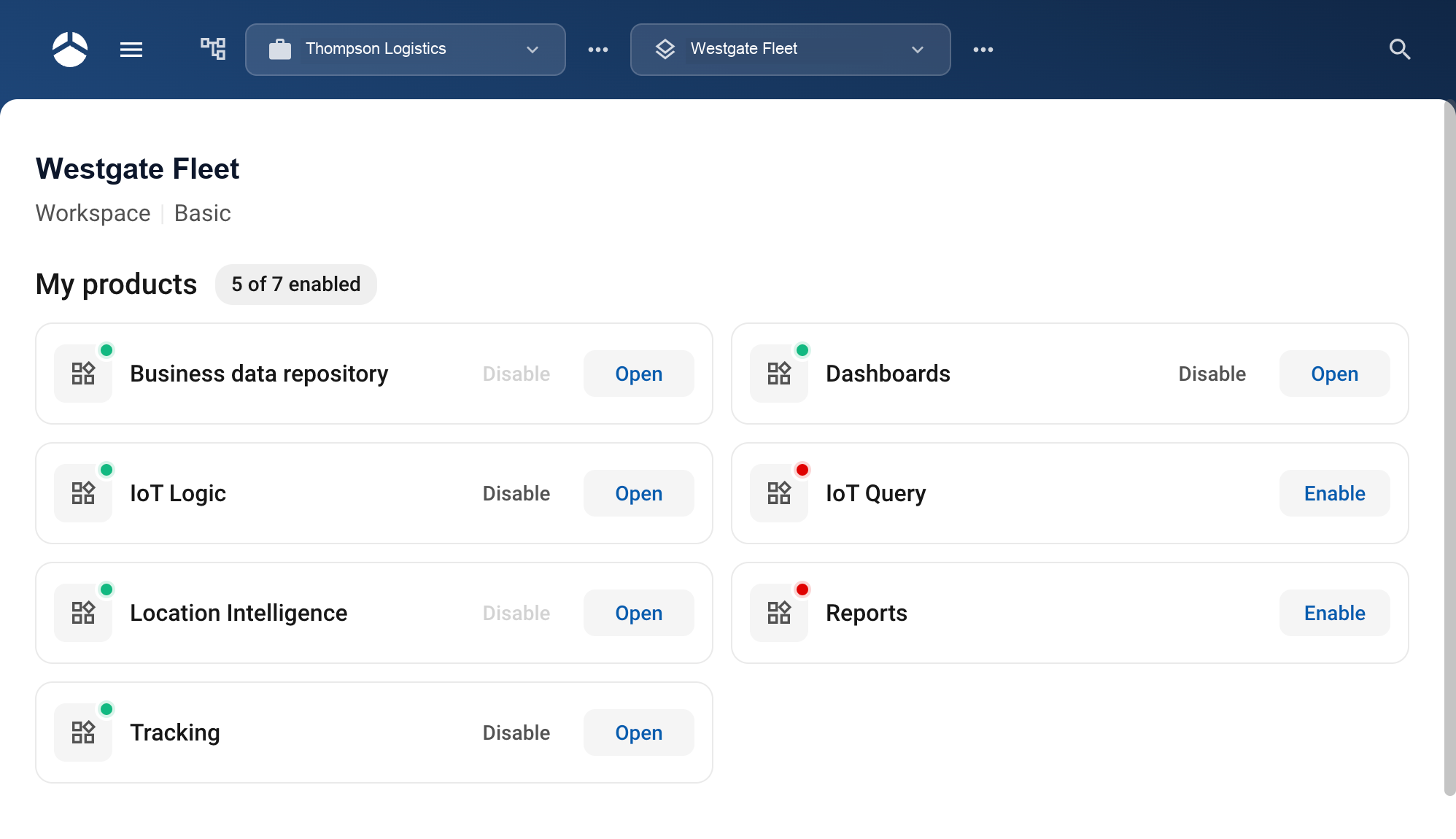
Each product has an Open button that launches its interface in a new browser tab. The products themselves stay separate: Tracking, IoT Logic, Dashboards, and the other Navixy products each keep their own interface. Console is where an administrator decides which of them each workspace has and who can use them.
End users rarely need Console at all. They work in Location Intelligence, the user interface where every product enabled for them is available, or they open a product directly by its URL and work under the roles assigned to them in Console. Administrators move between both, while access and roles stay managed in one place.
An administrator really has three questions to answer:
- Which products does this workspace have?
- Who can use them?
- What can each person do?
Each product has its own purpose
Once products and access permissions are configured in Console, users can get to work with the products they need.
Location Intelligence provides a single interface for accessing all enabled products. Users can also open individual products directly through their own URLs.
For example:
- Tracking lets you see where your vehicles are in real time or replay past trips.
- IoT Logic lets you create real-time rules and automation workflows.
- Dashboards gives you an overview of your assets, including their current status, activity, and trip summaries.
Each product continues to serve its own purpose. The difference is that they now work within a shared environment, with centralized access management. Instead of navigating disconnected tools, users can move between products more easily, without having to manage separate accounts or permissions.
Choose the products each workspace needs
Different workspaces may need different products. For example, one workspace might only need Tracking, while another also uses IoT Logic and Dashboards.
With Navixy Console, administrators can enable or disable products for each workspace as business needs change. If a product is no longer needed, they can simply disable it for that workspace. You can see which products are available right after you sign up for Console.
One login across organizations and workspaces
Some users need to manage multiple organizations or workspaces. For example, a telematics provider may work with dozens of customers, while a regional manager may oversee several business units, each with its own operations and access permissions.
With Navixy Console, users can switch between the organizations and workspaces they have access to, without having to log out and sign in again. What they can see and change in each one depends on their role.

The organization and workspace switchers are located next to each other in the top navigation bar, so you can always see which organization and workspace you're currently working in.
Whether you're managing multiple business units or supporting different customers, each organization and workspace remains separate, with its own data and access permissions. You can move between them using a single account, without having to log in again.
Your permissions depend on where you're working
With Navixy, you can use a single account across multiple organizations and workspaces, while having different permissions in each. When you switch between them, Navixy IAM automatically applies the appropriate access settings, determining which products and resources you can access and what actions you can perform.
For example:
- An external installer gets access only to the devices they need to install, within a single workspace, and only for a specified period. Once that period expires, access is automatically revoked. This is a common scenario for integrators and telematics providers, and Navixy makes it easy to manage without additional tools or workarounds.
- A manager may have full access in one workspace but limited permissions in another.
- A partner supporting a customer can access that customer's environment with only the permissions they've been granted.
- Users can only see the organizations and workspaces they've been given access to.
Your permissions are determined by your organization, workspace, and assigned role. To learn more about how this works, including delegated and time-limited access, read our article on the flexible access control model.
Audit log: track every change
When multiple people manage the same platform, it's important to know who made a change and when. Who deleted a user? Who assigned a role? When was a workspace renamed?
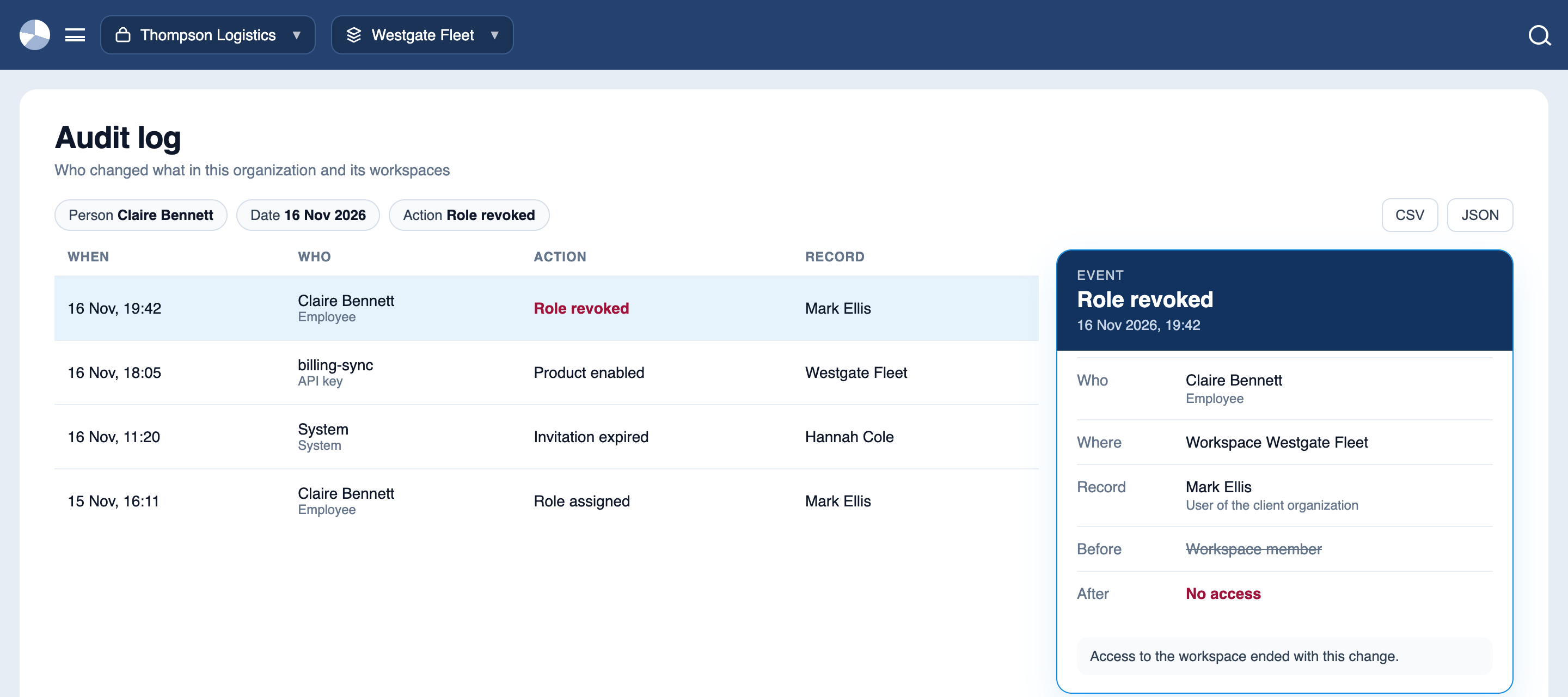
Navixy Console's Audit log gives administrators a clear record of these activities. It tracks changes to organizations, workspaces, users, roles, invitations, API keys, tariffs, and payments.
Each entry shows who or what initiated the change — a user, an API key, or the system itself — along with what changed and the values before and after. Some actions generate multiple related events, which can be viewed together. For example, creating an API key may produce several audit entries.
To find a specific event, administrators can search by user or API key, filter by date, product, or action type, and export records in CSV or JSON format. Audit history is retained indefinitely, even after the person responsible for a change leaves the company.
For example, imagine a customer suddenly loses access to a workspace. Instead of contacting colleagues to find out what happened, the administrator checks the Audit log and discovers that a role was revoked the previous evening. The issue can be traced back to a specific action in just a few clicks.
API keys for applications and AI agents
Integrations, scripts, and AI agents also need access to platform data — whether it's to export trip records to an accounting system, create devices, or build a custom interface for dispatchers. Sharing an employee's login credentials isn't a secure or practical solution. Instead, Navixy Console lets administrators create dedicated API keys for these tasks.
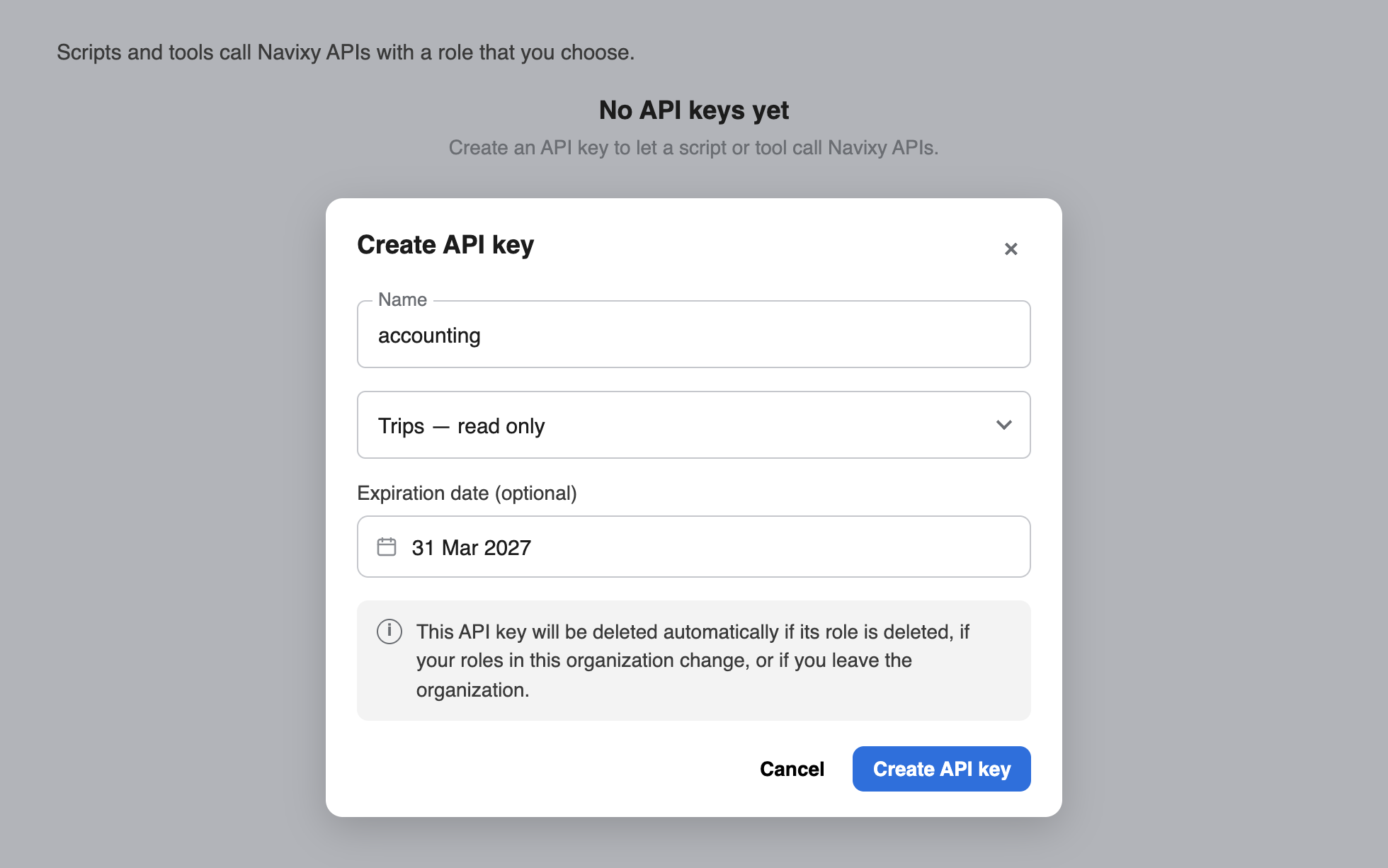
When creating an API key, the administrator assigns it a role and can optionally set an expiration date. The key inherits the permissions of that role, including access to specific workspaces, products, and records. It can never have more permissions than the person who created it, and Console continues to enforce this restriction throughout the key's lifetime. If the creator's permissions change or they leave the organization, their API keys are automatically deleted.
For security, the key is displayed only once, when it's created, along with a sample request for the developer.
For example, suppose a contractor is building an integration with an accounting system. The administrator creates an API key with read-only access to trip data in a single workspace and sets it to expire at the end of the project. Once the expiration date is reached, the key stops working automatically. Any changes made through the key remain traceable in the Audit log, with each action attributed to that specific key.
Manage billing alongside your products and users
Invoices and payments live in Console too.
Navixy uses a usage-based pricing model. Rather than paying a fixed subscription fee, you're charged based on the products enabled in each workspace and how much you actually use them. Once a product is disabled for a workspace, you are not charged for it there.
In Billing you can see each product's usage for a selected period, broken down by metric. The metrics are familiar ones: for Tracking, it is the number of active trackers in the period, the same thing telematics companies pay for today. So it is always clear what the bill is made of.
To learn more, read our article on how usage-based pricing works in fleet and IoT platforms.
Get things done faster with AI Assistant
Navixy Console comes with a built-in AI Assistant that lets you perform tasks using natural language, without navigating through multiple menus.
For example, to add a new device, simply type or say: "Create a new device: Teltonika FMB920, IMEI ..., name Delivery van 12."
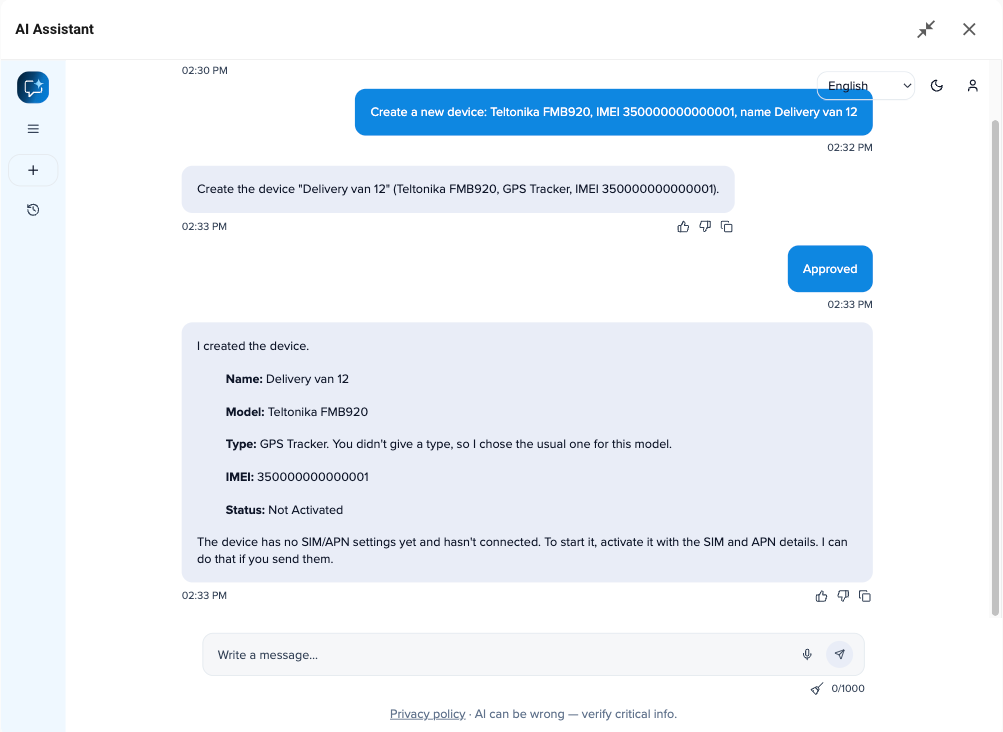
The AI Assistant can work with both your Console settings and the data in your workspace. This means you can manage organizations, users, and products, as well as devices and assets, all through a simple conversation. Just describe what you need, using text or voice.
Before making any changes, the assistant explains what it's going to do and asks for your approval. Once confirmed, it completes the task and shows you the result, including the device's name, model, type, IMEI, and status.
It can also suggest what to do next. For example, after creating a device, the assistant may recommend creating an asset for the vehicle and linking the device to it. This helps keep trip history associated with the vehicle rather than a specific tracking device.
Room to grow without rebuilding
Navixy Console makes it easier to expand your platform with new tools and applications. You can add apps from the Navixy Marketplace alongside existing products like Tracking, giving users access to everything they need within the same environment. We're also developing a command-line interface (CLI) for managing Console settings directly from a terminal.
We're working toward making it possible for customers and partners to integrate their own applications into Navixy. Whether it's a custom dashboard, an operations management tool, or an app built for a specific workflow, these solutions will be accessible alongside Navixy's native products, using the same login and access management system.
The idea is simple: rather than building one large application that tries to do everything, Navixy keeps products independent while bringing them together into a flexible, connected platform.
Get started with Navixy Console
New to Navixy? Sign up for Navixy Console to get started. Create your organization and workspace, invite your team, and enable the products you need. From there, you can explore the platform, switch between workspaces, and see how everything works together.
Already using Navixy? We're developing a tool to make the transition to Navixy 4 quick and seamless, with automatic data migration. Whenever you're ready to explore the new platform, you'll be able to do so without having to set everything up from scratch.
On this page
- How to set up Navixy Console
- Each product has its own purpose
- Choose the products each workspace needs
- One login across organizations and workspaces
- Your permissions depend on where you're working
- Audit log: track every change
- API keys for applications and AI agents
- Manage billing alongside your products and users
- Get things done faster with AI Assistant
- Room to grow without rebuilding
- Get started with Navixy Console