> For the complete documentation index, see [llms.txt](https://navixy.com/docs/llms.txt). Markdown versions of documentation pages are available by appending `.md` to page URLs; this page is available as [Markdown](https://navixy.com/docs/admin/id/activation-codes.md).
# Kode aktivasi
Kelola kode aktivasi yang membatasi pendaftaran pelacak dan menautkan kode ke paket perangkat untuk penyiapan otomatis
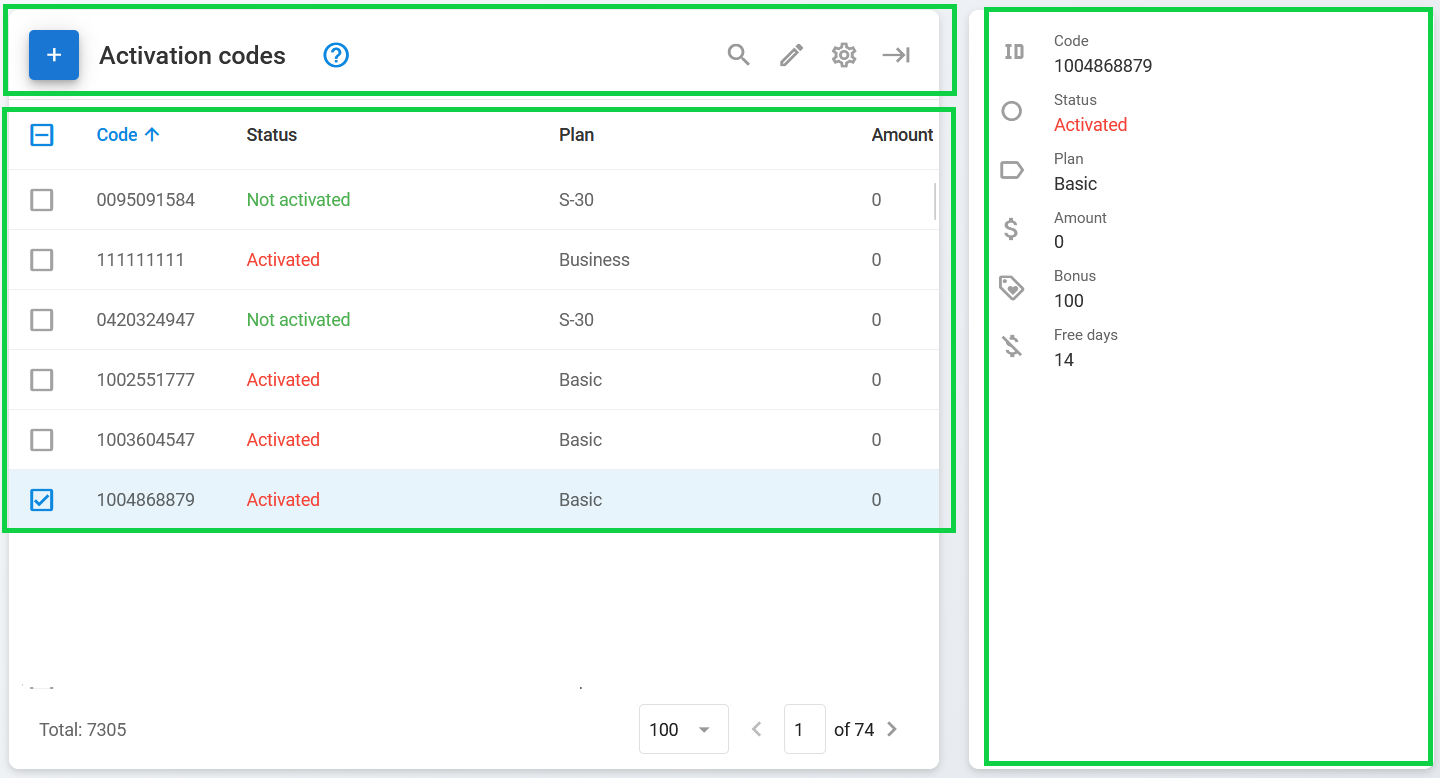
Halaman **Kode aktivasi** Halaman ini memungkinkan Anda untuk melihat, mencari, membuat, dan mengedit kode aktivasi untuk mengaktifkan pelacak Anda dalam asisten Aktivasi perangkat yang tersedia baik di [Detail pengguna](/docs/admin/id/users/user-details.md) atau di platform Navixy. Untuk informasi selengkapnya tentang proses ini, lihat [Aktivasi perangkat GPS](https://www.navixy.com/docs/user/guide/quick-start/activate-gps-device).
Halaman ini terdiri dari tiga bagian utama:
* **Bilah alat kode:** Bilah alat yang digunakan untuk dengan mudah membuat, mencari, dan mengedit kode aktivasi
* **Daftar kode:** Daftar kode aktivasi yang ada, diformat sebagai tabel
* **Detail kode:** Informasi tentang kode aktivasi yang dipilih
## Apa itu kode aktivasi?
Kode aktivasi adalah nomor acak unik 10 digit yang membatasi proses menambahkan perangkat pelacak baru ke akun pengguna. Proses ini biasanya digunakan untuk mencegah pengguna mengaktifkan perangkat yang dibeli dari sumber di luar organisasi Anda.
Penjelasan kode aktivasi
## Cara membuat kode aktivasi
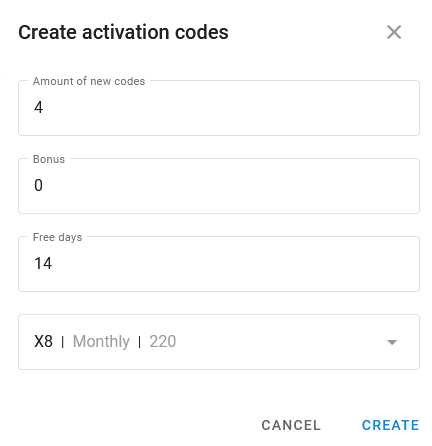
Untuk membuat kode aktivasi baru, klik pada bilah alat. Ini membuka **Buat kode aktivasi** jendela:
jendela Buat kode aktivasi
Di sini, Anda dapat membuat sejumlah kode, mengatur bonus dan hari gratis untuknya, serta memilih Rencana tarif perangkat yang ingin Anda gunakan.
## Menggunakan kode aktivasi
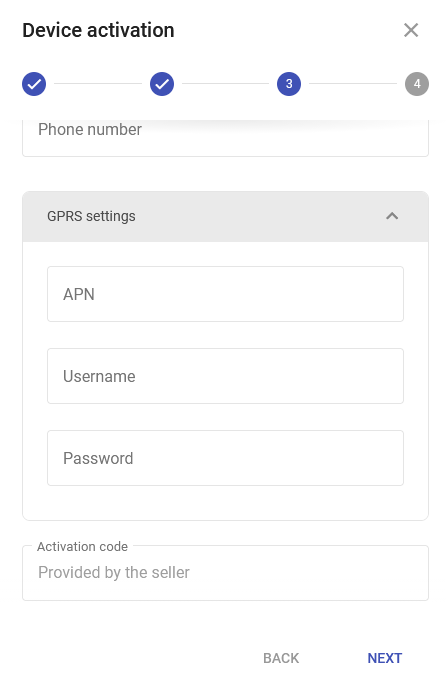
Jika Anda memberlakukan penggunaan kode aktivasi untuk pengguna Anda, proses aktivasi umumnya sama seperti metode lainnya. Satu-satunya perbedaannya adalah pengguna harus memasukkan kode yang disediakan ke dalam **Kode aktivasi** bidang pada langkah 3 proses Aktivasi perangkat:
Kode aktivasi dalam panduan Aktivasi perangkat
Anda dapat menautkan kode aktivasi secara langsung ke [rencana perangkat](/docs/admin/id/plans.md) tertentu untuk mengotomatiskan proses orientasi. Saat pengguna mengaktifkan perangkat menggunakan kode, sistem secara otomatis mengonfigurasi tingkat akses dan fitur yang sesuai.
Fitur ini dinonaktifkan secara bawaan. Untuk mengaktifkannya pada instance Navixy Anda, hubungi tim keberhasilan pelanggan Navixy.
---
# Agent Instructions
This documentation is published with GitBook. GitBook is the documentation platform designed so that both humans and AI agents can read, navigate, and reason over technical content effectively. Learn more at gitbook.com.
## Querying This Documentation
If you need additional information that is not directly available in this page, you can query the documentation by asking a question.
Perform an HTTP GET request on the following URL with the `ask` and `goal` query parameters:
```
GET https://navixy.com/docs/admin/id/activation-codes.md?ask=&goal=
```
`ask` is the immediate question: it should be specific, self-contained, and written in natural language.
`goal` is what the user is ultimately trying to achieve, the reason they need the answer. Sharing it helps GitBook give you a better, more relevant answer. A goal is most helpful when it describes the outcome the user wants rather than restating the question. For example, with `ask=how do I create an API token`, a goal like `automate deployments from our CI pipeline` lets GitBook tailor the answer to that use case.
The response will contain a direct answer to the question and relevant excerpts and sources from the documentation.
Use this mechanism when the answer is not explicitly present in the current page, you need clarification or additional context, or you want to retrieve related documentation sections.
-20230811-205456.png?alt=media)
 pada bilah alat. Ini membuka **Buat kode aktivasi** jendela: