> For the complete documentation index, see [llms.txt](https://navixy.com/docs/llms.txt). Markdown versions of documentation pages are available by appending `.md` to page URLs; this page is available as [Markdown](https://navixy.com/docs/admin/id/users/create-user.md).
# Membuat pengguna
Buat dan kelola akun pengguna individual di Admin Panel atau impor massal beberapa pengguna sekaligus dari file XLSX atau CSV menggunakan templat yang disediakan
Untuk menambahkan pengguna baru ke panel admin, klik pada halaman Pengguna. Ini membuka **Pengguna baru** jendela:
Jendela pengguna baru
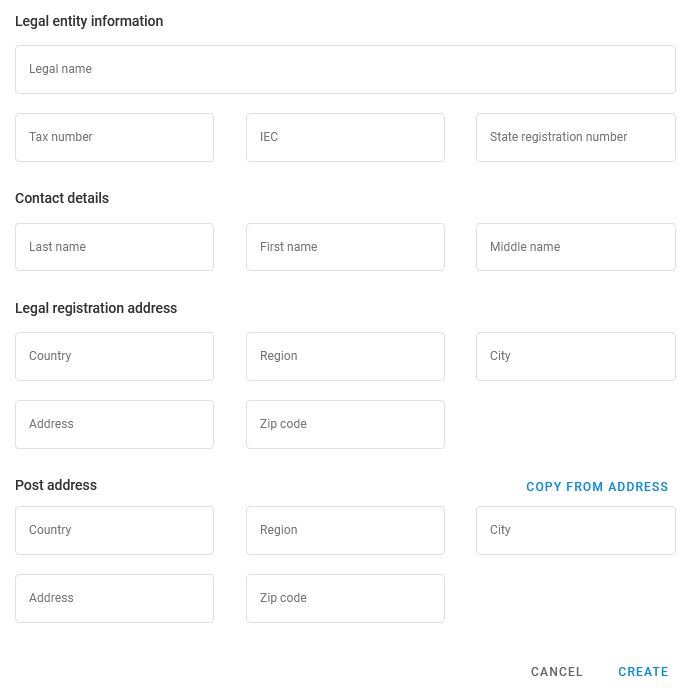
Masukkan alamat email yang digunakan sebagai login pengguna ke platform Navixy dan kata sandi. Bergantung pada status hukum pengguna (perorangan, badan hukum, atau pedagang tunggal), bidang yang diperlukan juga dapat mencakup nama, detail kontak, serta alamat hukum dan alamat pos.
Bagian **Pengaturan UI** pada jendela berisi **Sembunyikan IMEI perangkat** kotak centang, yang dipilih sebelumnya menurut bawaan platform. Kosongkan atau pilih untuk memberi pengguna ini nilai yang berbeda dari nilai pada seluruh platform. Untuk mengetahui apa yang dikontrol kotak centang tersebut, lihat [Default pengguna](/docs/admin/id/settings/user-defaults.md#ui-settings).
## Cara mengimpor data pengguna
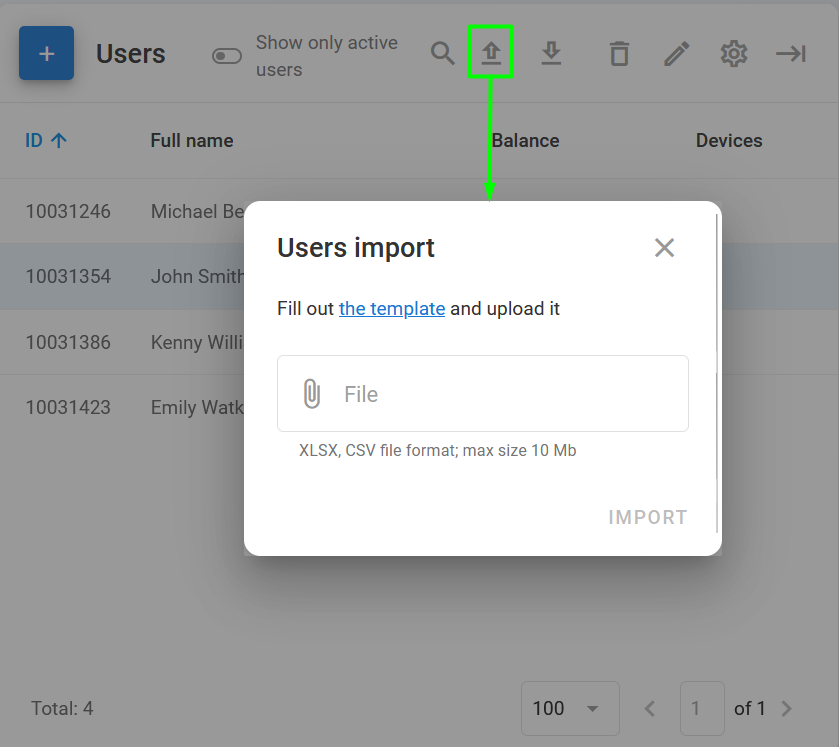
Untuk menambahkan beberapa pengguna baru sekaligus, Anda dapat menggunakan **Impor data pengguna** fitur di [Toolbar pengguna](/docs/admin/id/users.md#user-toolbar). Klik dan unggah file XLSX atau CSV berukuran tidak lebih dari 10 Mb. Untuk memastikan bahwa file diformat dengan benar, unduh templat dengan mengeklik tautan.
Mengimpor data pengguna
---
# Agent Instructions
This documentation is published with GitBook. GitBook is the documentation platform designed so that both humans and AI agents can read, navigate, and reason over technical content effectively. Learn more at gitbook.com.
## Querying This Documentation
If you need additional information that is not directly available in this page, you can query the documentation by asking a question.
Perform an HTTP GET request on the following URL with the `ask` and `goal` query parameters:
```
GET https://navixy.com/docs/admin/id/users/create-user.md?ask=&goal=
```
`ask` is the immediate question: it should be specific, self-contained, and written in natural language.
`goal` is what the user is ultimately trying to achieve, the reason they need the answer. Sharing it helps GitBook give you a better, more relevant answer. A goal is most helpful when it describes the outcome the user wants rather than restating the question. For example, with `ask=how do I create an API token`, a goal like `automate deployments from our CI pipeline` lets GitBook tailor the answer to that use case.
The response will contain a direct answer to the question and relevant excerpts and sources from the documentation.
Use this mechanism when the answer is not explicitly present in the current page, you need clarification or additional context, or you want to retrieve related documentation sections.
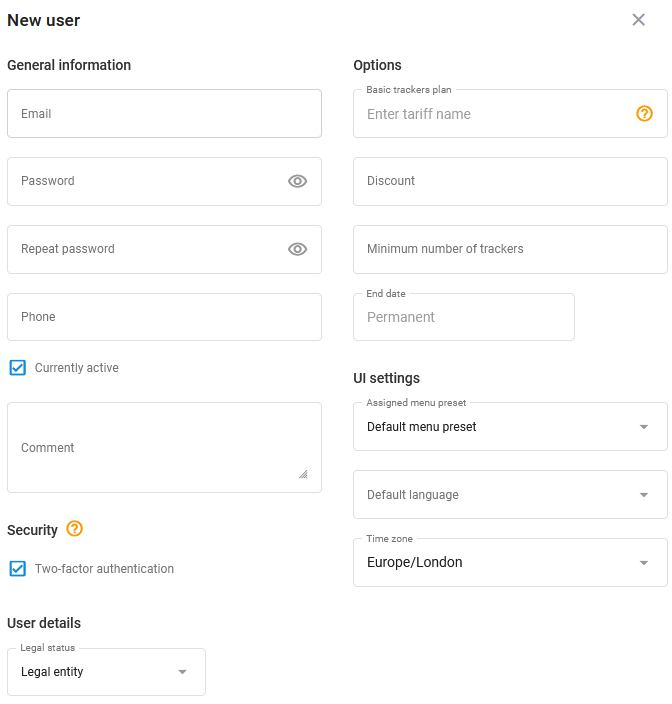
.png?alt=media) pada halaman Pengguna. Ini membuka **Pengguna baru** jendela:
pada halaman Pengguna. Ini membuka **Pengguna baru** jendela:
 dan unggah file XLSX atau CSV berukuran tidak lebih dari 10 Mb. Untuk memastikan bahwa file diformat dengan benar, unduh templat dengan mengeklik tautan.