> For the complete documentation index, see [llms.txt](https://navixy.com/docs/llms.txt). Markdown versions of documentation pages are available by appending `.md` to page URLs; this page is available as [Markdown](https://navixy.com/docs/admin/ru/plans/suspending-service-for-a-device.md).
# Приостановка трекера
Приостановите трекер, переведя его на ограниченный тарифный план, остановив новый мониторинг при сохранении исторических данных
В некоторых ситуациях может понадобиться временно приостановить обслуживание трекера, например из-за пропущенного платежа. В таких случаях можно перевести трекер на ограниченный тарифный план. Пока он приостановлен, мониторинг и запись новых данных прекращаются, пока ограничение не будет снято.
{% hint style="warning" %}
Все исторические данные, записанные до приостановки, остаются надежно сохраненными и доступными.
{% endhint %}
Чтобы создать тарифный план, который приостанавливает обслуживание устройства, выполните следующие шаги:
{% stepper %}
{% step %}
## Откройте страницу «Планы»
Откройте Панель администратора и перейдите к **документации «Планы»** странице.
{% endstep %}
{% step %}
## Создайте новый тарифный план
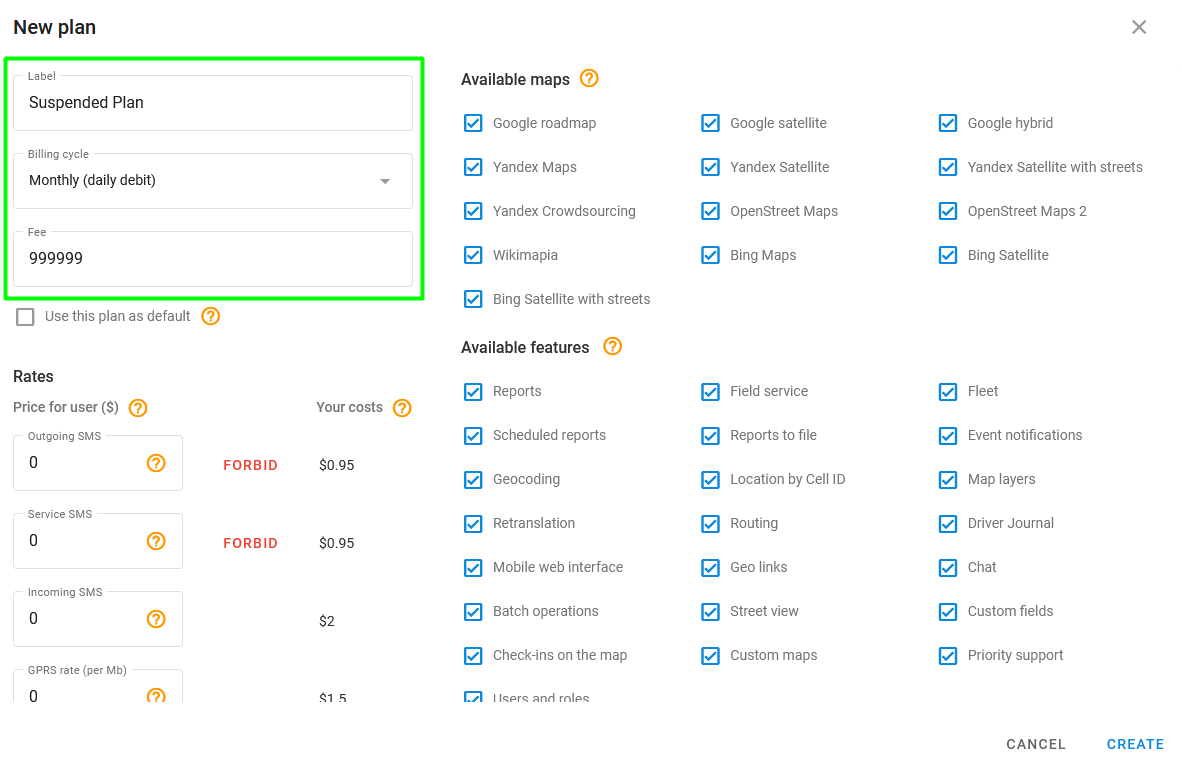
Нажмите чтобы создать новый тарифный план и дать ему название (например, «Приостановленный план»).
{% endstep %}
{% step %}
## Настройте оплату
Выберите **Ежемесячно (ежедневное списание)** в качестве цикла выставления счетов и установите ежемесячную плату на очень высокое значение, например $999 999. Это не позволит взимать с клиента плату в период приостановки.
{% endstep %}
{% step %}
## Настройте остальные параметры тарифного плана
В настройках тарифного плана отключите нужные вам функции или оставьте параметры по умолчанию, чтобы ограничить использование устройства.
{% endstep %}
{% step %}
## Завершите процесс создания
Нажмите **Создать** чтобы завершить создание плана.
{% endstep %}
{% step %}
## Назначьте тарифный план устройству
Назначьте новый тарифный план устройству, для которого вы хотите приостановить обслуживание. Устройство будет приостановлено со следующего дня после изменения тарифного плана.
{% endstep %}
{% endstepper %}
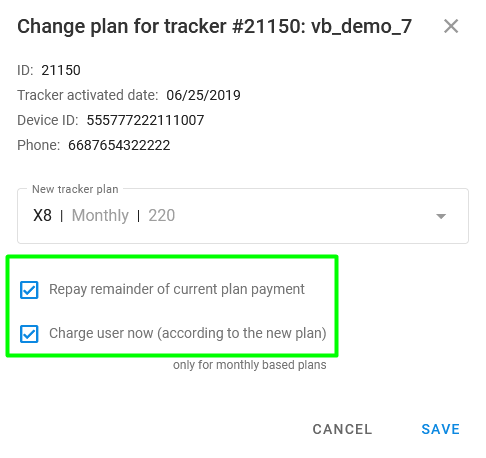
Установите флажок **Доплатить остаток платежа по текущему тарифному плану** и **Списать плату с пользователя сейчас (согласно новому плану)** при смене тарифного плана.
Варианты оплаты при смене плана
---
# Agent Instructions
This documentation is published with GitBook. GitBook is the documentation platform designed so that both humans and AI agents can read, navigate, and reason over technical content effectively. Learn more at gitbook.com.
## Querying This Documentation
If you need additional information that is not directly available in this page, you can query the documentation by asking a question.
Perform an HTTP GET request on the following URL with the `ask` and `goal` query parameters:
```
GET https://navixy.com/docs/admin/ru/plans/suspending-service-for-a-device.md?ask=&goal=
```
`ask` is the immediate question: it should be specific, self-contained, and written in natural language.
`goal` is what the user is ultimately trying to achieve, the reason they need the answer. Sharing it helps GitBook give you a better, more relevant answer. A goal is most helpful when it describes the outcome the user wants rather than restating the question. For example, with `ask=how do I create an API token`, a goal like `automate deployments from our CI pipeline` lets GitBook tailor the answer to that use case.
The response will contain a direct answer to the question and relevant excerpts and sources from the documentation.
Use this mechanism when the answer is not explicitly present in the current page, you need clarification or additional context, or you want to retrieve related documentation sections.
.png?alt=media)
 чтобы создать новый тарифный план и дать ему название (например, «Приостановленный план»).