> For the complete documentation index, see [llms.txt](https://navixy.com/docs/llms.txt). Markdown versions of documentation pages are available by appending `.md` to page URLs; this page is available as [Markdown](https://navixy.com/docs/admin/ru/settings/service-preferences.md).
# Настройки сервиса
Настройте основные параметры интерфейса сервиса, такие как домен/URL, язык/валюта, страница входа, демо-учетная запись, активация и ссылки поддержки
Эта страница позволяет настроить основные параметры интерфейса. Доступ к ней осуществляется через **Настройки** → **Настройки сервиса.**
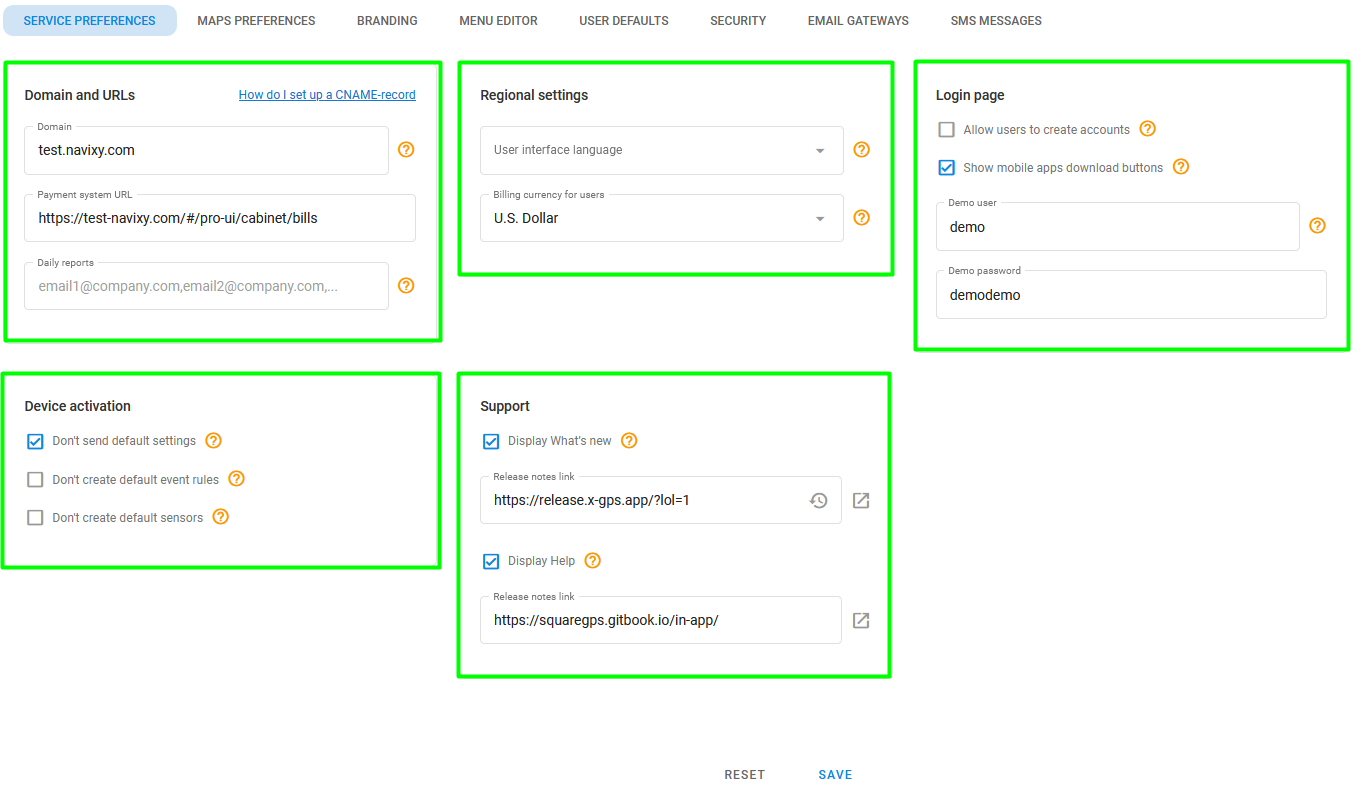
Страница настроек сервиса
Страница состоит из следующих разделов:
* **Домен и URL-адреса**: Укажите домен, который будет использоваться для вашего сервиса, URL платежной системы и адреса электронной почты для получения ежедневных отчетов. Подробнее о настройке доменного имени см. [Доменное имя](/docs/admin/ru/settings/domain-name.md). Информацию о настройке платежного шлюза см. [Платежный шлюз](/docs/admin/ru/settings/payment-gateway.md).
* **Региональные настройки:** Выберите язык и валюту для вашего сервиса. Подробнее см. [Региональные настройки](/docs/admin/ru/settings/service-preferences/regional-settings.md).
* **Настройки страницы входа:** Настройте [страницу входа](/docs/admin/ru/settings/service-preferences/login-page-settings.md) настройки.
* **Демонстрационная учетная запись пользователя:** Navixy позволяет вам создать [демонстрационную учетную запись пользователя](/docs/admin/ru/settings/service-preferences/demo-user-account.md) чтобы продемонстрировать возможности платформы вашим клиентам.
* **Активация устройства:** Настройте параметры активации устройства для ваших пользователей.
* **Поддержка**: Добавьте ссылки на ваши собственные примечания к выпуску и документацию по поддержке (информация Navixy отображается по умолчанию).
---
# Agent Instructions
This documentation is published with GitBook. GitBook is the documentation platform designed so that both humans and AI agents can read, navigate, and reason over technical content effectively. Learn more at gitbook.com.
## Querying This Documentation
If you need additional information that is not directly available in this page, you can query the documentation by asking a question.
Perform an HTTP GET request on the following URL with the `ask` and `goal` query parameters:
```
GET https://navixy.com/docs/admin/ru/settings/service-preferences.md?ask=&goal=
```
`ask` is the immediate question: it should be specific, self-contained, and written in natural language.
`goal` is what the user is ultimately trying to achieve, the reason they need the answer. Sharing it helps GitBook give you a better, more relevant answer. A goal is most helpful when it describes the outcome the user wants rather than restating the question. For example, with `ask=how do I create an API token`, a goal like `automate deployments from our CI pipeline` lets GitBook tailor the answer to that use case.
The response will contain a direct answer to the question and relevant excerpts and sources from the documentation.
Use this mechanism when the answer is not explicitly present in the current page, you need clarification or additional context, or you want to retrieve related documentation sections.