> For the complete documentation index, see [llms.txt](https://navixy.com/docs/llms.txt). Markdown versions of documentation pages are available by appending `.md` to page URLs; this page is available as [Markdown](https://navixy.com/docs/expert-center/es/faq-and-troubleshooting/iot-logic/how-to-connect-telegram-with-navixy-iot-logic.md).
# Cómo conectar Telegram con Navixy IoT Logic
Integre un bot de Telegram con IoT Logic de Navixy para enviar notificaciones automáticas. Configure el bot, establezca el ID del chat y conecte el Webhook.
Esta es una guía rápida de los pasos que podrían seguirse para crear la conexión entre IoT Logic y Telegram.
1. Crear un bot y obtener su token
* En Telegram, abra el chat con @BotFather.
* Ejecute el comando /newbot.
* Siga las instrucciones y copie el token del bot proporcionado (se ve así: 123456:ABC-...).
2. Obtenga el chat\_id al que desea enviar mensajes
Formas comunes de hacerlo:
* Envíe un mensaje a su bot (o agréguelo a un grupo y envíe un mensaje allí).
* Luego llame al método getUpdates de la API de Telegram.
* Si es un grupo, el chat\_id suele ser un número negativo.
* Asegúrese de que el bot haya recibido al menos un mensaje para que aparezca en getUpdates.
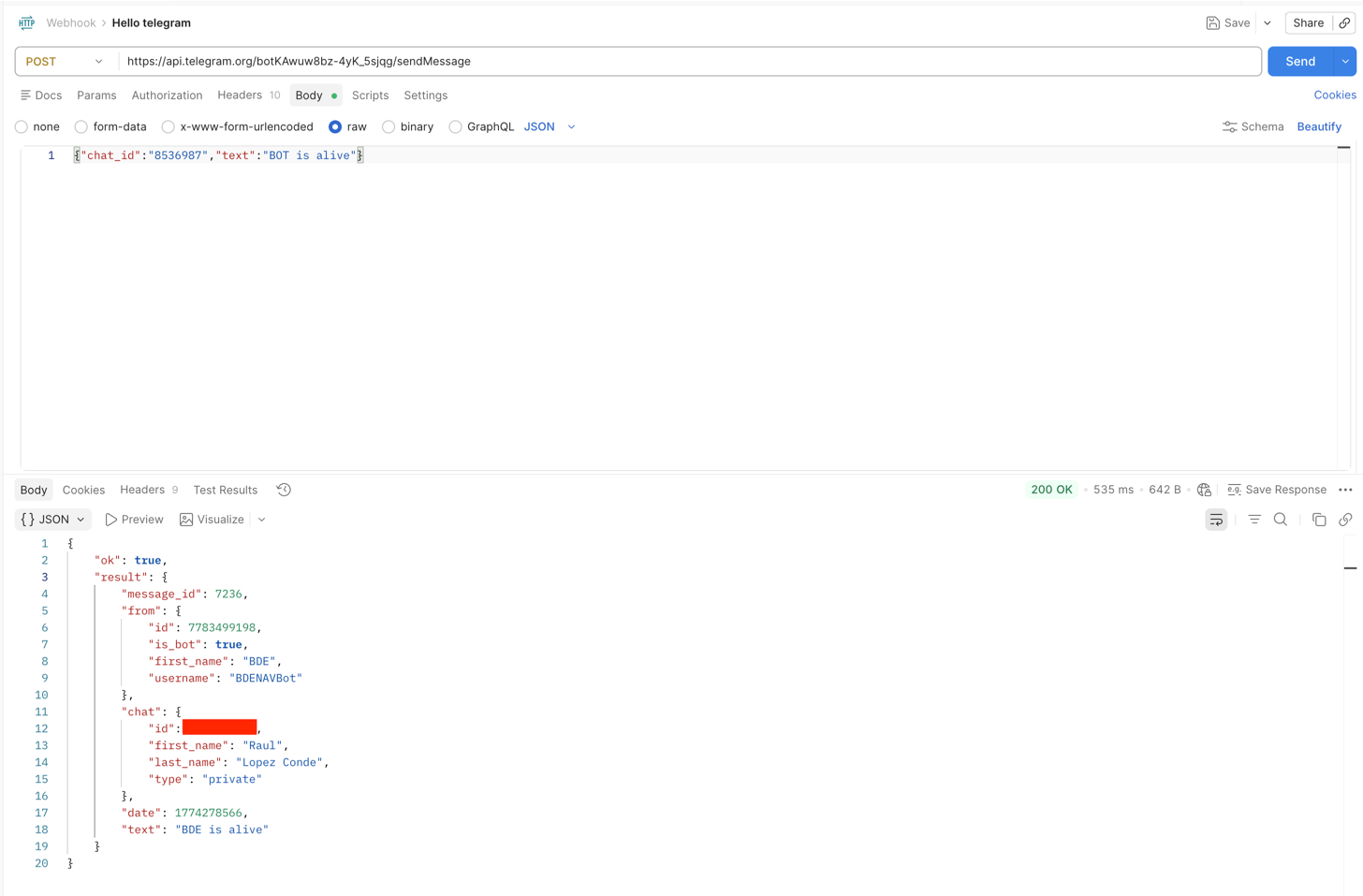
3. Enviar el mensaje (llamada REST)
* Use el método sendMessage de la API de Telegram.
* En el cuerpo de la solicitud, incluya el chat\_id y el texto del mensaje.
* La solicitud debe enviarse en formato JSON con el encabezado Content-Type: application/json.
4. Crear el flujo de IoT en Navixy
* Una vez que se haya creado el flujo, conecte el Nodo Webhook en la sección donde desea enviar los datos.
* Siga la misma estructura que la llamada a la API. En el campo URL, coloque el punto final de la solicitud:
\/sendMessage
* En la sección de encabezados:
* Clave: Content-Type
* Valor: application/json
* Finalmente, en el cuerpo de la solicitud, incluya los parámetros de telemetría que desea enviar, asegurándose de incluir nuevamente el chat\_id, por ejemplo:
{
"chat\_id": X,
"text": "Dispositivo 12563254, latitud: {{latitude}}, longitud: {{longitude}}, satélites: {{satellites}}, velocidad: {{speed}}"
}
 
Con estos pasos, su bot podrá recibir mensajes correctamente, incluidos datos de telemetría automatizados de Navixy.
---
# Agent Instructions
This documentation is published with GitBook. GitBook is the documentation platform designed so that both humans and AI agents can read, navigate, and reason over technical content effectively. Learn more at gitbook.com.
## Querying This Documentation
If you need additional information that is not directly available in this page, you can query the documentation by asking a question.
Perform an HTTP GET request on the following URL with the `ask` and `goal` query parameters:
```
GET https://navixy.com/docs/expert-center/es/faq-and-troubleshooting/iot-logic/how-to-connect-telegram-with-navixy-iot-logic.md?ask=&goal=
```
`ask` is the immediate question: it should be specific, self-contained, and written in natural language.
`goal` is what the user is ultimately trying to achieve, the reason they need the answer. Sharing it helps GitBook give you a better, more relevant answer. A goal is most helpful when it describes the outcome the user wants rather than restating the question. For example, with `ask=how do I create an API token`, a goal like `automate deployments from our CI pipeline` lets GitBook tailor the answer to that use case.
The response will contain a direct answer to the question and relevant excerpts and sources from the documentation.
Use this mechanism when the answer is not explicitly present in the current page, you need clarification or additional context, or you want to retrieve related documentation sections.