> For the complete documentation index, see [llms.txt](https://navixy.com/docs/llms.txt). Markdown versions of documentation pages are available by appending `.md` to page URLs; this page is available as [Markdown](https://navixy.com/docs/expert-center/faq-and-troubleshooting/iot-logic/how-to-implement-event-driven-scheduling-using-unix-time-in-iot-logic.md).
# How to implement event-driven scheduling using Unix time in IoT Logic
Schedule timer-based output actions in IoT Logic using Unix timestamps. Trigger device commands at exact times with continuous device reporting enabled.
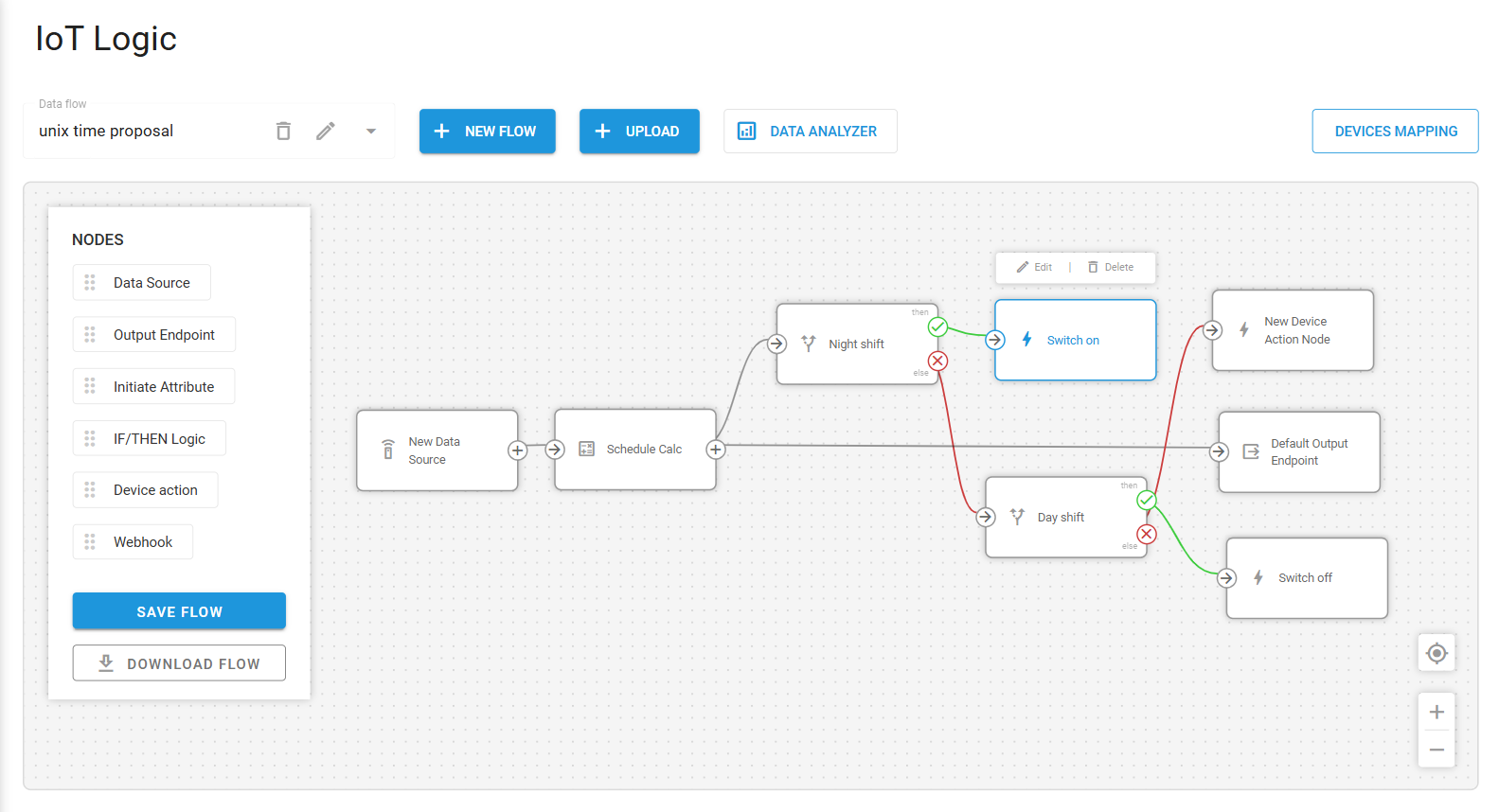
In this section, configure a timer in IoT Logic to control the activation of outputs on the devices. This functions as a scheduler by using Unix time for time-based control.
First, the scheduler logic was built based on Unix time, since it is the only reliable and consistent parameter we can always depend on. The second key element is the timestamp of valid packets received by the Navixy platform.\
It is important to note that this logic requires the device to continuously send valid data packets to the platform. The frequency itself is not critical; however, if no incoming messages are received, it becomes impossible to evaluate time or trigger any scheduled actions.
\
Now, moving on to the implemented logic attribute calculation node.\
This node retrieves:
* The current event time (current\_time) from the latest packet
* The previous event time (prev\_time) from the prior packet
Both values are converted from milliseconds to seconds.
It's important to note that **genTime** is provided in Unix time (milliseconds) and must be divided by 1000 to obtain the Unix time in seconds, which is the format used for all calculations.
\
From these, the system calculates:
* current\_sod (seconds of day)
* prev\_sod (seconds of day for the previous packet)
This is done using the module operation, which extracts the number of seconds elapsed since midnight, effectively converting Unix time into a time-of-day reference.
time % 86400
A time offset may be observed in these formulas. This offset is determined by the UTC timezone in which the calculations are performed.
In the test scenario, the calculations were conducted in UTC -6, resulting in a 6-hour difference. When converted to seconds, this equals:\
6 hours × 60 min × 60 sec = 21,600 seconds.
{% code overflow="wrap" %}
```
current_sod = (current_time - offset_time) % 86400
prev_sod = (prev_time - offset_time) % 86400
```
{% endcode %}
\
Using these values, the system detects time transitions, not continuous states.
\
For example:
* Switch ON condition (e.g., 8 PM):The system checks when time crosses the threshold:
prev_sod < 72000 AND current_sod >= 72000
* Switch OFF condition (e.g., 5 AM):
prev_sod < 18000 AND current_sod >= 18000
This ensures that the action is triggered only once at the moment of transition, rather than continuously during the entire time window.
\
Once the logic is met, the action node will trigger the output command to change the output state.\
Some limitations may arise throughout this flow, and it is important to highlight them so they can be taken into consideration:
* **Dependent on incoming data:**
If the device stops sending data, no actions are triggered. This is why continuous monitoring of the unit is required. If the device is disconnected, jammed, or in sleep mode without sending valid data, the state change is never detected.
* **No exact execution time guarantee:**
Actions are executed when the next data packet arrives after the threshold is met, not exactly at the scheduled time. For example, if the device reports every 5 minutes and the last packet was received at 20:58, the next message will arrive at 21:03. At that moment, the logic will be fulfilled and the action (e.g., output activation) will be triggered.
* **Timezone handling required:**
Since Unix time is in UTC, an offset must be applied to align it with the desired local time.
* **No persistent scheduling state:**
The system does not store future trigger times; it relies entirely on real-time comparisons between consecutive incoming packets.
This solution simulates a scheduler in an event-driven system by using Unix timestamps and detecting time transitions between consecutive data packets. While it is not a true scheduler, it provides a reliable and scalable way to implement time-based automation without requiring native scheduling support.
---
# Agent Instructions
This documentation is published with GitBook. GitBook is the documentation platform designed so that both humans and AI agents can read, navigate, and reason over technical content effectively. Learn more at gitbook.com.
## Querying This Documentation
If you need additional information that is not directly available in this page, you can query the documentation by asking a question.
Perform an HTTP GET request on the following URL with the `ask` and `goal` query parameters:
```
GET https://navixy.com/docs/expert-center/faq-and-troubleshooting/iot-logic/how-to-implement-event-driven-scheduling-using-unix-time-in-iot-logic.md?ask=&goal=
```
`ask` is the immediate question: it should be specific, self-contained, and written in natural language.
`goal` is what the user is ultimately trying to achieve, the reason they need the answer. Sharing it helps GitBook give you a better, more relevant answer. A goal is most helpful when it describes the outcome the user wants rather than restating the question. For example, with `ask=how do I create an API token`, a goal like `automate deployments from our CI pipeline` lets GitBook tailor the answer to that use case.
The response will contain a direct answer to the question and relevant excerpts and sources from the documentation.
Use this mechanism when the answer is not explicitly present in the current page, you need clarification or additional context, or you want to retrieve related documentation sections.