> For the complete documentation index, see [llms.txt](https://navixy.com/docs/llms.txt). Markdown versions of documentation pages are available by appending `.md` to page URLs; this page is available as [Markdown](https://navixy.com/docs/expert-center/ru/faq-and-troubleshooting/iot-logic/how-to-connect-telegram-with-navixy-iot-logic.md).
# Как подключить Telegram к Navixy IoT Logic
Интегрируйте бота Telegram с Navixy IoT Logic, чтобы отправлять автоматические уведомления. Настройте бота, укажите ID чата и подключите Вебхук.
Это краткое руководство по шагам, которые можно выполнить для создания подключения между IoT Logic и Telegram.
1. Создайте бота и получите токен
* В Telegram откройте чат с @BotFather.
* Выполните команду /newbot.
* Следуйте инструкциям и скопируйте предоставленный токен бота (он выглядит так: 123456:ABC-...).
2. Получите chat\_id чата, которому хотите отправить сообщение
Распространенные способы сделать это:
* Отправьте сообщение своему боту (или добавьте его в группу и отправьте сообщение туда).
* Затем вызовите метод getUpdates из Telegram API.
* Если это Группа, chat\_id обычно является отрицательным числом.
* Убедитесь, что бот получил хотя бы одно сообщение, чтобы он появился в getUpdates.
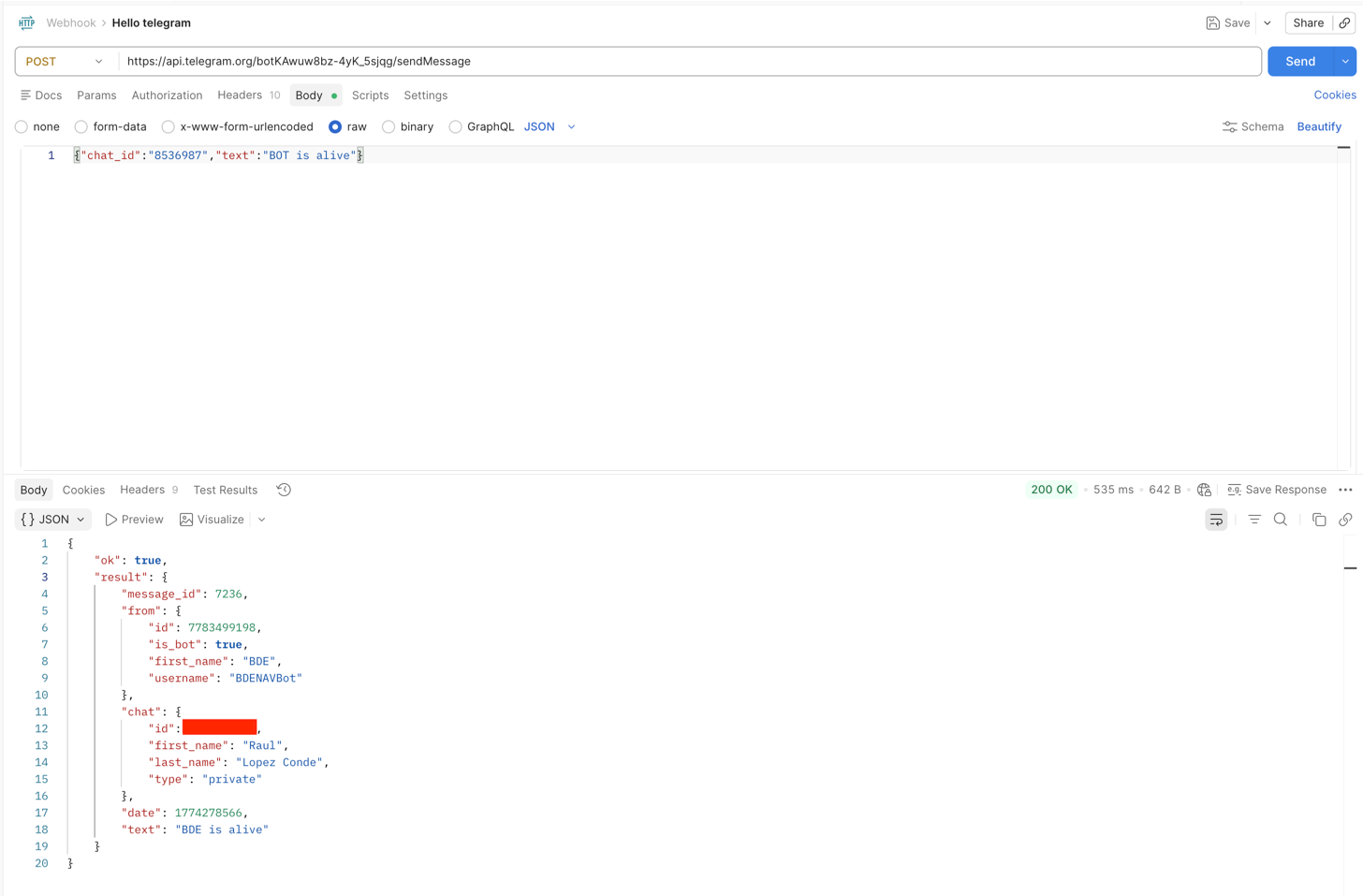
3. Отправка сообщения (REST-вызов)
* Используйте метод sendMessage из Telegram API.
* В теле запроса укажите chat\_id и текст сообщения.
* Запрос следует отправлять в формате JSON с заголовком Content-Type: application/json.
4. Создайте IoT-поток в Navixy
* После создания потока подключите Узел Вебхук в разделе, куда вы хотите отправлять данные.
* Следуйте той же структуре, что и при вызове API. В поле URL укажите конечную точку запроса:
\/sendMessage
* В разделе заголовков:
* Ключ: Content-Type
* Значение: application/json
* Наконец, в теле запроса укажите параметры телеметрии, которые хотите отправить, не забудьте еще раз включить chat\_id, например:
{
"chat\_id": X,
"text": "Устройство 12563254, широта: {{latitude}}, долгота: {{longitude}}, спутники: {{satellites}}, скорость: {{speed}}"
}
 
Благодаря этим шагам ваш бот сможет успешно получать сообщения, включая автоматизированные телематические данные от Navixy.
---
# Agent Instructions
This documentation is published with GitBook. GitBook is the documentation platform designed so that both humans and AI agents can read, navigate, and reason over technical content effectively. Learn more at gitbook.com.
## Querying This Documentation
If you need additional information that is not directly available in this page, you can query the documentation by asking a question.
Perform an HTTP GET request on the following URL with the `ask` and `goal` query parameters:
```
GET https://navixy.com/docs/expert-center/ru/faq-and-troubleshooting/iot-logic/how-to-connect-telegram-with-navixy-iot-logic.md?ask=&goal=
```
`ask` is the immediate question: it should be specific, self-contained, and written in natural language.
`goal` is what the user is ultimately trying to achieve, the reason they need the answer. Sharing it helps GitBook give you a better, more relevant answer. A goal is most helpful when it describes the outcome the user wants rather than restating the question. For example, with `ask=how do I create an API token`, a goal like `automate deployments from our CI pipeline` lets GitBook tailor the answer to that use case.
The response will contain a direct answer to the question and relevant excerpts and sources from the documentation.
Use this mechanism when the answer is not explicitly present in the current page, you need clarification or additional context, or you want to retrieve related documentation sections.