> For the complete documentation index, see [llms.txt](https://navixy.com/docs/llms.txt). Markdown versions of documentation pages are available by appending `.md` to page URLs; this page is available as [Markdown](https://navixy.com/docs/user/guide/account/iot-logic/flow-management/default-flow.md).
# Default data processing
Navixy processes all device data through the default flow when no custom IoT Logic flow is assigned, ensuring no telemetry is lost or dropped.
Navixy automatically ensures that every device in your account transmits data to the Navixy platform, regardless of whether the device is assigned to a custom flow. This guarantee operates at the system level and requires no configuration.
When a device isn't included in any custom flow, Navixy still processes its data and delivers it to the Navixy platform directly, without any transformations. This means no device data is ever lost due to routing configuration. Custom flows are how you go beyond this baseline. They let you enrich data with calculated attributes, apply conditional routing, and forward results to external systems. If your devices only need to reach the Navixy platform without any processing, no custom flow is required.
## How data flows
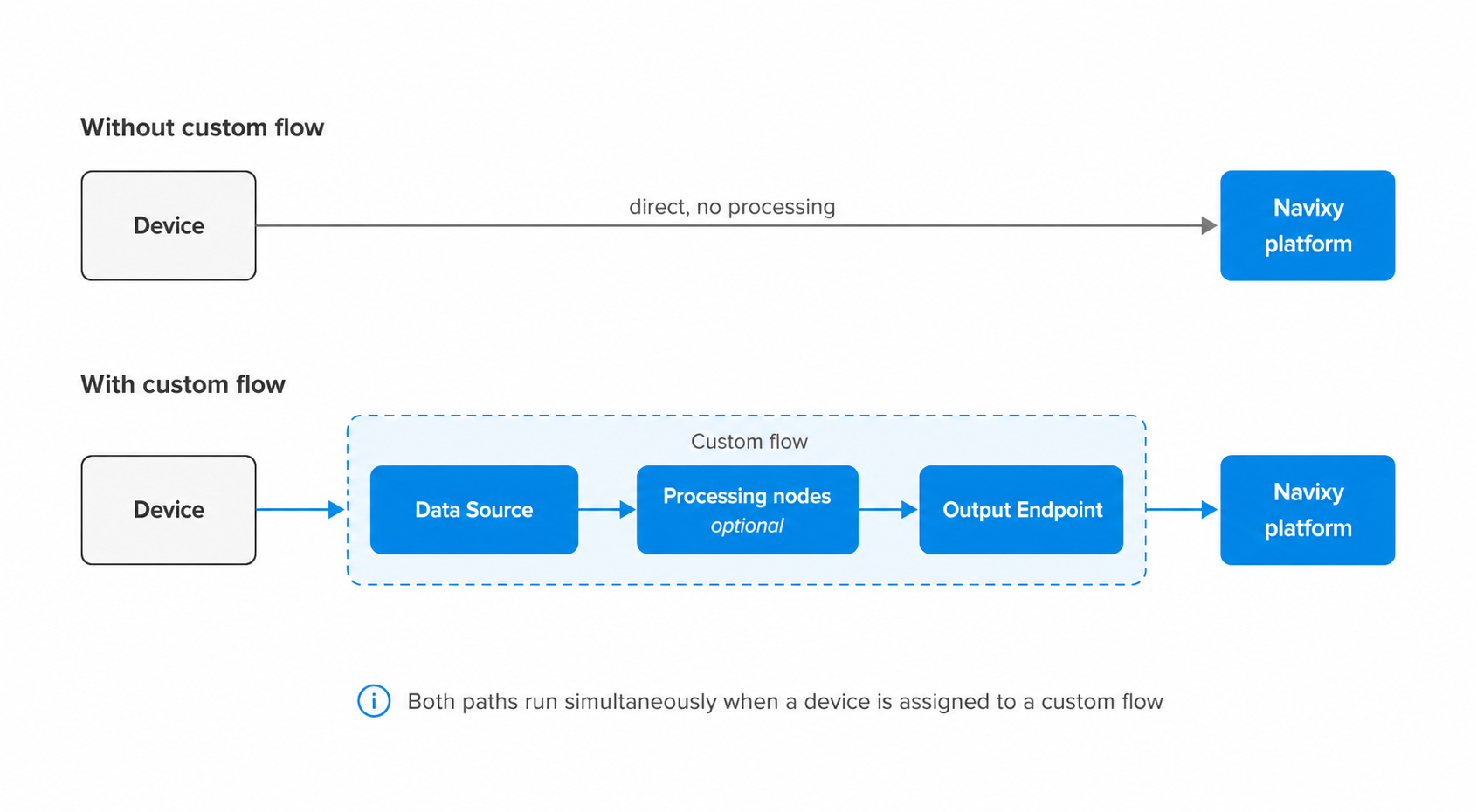
Without a custom flow, device data travels directly to the Navixy platform without any processing or transformation. Navixy receives the raw device data and delivers it as-is, ensuring the device is visible and monitored in the platform.
With a custom flow, data enters through a **Data Source** node, passes through any processing nodes you have configured, and exits through an **Output Endpoint** node set to **Default endpoint** mode to reach the platform. This path lets you enrich, filter, and route data before it arrives. When a device is assigned to a custom flow, both paths run simultaneously: the custom flow handles processing, while Navixy independently ensures the raw data reaches the platform regardless.
{% hint style="danger" %}
Disabling a custom flow stops all data transmission for the devices assigned to it. The automatic system coverage doesn't substitute for a disabled flow. Re-enable the flow to restore data transmission for the affected devices.
{% endhint %}
## Sending data to the Navixy platform
Sending data to the Navixy platform from a custom flow doesn't require a dedicated node type. It's the same **Output Endpoint** node used for any other destination, configured with **Mode** set to **Default endpoint**: a pre-configured, non-editable option that transmits directly to Navixy's servers. Unless you give it a custom name, this node appears on the canvas labeled **Default Output Endpoint**. See [Output Endpoint node](/docs/user/guide/account/iot-logic/nodes/output-endpoint-node.md#configuration-options) for the full configuration steps.
This ensures that data processed by a custom flow is properly formatted and transmitted to the Navixy platform, enabling full visibility of your devices in the main Navixy interface.
{% hint style="info" %}
Each custom flow should maintain a connection to an **Output Endpoint** node in **Default endpoint** mode to ensure device data is sent to the platform, enabling monitoring capabilities using Navixy tools. If this connection is removed from a custom flow, data from the devices involved in that flow no longer reaches the platform.
{% endhint %}
## Flow and device relationships
The following principles govern how device data coverage works across flows:
* **Every device in your account has a guaranteed path to transmit data.** The system ensures that all devices connected to your account always have a defined route for their data, maintaining complete visibility of your device fleet.
* **A device can belong to multiple flows at the same time.** All flows that include the device process its data simultaneously, and results are merged to avoid data loss. There are no constraints on how many flows a device can belong to.
* **Automatic system coverage always runs in parallel with custom flows.** Regardless of how many custom flows a device belongs to, Navixy always processes its data independently. Assigning a device to a custom flow does not replace or affect this behavior.
This approach ensures complete data coverage while allowing for customized data processing where needed.
{% hint style="info" %}
[Data Stream Analyzer](/docs/user/guide/account/iot-logic/data-stream-analyzer.md) is scoped to custom flows. Devices that are not assigned to any custom flow cannot currently be monitored through it.
{% endhint %}
---
# Agent Instructions
This documentation is published with GitBook. GitBook is the documentation platform designed so that both humans and AI agents can read, navigate, and reason over technical content effectively. Learn more at gitbook.com.
## Querying This Documentation
If you need additional information that is not directly available in this page, you can query the documentation by asking a question.
Perform an HTTP GET request on the following URL with the `ask` and `goal` query parameters:
```
GET https://navixy.com/docs/user/guide/account/iot-logic/flow-management/default-flow.md?ask=&goal=
```
`ask` is the immediate question: it should be specific, self-contained, and written in natural language.
`goal` is what the user is ultimately trying to achieve, the reason they need the answer. Sharing it helps GitBook give you a better, more relevant answer. A goal is most helpful when it describes the outcome the user wants rather than restating the question. For example, with `ask=how do I create an API token`, a goal like `automate deployments from our CI pipeline` lets GitBook tailor the answer to that use case.
The response will contain a direct answer to the question and relevant excerpts and sources from the documentation.
Use this mechanism when the answer is not explicitly present in the current page, you need clarification or additional context, or you want to retrieve related documentation sections.