> For the complete documentation index, see [llms.txt](https://navixy.com/docs/llms.txt). Markdown versions of documentation pages are available by appending `.md` to page URLs; this page is available as [Markdown](https://navixy.com/docs/user/guide/reports/specific-report-details/fuel-volume-2.0-report.md).
# Fuel volume 2.0 report
Track fuel consumption with Fuel volume 2.0: automatic refueling detection, daily fuel data, and sensor quality indicators per vehicle.
The **Fuel volume 2.0 report** tracks refueling events and fuel consumption over a selected period. Unlike the standard Fuel volume report, it has no configuration options. All data processing, smoothing, and event detection are handled automatically by Navixy's processing service, without any threshold settings to adjust.
This report is a good starting point: there are no parameters to configure before building the report, and the graph is always processed and smoothed automatically. However, **Fuel volume 2.0** only detects refueling events and can't identify fuel drains or theft. If you need drain detection, use the standard [Fuel volume report](/docs/user/guide/reports/specific-report-details/fuel-volume-report.md) instead.
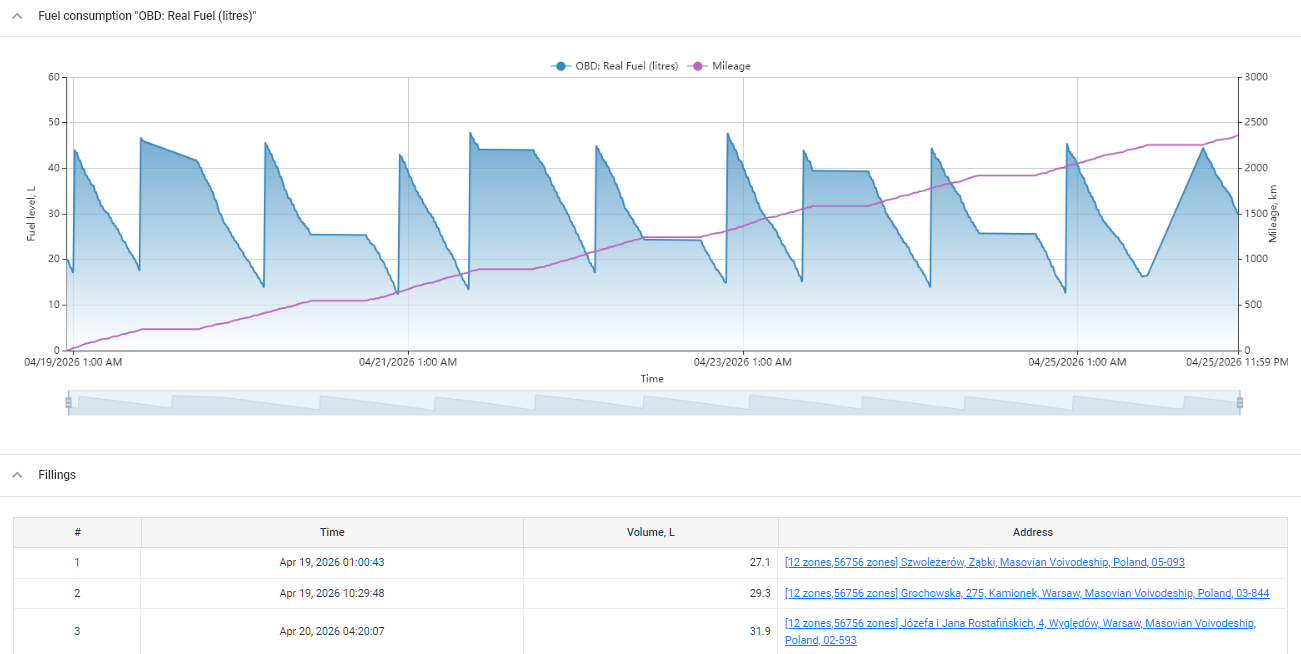
Fuel volume 2.0 report
The **Fuel volume 2.0 report** is composed of several sections:
* **Graph of change in fuel volume:** A visual representation of fuel level changes over time.
* **Fillings:** A detailed list of refueling events, including the time, volume, and location of each filling.
* **Details by dates:** Daily summaries of fuel volume changes, including mileage, refueling counts, and fuel consumption calculations.
* **Quality of fuel level sensor readings:** An experimental feature that evaluates the accuracy and reliability of fuel sensor data. See also: [Enhancing fuel management accuracy with Fuel Sensor Quality Index](https://www.navixy.com/blog/enhancing-fuel-management-accuracy-with-fuel-sensor-quality-index/).
## **Fuel volume 2.0 report** use cases
This report can be used in various scenarios:
* **Monitoring fuel consumption:** Track fuel usage and identify patterns or anomalies that could indicate inefficiencies or potential fuel theft.
* **Evaluating sensor accuracy:** Assess the performance of fuel level sensors to ensure reliable data collection.
* **Fuel fraud detection:** Identify unusual refueling patterns or locations that may indicate fraudulent activity.
It can reveal critical insights, such as:
* **Fuel fraud detection:** Identifying discrepancies between reported refueling events and actual fuel usage, particularly at fuel stations.
* **Operational efficiency:** Analyzing fuel consumption relative to mileage to identify potential inefficiencies or areas for cost reduction.
* **Sensor performance monitoring:** Regularly assessing the accuracy and reliability of fuel sensors to ensure that the data used for decision-making is trustworthy.
## **Fuel volume 2.0 report prerequisites**
To generate an accurate **Fuel volume 2.0 report**, ensure that the following configurations are correctly set up:
* **Fuel level sensor calibration:**
* For a single fuel level sensor, ensure that the calibration table is filled out according to the manufacturer's recommendations. Additionally, set thresholds for emission filtering in the **Advanced** section under the calibration table.
* For vehicles with multiple tanks, calibrate each sensor separately and create an aggregate sensor with volume units set to liters or gallons. Avoid selecting **Custom** in the measurement sensor's **Main →** **Unit** setting.
* For sensors that report fuel levels as a percentage, calibration is also required, with minimum and maximum fuel volumes specified.
* **Sensor data processing:**\
The Navixy platform collects raw data from devices and fuel sensors, which is then filtered based on the ignored values set in the sensor settings. The platform records data as received, without modifying it.
* **Graph generation:**\
The platform generates a graph of stored values based on the report parameters. Fuel sensor settings, including threshold values, are applied to this graph.
* **Automated smoothing:**\
The process of smoothing the graph is fully automated, with all smoothing and filtering settings applied automatically to produce a user-friendly, readable chart.
## Fuel volume report 2.0 parameters
* **Hide empty tabs:** Omits tabs for devices that have no trips in any configured shift during the selected period.
* **Show seconds:** Shows durations with second precision (`hh:mm:ss`) instead of `hh:mm`.
* **Include POI in location address:** If the address in the report matches a POI, displays the POI's name in front of the address.
* **Include geofence in location address:** If the address in the report matches a geofence, displays the gefence's name in front of the address.
## How to read Fuel volume 2.0 report
The report contains the following columns:
* **Fuel volume change graph:**\
This graph shows mileage and fuel level sensor readings over time. If a composite sensor is configured for multiple tanks, only the composite sensor data is shown. Individual physical sensors that are part of a composite are hidden. Refueling events are numbered and plotted at their corresponding points on the graph.
* **Fillings:**\
The table lists all refueling events during the selected period, including the time, fuel volume, and address.
* **Details by dates:**\
Provides daily data summaries, including:
* **Date:** The specific day for which the data is calculated.
* **Mileage:** The distance traveled on that day.
* **Count of refuelings:** Number of refueling events.
* **Volume:** Total volume of fuel refilled.
* **Consumed:** Actual fuel consumption for the day, calculated as `initial fuel level + volume of refuelings - final fuel level`.
* **Consumption per 100 units:** Fuel consumption per 100 measurement units (km/miles/etc.), calculated as `(initial fuel level + volume of refuelings - final fuel level) / mileage * 100`.
* **Assessment of fuel sensor reading:**
* This section evaluates the quality of the fuel sensor readings. The score falls into one of three categories:
* **High (8.0–10.0)**: Readings are highly accurate. Reports based on this sensor are the most reliable and provide detailed information on fuel status.
* **Moderate (above 3.0 to 8.0)**: Readings have acceptable accuracy but the signal is somewhat noisy. This may be due to operating conditions or other environmental factors. Reports are reasonably reliable.
* **Low (1.0–3.0):** Readings have low accuracy due to excessive signal noise, which may indicate sensor defects or installation issues. Reports based on these readings carry a significant degree of error.
* The Navixy platform may display a message indicating insufficient data for quality assessment if the sensor has been recently installed or if the data collection period is too short.
---
# Agent Instructions
This documentation is published with GitBook. GitBook is the documentation platform designed so that both humans and AI agents can read, navigate, and reason over technical content effectively. Learn more at gitbook.com.
## Querying This Documentation
If you need additional information that is not directly available in this page, you can query the documentation by asking a question.
Perform an HTTP GET request on the following URL with the `ask` and `goal` query parameters:
```
GET https://navixy.com/docs/user/guide/reports/specific-report-details/fuel-volume-2.0-report.md?ask=&goal=
```
`ask` is the immediate question: it should be specific, self-contained, and written in natural language.
`goal` is what the user is ultimately trying to achieve, the reason they need the answer. Sharing it helps GitBook give you a better, more relevant answer. A goal is most helpful when it describes the outcome the user wants rather than restating the question. For example, with `ask=how do I create an API token`, a goal like `automate deployments from our CI pipeline` lets GitBook tailor the answer to that use case.
The response will contain a direct answer to the question and relevant excerpts and sources from the documentation.
Use this mechanism when the answer is not explicitly present in the current page, you need clarification or additional context, or you want to retrieve related documentation sections.