> For the complete documentation index, see [llms.txt](https://navixy.com/docs/llms.txt). Markdown versions of documentation pages are available by appending `.md` to page URLs; this page is available as [Markdown](https://navixy.com/docs/user/guide/reports/specific-report-details/report-on-all-events.md).
# Report on all events
Filter platform events by type and date in the Report on all events. Review timestamps, locations, and event details in tables, timelines, and summaries.
The **Report on all events** in Navixy is a comprehensive tool that provides a detailed overview of every event logged by the Navixy platform. It covers a wide range of event types, categorized into general events, location-based events, hardware events, and service notifications.
This report is particularly valuable when there is a need to monitor device activity over a specified period, analyze event patterns, and document specific incidents.
The report on all events includes the following features:
* **Event logging:** Displays when and where each event occurred, along with associated driver information if a driver was assigned to the device at the time.
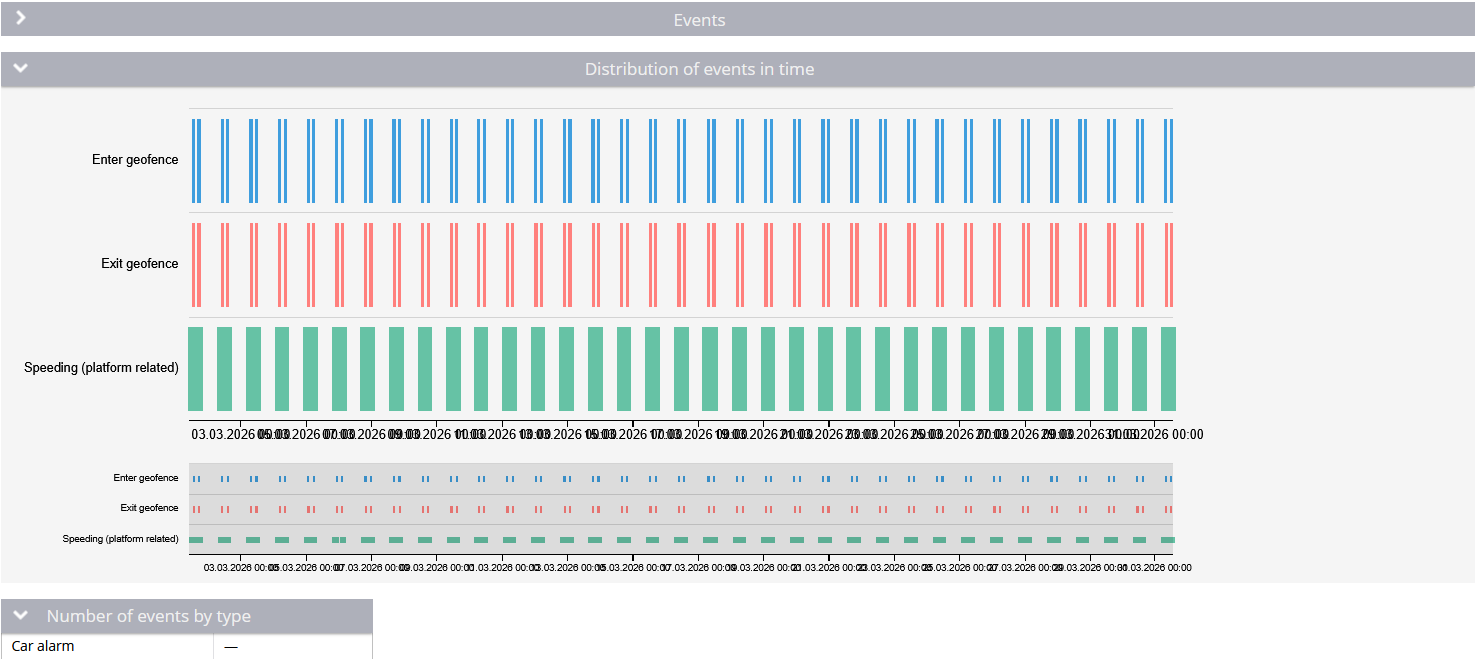
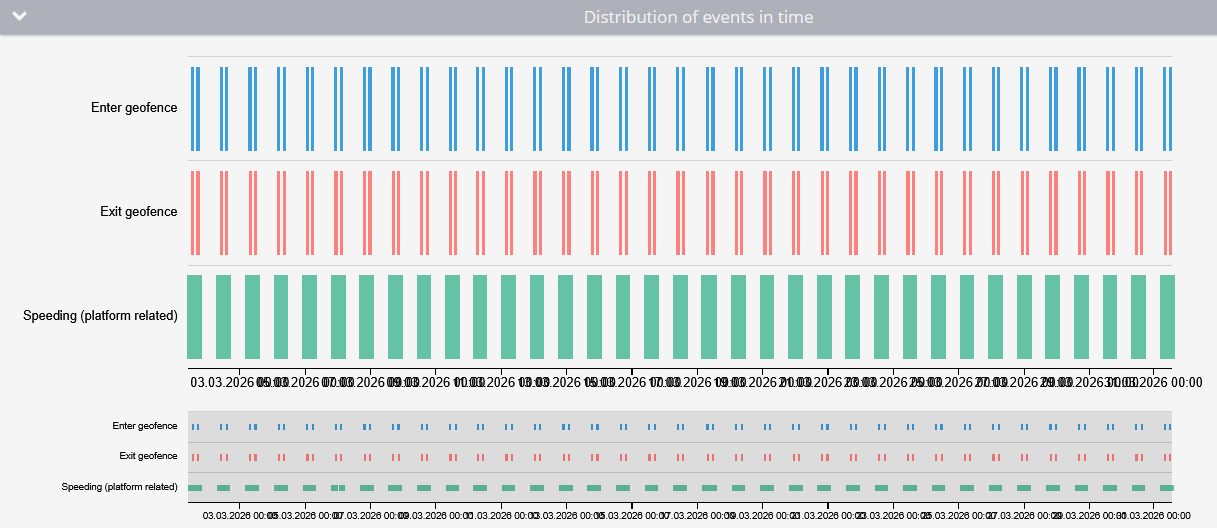
* **Event distribution graph:** Visual representation of how events were distributed over the selected time period.
* **Aggregate summary:** Summarizes the total number of events logged for each type during the reporting period.
Many event types require a corresponding rule to work with the device (e.g., geofence entry/exit, speed violations, GPS signal lost). Others are generated automatically by hardware (ADAS warnings, ignition, tachograph events) or by the platform (system messages, fueling/drain detection, check-in creation) and don't require rules.
{% hint style="warning" %}
Each day in the report period can display a maximum of 10,000 events. If a device generates more events than this in a single day, the excess events aren't included.
{% endhint %}
## Report on all events parameters
In addition to standard report parameters, the report on all events includes:
* **Hide empty tabs:** Omits tabs for devices that have no trips in any configured shift during the selected period.
* **Show seconds:** Shows durations with second precision (`hh:mm:ss`) instead of `hh:mm`.
* **Include POI in location address:** If the address in the report matches a POI, displays the POI's name in front of the address.
* **Include geofence in location address:** If the address in the report matches a geofence, displays the gefence's name in front of the address.
* **Group by event type:** Organizes events into tables based on their type. When grouping is enabled, sections appear in the platform's predefined order, not in the order you selected the event types.
* **Event type selection:** Allows filtering the report by specific event types. A quick search feature helps you find the events you need.
## How to choose event types for reporting
The event type selection presents all available event types as a flat list. You can filter by any combination. Use the quick search to find the events you need.
Over 80 event types are available for selection. These examples cover some of the most common ones:
* **General events:**
* **Inside/outside auto-created geofence:** Triggered by the [Unauthorized movement (by coordinates)](/docs/user/guide/events-and-notifications/security/unauthorized-movement.md) rule.
* **Cruise control on/off:** Associated with the [Cruise control on/off](/docs/user/guide/events-and-notifications/safety/cruise-control.md) rule.
* **Tracker attach:** Related to the [Tracker detach from object](/docs/user/guide/events-and-notifications/security/tracker-detach.md) rule.
* **Forward collision warning:** Linked to the [Advanced driver assistance systems (ADAS)](/docs/user/guide/events-and-notifications/safety/adas-warnings.md) rule.
* **GPS signal lost/recovered:** Tied to the [GPS signal lost/recovered](/docs/user/guide/events-and-notifications/device-positioning/gps-signal-loss-and-recovery.md) rule.
* **Harsh driving:** Triggered by the [Harsh driving](/docs/user/guide/events-and-notifications/safety/harsh-driving.md) rule.
* **Parking start/end:** Related to the [Parking state detection](/docs/user/guide/events-and-notifications/movement-monitoring/parking-state-detection.md) rule.
* **Location-based events:**
* **Geofence entry/exit:** Logs when a vehicle enters or exits a predefined [geofence](/docs/user/guide/events-and-notifications/movement-monitoring/geofence-entrance-or-exit.md).
* **POI visits:** Tracks visits to [points of interest (POIs)](/docs/user/guide/tracking/map-tools/places-pois.md).
* **Hardware events:**
* **Ignition activation:** Logs when the ignition is turned on or off.
* **GSM/GPS jamming:** Indicates attempts to jam the GSM or GPS signals.
* **Service notifications:**
* **Low battery:** Alerts when the device's battery level drops below a certain threshold.
* **Check engine light (MIL) on:** Logs when the vehicle’s check engine light is activated.
## How to read Report on all events
### Events table
Events table
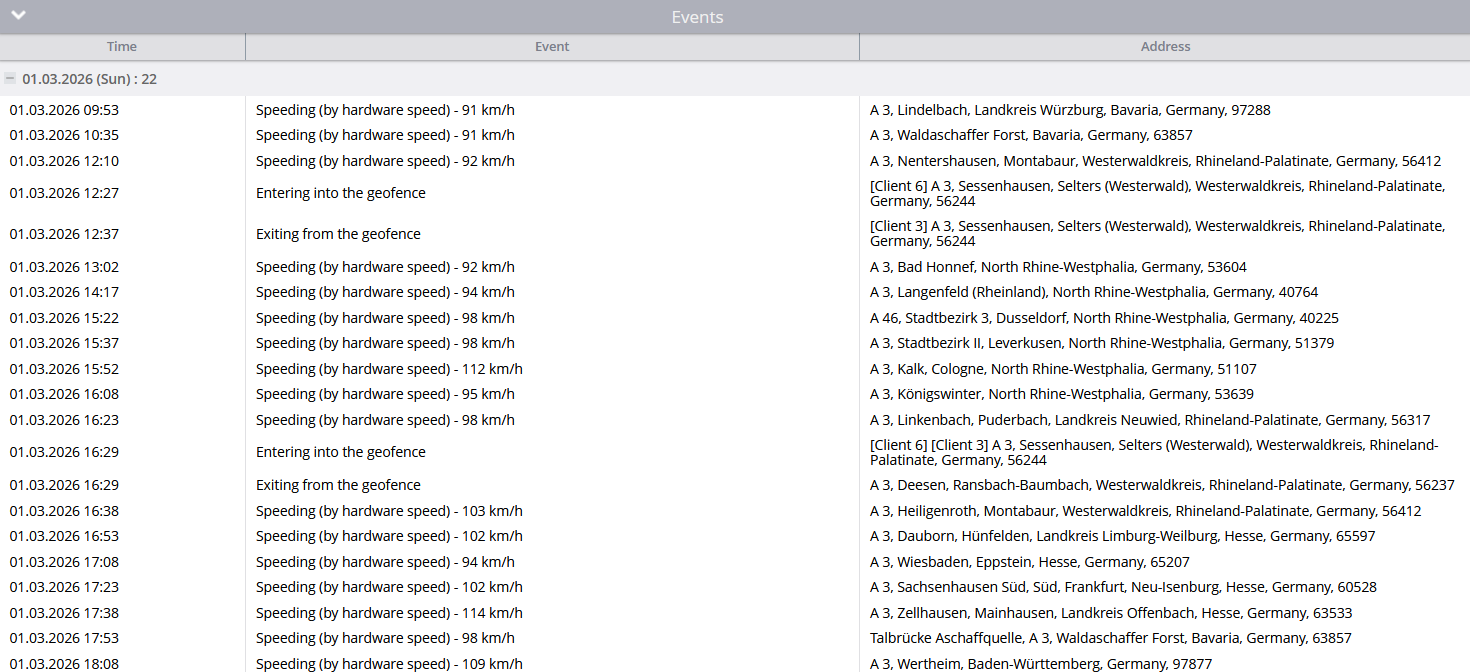
The **events table** provides a detailed list of all events, including:
* **Time:** The exact time the event occurred.
* **Event name:** The name of the event that was triggered.
* **Address:** The location where the event took place.
{% hint style="info" %}
If the event's location was determined approximately (e.g., via cell towers rather than GPS), the address includes a note indicating the accuracy radius, such as "(within 500 m)."
{% endhint %}
* **Employee:** The employee assigned to the device at the time of the event. This column only appears when at least one event in the report has an associated employee.
### Event distribution graph
Event distribution graph
The event distribution graph plots each individual event as a point on a timeline. Each selected event type is shown as a separate series, making it easy to see clusters of activity and correlations between different event types.
### Number of events by type
This section of the report tallies the total occurrences of each event type during the reporting period. If a specific event type didn't occur, it is marked with a dash.
---
# Agent Instructions
This documentation is published with GitBook. GitBook is the documentation platform designed so that both humans and AI agents can read, navigate, and reason over technical content effectively. Learn more at gitbook.com.
## Querying This Documentation
If you need additional information that is not directly available in this page, you can query the documentation by asking a question.
Perform an HTTP GET request on the following URL with the `ask` and `goal` query parameters:
```
GET https://navixy.com/docs/user/guide/reports/specific-report-details/report-on-all-events.md?ask=&goal=
```
`ask` is the immediate question: it should be specific, self-contained, and written in natural language.
`goal` is what the user is ultimately trying to achieve, the reason they need the answer. Sharing it helps GitBook give you a better, more relevant answer. A goal is most helpful when it describes the outcome the user wants rather than restating the question. For example, with `ask=how do I create an API token`, a goal like `automate deployments from our CI pipeline` lets GitBook tailor the answer to that use case.
The response will contain a direct answer to the question and relevant excerpts and sources from the documentation.
Use this mechanism when the answer is not explicitly present in the current page, you need clarification or additional context, or you want to retrieve related documentation sections.