> For the complete documentation index, see [llms.txt](https://navixy.com/docs/llms.txt). Markdown versions of documentation pages are available by appending `.md` to page URLs; this page is available as [Markdown](https://navixy.com/docs/user/guide/reports/specific-report-details/trips-and-stops-by-shifts-report.md).
# Trips and stops by shifts report
Analyze trips and stops by work shift with the Trips and stops by shifts report. Compare shift-based mileage, time, idling, and fuel data.
The **Trips and stops by shifts** **report** provides the same per-trip driving analysis as the regular [Trips report](/docs/user/guide/reports/specific-report-details/trip-report.md), but groups the data by the work shifts you define. For each shift you configure, the report lists every trip and stop that fell within that shift's time window, with a per-shift summary at the end of the report.
This makes it possible to see, for example, how much each shift drove, how long they idled, and how much fuel they consumed, side by side in a single comparison.
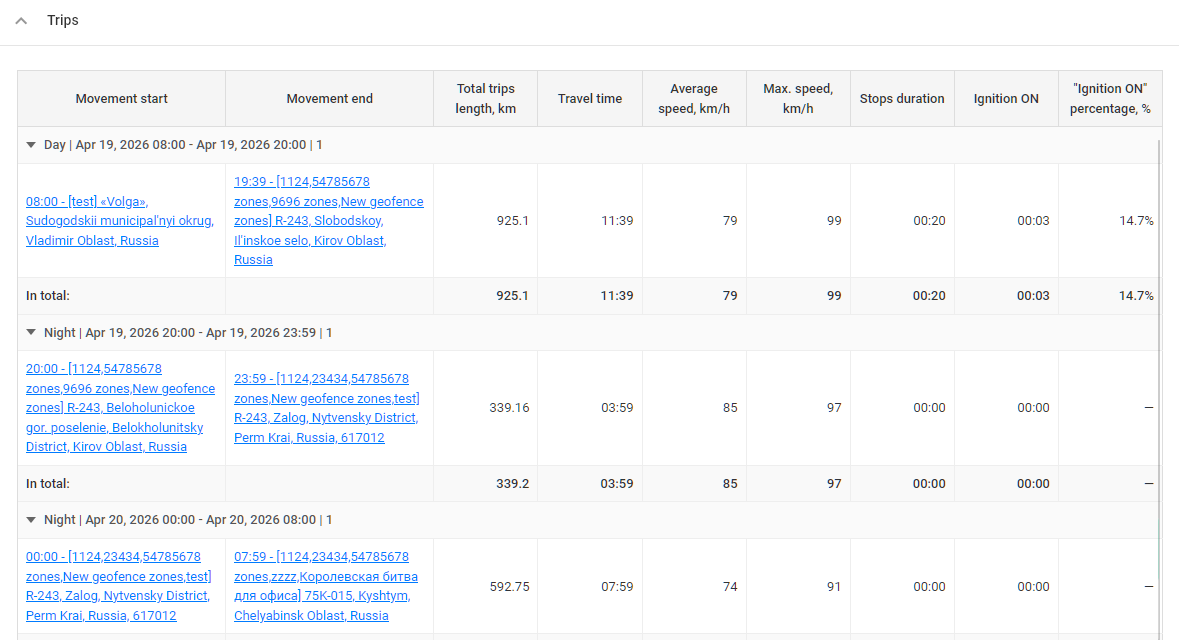
Time and stops by shifts
## Trips and stops by shifts report use cases
The report is particularly useful when the same vehicle is used by different drivers or crews on a rotating schedule and you need to attribute activity to a specific shift rather than a specific day or driver:
* **Shift performance comparison:** Compare mileage, travel time, average and maximum speeds, and idling across morning, day, and night shifts to identify which shift uses vehicles most efficiently.
* **Payroll and billing:** Measure vehicle usage attributable to each shift for time-based billing, overtime validation, or internal cost allocation.
* **Driver shift monitoring:** When drivers are known to work fixed shifts, the report effectively summarizes each driver's activity without requiring an explicit driver assignment on the Navixy platform.
* **Unauthorized use detection:** Trips that fall outside of all configured shifts are excluded, making off-schedule vehicle use easy to spot when the numbers don't add up.
* **Cost management:** Compare fuel consumption and fuel cost by shift to understand how workload distribution affects operating costs.
## Trips and stops by shifts report parameters
The report has one required setting, the list of shifts. All other options either refine the output or adjust the level of detail.
* **Hide empty tabs:** Omits tabs for devices that have no trips in any configured shift during the selected period.
* **Show seconds:** Shows durations with second precision (`hh:mm:ss`) instead of `hh:mm`.
* **Include POI in location address:** If the address in the report matches a POI, displays the POI's name in front of the address.
* **Include geofence in location address:** If the address in the report matches a geofence, displays the gefence's name in front of the address.
* **Shifts (required)**: define between 1 and 4 named shifts. Each shift has a name, a start time, and an end time. Shifts can cross midnight (e.g., a night shift from 22:00 to 06:00). Shifts must not overlap and their start and end times must not be identical. Shift names must be unique. Only trips that fall entirely inside one of the configured shifts are included. Any activity outside all shifts is omitted from the report.
* **Use smart filter:** Excludes short or invalid trips from the report. A regular trip is excluded if it has fewer than 3 data points, covers less than 100 meters, or stays within a 200-meter diameter. Additionally, individual track points with suspicious mileage patterns (e.g. implausibly high or low speeds) are removed.
* **Show coordinates:** Adds latitude and longitude to the start and end of every trip, next to the address.
* **Split overnight shifts:** When enabled, a shift that crosses midnight is split into two intervals at midnight, so the portion before and after midnight appear as separate sections on the corresponding calendar days. When disabled, the full overnight shift is kept as one continuous block attributed to the day it started.
Note that this report always divides trips by stops and always shows stop duration after each trip. These can't be turned off. The report also never groups trips by drivers, even if drivers are assigned to the vehicles.
## How to read Trips and stops by shifts report
Each device gets its own tab. Inside the tab, the trips table is divided into sections: one section per shift per day, in chronological order.
Inside each section, every row is either a trip or a stop between trips. The columns are:
* **Movement start:** date, time, and address where the trip began (plus coordinates if Show coordinates is enabled).
* **Movement end:** date, time, and address where the trip ended (plus coordinates if Show coordinates is enabled).
* **Total trips length:** distance covered on the trip, in the unit from your measurement system (km or miles).
* **Travel time:** duration from movement start to movement end.
* **Average speed** and **Max speed:** for that trip, in km/h or mph.
* **Stops duration:** how long the vehicle stayed stopped after the trip, before the next trip began.
* **Fuel consumed (by sensors):** Shows actual fuel consumption if a fuel sensor is installed and transmitting data to the platform. Measures fuel in liters or gallons.
* **Ignition duration** and **Ignition %** (only if the device has an ignition sensor): how long the ignition was on during the following stop, and what share of the stop that represents. Useful for spotting stops where the engine was left running.
**Example**
A section for the morning shift on February 7, 2024 might contain:
* **Movement start:** February 7, 2024, at 08:12:06, 6750 Putnam Drive, Highland-on-the-Lake, NY.
* **Movement end:** February 7, 2024, at 09:09:46, 49 Steinfeldt Road, Lancaster, NY.
* **Total trips length:** 42.89 kilometers.
* **Travel time:** 57 minutes and 40 seconds.
* **Max speed:** 59 km/h.
* **Average speed:** 45 km/h.
* **Stops duration:** 1 hour and 12 minutes.
### Trips and stops by shifts report summary
Below the trips table, each device tab ends with a summary table unique to this report: a side-by-side comparison of the configured shifts across the entire reporting period. Rows list each metric. Columns correspond to the shifts (in the order they were defined), plus a final **Summary** column that totals everything.
Rows include:
* **Trips:** Total number of trips in the shift.
* **Total trips length:** Total distance driven during the shift, in km or miles.
* **Travel time:** Total time in motion.
* **Average speed** and **Max speed**: Aggregated across the shift.
* **Idle duration:** Total time spent stopped between trips within the shift.
* **Fuel consumed by norm** and **Trip cost by norm** (when standard consumption and fuel price are configured in the vehicle profile).
* **Ignition ON** and **Ignition ON percentage** (when an ignition sensor is available): Total ignition-on time during stops, and what share of stop time that represents.
* **Odometer value:** The vehicle's odometer at the end of the report period (shown in the Summary column only).
---
# Agent Instructions
This documentation is published with GitBook. GitBook is the documentation platform designed so that both humans and AI agents can read, navigate, and reason over technical content effectively. Learn more at gitbook.com.
## Querying This Documentation
If you need additional information that is not directly available in this page, you can query the documentation by asking a question.
Perform an HTTP GET request on the following URL with the `ask` and `goal` query parameters:
```
GET https://navixy.com/docs/user/guide/reports/specific-report-details/trips-and-stops-by-shifts-report.md?ask=&goal=
```
`ask` is the immediate question: it should be specific, self-contained, and written in natural language.
`goal` is what the user is ultimately trying to achieve, the reason they need the answer. Sharing it helps GitBook give you a better, more relevant answer. A goal is most helpful when it describes the outcome the user wants rather than restating the question. For example, with `ask=how do I create an API token`, a goal like `automate deployments from our CI pipeline` lets GitBook tailor the answer to that use case.
The response will contain a direct answer to the question and relevant excerpts and sources from the documentation.
Use this mechanism when the answer is not explicitly present in the current page, you need clarification or additional context, or you want to retrieve related documentation sections.