> For the complete documentation index, see [llms.txt](https://navixy.com/docs/llms.txt). Markdown versions of documentation pages are available by appending `.md` to page URLs; this page is available as [Markdown](https://navixy.com/docs/user/id/guide/devices-and-settings/vehicle-sensors/specialized-sensors-by-manufacturer/teltonika-sensors/ble-beacons-teltonika.md).
# Beacon BLE (Teltonika)
Konfigurasikan beacon BLE Teltonika di Navixy sebagai sensor suhu, deteksi magnet, atau sensor ID supir. Berfungsi tanpa kabel, dengan masa pakai baterai hingga 19 tahun.
Beacon BLE Teltonika adalah perangkat serbaguna yang dapat mengumpulkan data suhu, status magnet, dan mengirimkan identifikatornya dalam jarak jauh, mencapai hingga 200 meter di area terbuka.
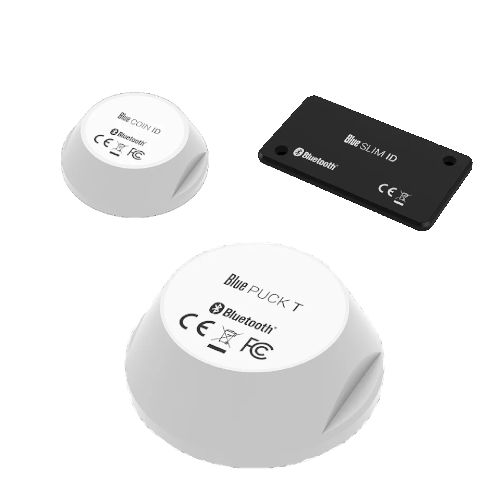
Beacon ini menggunakan **Bluetooth Low Energy** teknologi (BLE 4.0+, standar nirkabel jarak pendek yang dioptimalkan untuk konsumsi daya rendah), sehingga dapat beroperasi dalam waktu lama dengan baterai internalnya: hingga 2 tahun untuk model SLIM (seukuran kartu), hingga 5 tahun untuk model COIN (cakram kecil), dan hingga 19 tahun untuk model PUCK (besar dan tahan banting).
Beacon ini ditempatkan dalam casing berperingkat IP68 (tertutup rapat terhadap debu dan aman untuk direndam dalam air).
## Model beacon yang didukung
* **Blue COIN MAG**: Beacon magnet kecil
* **Blue PUCK MAG**: Beacon magnet besar
* **Blue COIN ID**: Beacon ID kecil
* **Blue PUCK ID**: Beacon ID besar
* **Blue SLIM ID**: Beacon seukuran kartu untuk identifikasi karyawan
* **Blue COIN T**: Beacon suhu kecil
* **Blue PUCK T**: Beacon suhu besar
### Sensor suhu
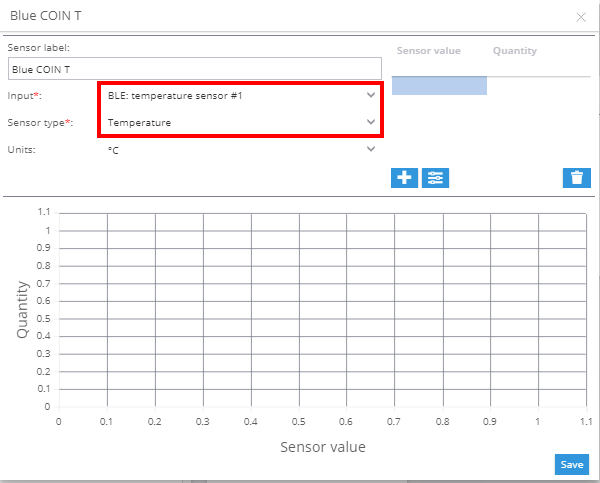
Untuk menambahkan sensor suhu:
1. Buka bagian sensor pengukuran di tab input.
2. Pilih **BLE: Temperature** sebagai jenis input.
3. Pilih **Suhu** sebagai jenis sensor.
### Sensor magnetik
Beacon magnetik (MAG) mendeteksi ada atau tidaknya magnet, berguna untuk memantau pintu kontainer, tutup kotak perkakas, atau aset lainnya. Konfigurasikan sebagai sensor virtual menggunakan **Nilai sumber** metode:
1. Buka ke **Sensor dan tombol** dan klik **+** → **Sensor virtual**.
2. Pilih **BLE: Magnetic field** input yang sesuai dengan nomor slot beacon.
3. Pilih **Nilai sumber** sebagai metode perhitungan.
4. Petakan kedua status tersebut (misalnya, `0` → `Buka`, `1` → `Closed`) dan simpan.
Status sensor muncul di **Pembacaan sensor** blok dari [widget Pelacak](/docs/user/id/guide/tracking/objects-list/object-widget.md).
### Sensor identifikasi supir
Beacon ID (COIN ID, PUCK ID, SLIM ID) bekerja seperti iButton atau RFID tetapi melalui Bluetooth. Tidak memerlukan pembaca fisik. Saat beacon berada dalam jangkauan perangkat GPS, identifikatornya dibaca secara otomatis. Konfigurasikan sebagai sensor virtual menggunakan **Nilai sumber** metode:
1. Buka ke **Sensor dan tombol** dan klik **+** → **Sensor virtual**.
2. Pilih **BLE: Hardware key** input.
3. Pilih **Nilai sumber** sebagai metode perhitungan.
4. Petakan setiap alamat MAC atau identifikator beacon ke nama supir dan simpan.
Setelah dikonfigurasi, supir yang teridentifikasi muncul di **Pembacaan sensor** blok dan dapat digunakan dalam aturan identifikasi supir.
**Lihat juga:**
* [Menetapkan kunci ID supir di profil Supir](/docs/user/id/guide/fleet-management/drivers.md)
* [Identifikasi supir (Aturan dan pemberitahuan)](/docs/user/id/guide/events-and-notifications/scheduling-and-dispatching/driver-identification.md)
---
# Agent Instructions
This documentation is published with GitBook. GitBook is the documentation platform designed so that both humans and AI agents can read, navigate, and reason over technical content effectively. Learn more at gitbook.com.
## Querying This Documentation
If you need additional information that is not directly available in this page, you can query the documentation dynamically by asking a question.
Perform an HTTP GET request on the current page URL with the `ask` query parameter, and the optional `goal` query parameter:
```
GET https://navixy.com/docs/user/id/guide/devices-and-settings/vehicle-sensors/specialized-sensors-by-manufacturer/teltonika-sensors/ble-beacons-teltonika.md?ask=&goal=
```
`ask` is the immediate question: it should be specific, self-contained, and written in natural language.
`goal` is optional and describes the broader end goal you are ultimately trying to accomplish on behalf of the user. GitBook uses it to tailor the answer towards what is most useful for that goal.
The response will contain a direct answer to the question and relevant excerpts and sources from the documentation.
Use this mechanism when the answer is not explicitly present in the current page, you need clarification or additional context, or you want to retrieve related documentation sections.