> For the complete documentation index, see [llms.txt](https://navixy.com/docs/llms.txt). Markdown versions of documentation pages are available by appending `.md` to page URLs; this page is available as [Markdown](https://navixy.com/docs/user/id/guide/x-gps-mobile-apps/x-gps-monitor/quick-start.md).
# Mulai cepat
Unduh X-GPS Monitor dari Google Play atau App Store, lalu masuk dengan kredensial Navixy Anda untuk mulai memantau armada Anda di ponsel.
{% columns %}
{% column %}
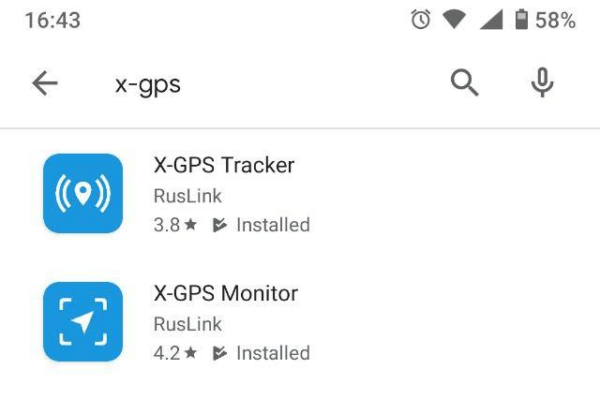
Anda dapat mengunduh aplikasi ini secara gratis dari Google Play atau App Store.
Buka toko aplikasi dan ketik X-GPS di kolom pencarian.
Pilih **X-GPS Monitor** dan klik "Instal".
{% endcolumn %}
{% column %}
{% endcolumn %}
{% endcolumns %}
### Masuk
{% columns %}
{% column %}
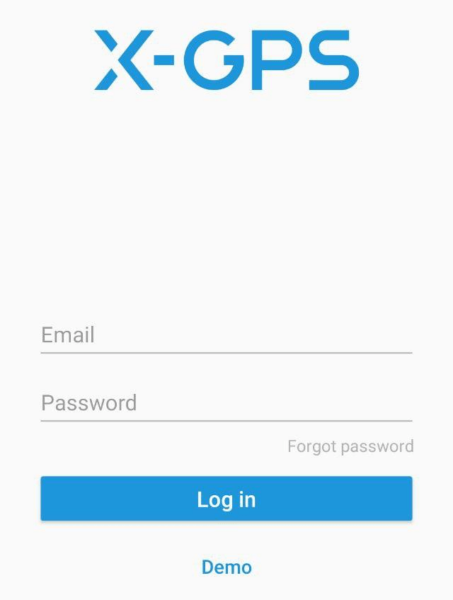
Pada peluncuran pertama, aplikasi akan menawarkan untuk memindai kode QR. Untuk menerima kode QR, klik tombol di bawah  formulir login platform Navixy [formulir login](https://tracking.navixy.com/).
Setelah memindai kode QR, masukkan nama pengguna dan kata sandi Anda, lalu klik **Masuk** tombol.
Jika Anda lupa kata sandi, klik tombol yang sesuai, masukkan alamat email Anda, dan captcha. Setelah itu, Anda akan menerima email berisi tautan untuk mengatur ulang kata sandi Anda.
Setelah berhasil masuk, Anda akan melihat layar peta.
{% endcolumn %}
{% column %}
{% endcolumn %}
{% endcolumns %}
### Alat utama
{% columns %}
{% column %}
Item berikut tersedia di layar utama:
1. **Bilah samping.** Menekan tombol akan menampilkan menu tempat Anda dapat mengakses informasi tentang pengguna, saldo, daftar perangkat, dan kontrol lainnya.
2. **Tampilkan pelacak.** Klik untuk memilih pelacak yang akan ditampilkan - semua, satu, atau kelompok. Anda juga dapat mengaktifkan **Ikuti pelacak**dan peta akan otomatis berpusat pada satu perangkat.
3. **Jenis peta.** Memungkinkan Anda memilih dari daftar peta yang tersedia, serta mengaktifkan tampilan lalu lintas.
4. **Daftar notifikasi.** Menampilkan semua notifikasi yang belum dibaca.
5. **Tampilkan lokasi.** Pusatkan peta pada lokasi Anda saat ini.
6. **Skala.** Anda dapat mengubah skala peta dengan tombol "+" dan "-".
{% endcolumn %}
{% column %}

{% endcolumn %}
{% endcolumns %}
---
# Agent Instructions
This documentation is published with GitBook. GitBook is the documentation platform designed so that both humans and AI agents can read, navigate, and reason over technical content effectively. Learn more at gitbook.com.
## Querying This Documentation
If you need additional information that is not directly available in this page, you can query the documentation by asking a question.
Perform an HTTP GET request on the following URL with the `ask` and `goal` query parameters:
```
GET https://navixy.com/docs/user/id/guide/x-gps-mobile-apps/x-gps-monitor/quick-start.md?ask=&goal=
```
`ask` is the immediate question: it should be specific, self-contained, and written in natural language.
`goal` is what the user is ultimately trying to achieve, the reason they need the answer. Sharing it helps GitBook give you a better, more relevant answer. A goal is most helpful when it describes the outcome the user wants rather than restating the question. For example, with `ask=how do I create an API token`, a goal like `automate deployments from our CI pipeline` lets GitBook tailor the answer to that use case.
The response will contain a direct answer to the question and relevant excerpts and sources from the documentation.
Use this mechanism when the answer is not explicitly present in the current page, you need clarification or additional context, or you want to retrieve related documentation sections.
formulir login platform Navixy [formulir login](https://tracking.navixy.com/).
Setelah memindai kode QR, masukkan nama pengguna dan kata sandi Anda, lalu klik **Masuk** tombol.
Jika Anda lupa kata sandi, klik tombol yang sesuai, masukkan alamat email Anda, dan captcha. Setelah itu, Anda akan menerima email berisi tautan untuk mengatur ulang kata sandi Anda.
Setelah berhasil masuk, Anda akan melihat layar peta.
{% endcolumn %}
{% column %}

{% endcolumn %}
{% endcolumns %}
### Alat utama
{% columns %}
{% column %}
Item berikut tersedia di layar utama:
1. **Bilah samping.** Menekan tombol akan menampilkan menu tempat Anda dapat mengakses informasi tentang pengguna, saldo, daftar perangkat, dan kontrol lainnya.
2. **Tampilkan pelacak.** Klik untuk memilih pelacak yang akan ditampilkan - semua, satu, atau kelompok. Anda juga dapat mengaktifkan **Ikuti pelacak**dan peta akan otomatis berpusat pada satu perangkat.
3. **Jenis peta.** Memungkinkan Anda memilih dari daftar peta yang tersedia, serta mengaktifkan tampilan lalu lintas.
4. **Daftar notifikasi.** Menampilkan semua notifikasi yang belum dibaca.
5. **Tampilkan lokasi.** Pusatkan peta pada lokasi Anda saat ini.
6. **Skala.** Anda dapat mengubah skala peta dengan tombol "+" dan "-".
{% endcolumn %}
{% column %}

{% endcolumn %}
{% endcolumns %}
---
# Agent Instructions
This documentation is published with GitBook. GitBook is the documentation platform designed so that both humans and AI agents can read, navigate, and reason over technical content effectively. Learn more at gitbook.com.
## Querying This Documentation
If you need additional information that is not directly available in this page, you can query the documentation by asking a question.
Perform an HTTP GET request on the following URL with the `ask` and `goal` query parameters:
```
GET https://navixy.com/docs/user/id/guide/x-gps-mobile-apps/x-gps-monitor/quick-start.md?ask=&goal=
```
`ask` is the immediate question: it should be specific, self-contained, and written in natural language.
`goal` is what the user is ultimately trying to achieve, the reason they need the answer. Sharing it helps GitBook give you a better, more relevant answer. A goal is most helpful when it describes the outcome the user wants rather than restating the question. For example, with `ask=how do I create an API token`, a goal like `automate deployments from our CI pipeline` lets GitBook tailor the answer to that use case.
The response will contain a direct answer to the question and relevant excerpts and sources from the documentation.
Use this mechanism when the answer is not explicitly present in the current page, you need clarification or additional context, or you want to retrieve related documentation sections.