> For the complete documentation index, see [llms.txt](https://navixy.com/docs/llms.txt). Markdown versions of documentation pages are available by appending `.md` to page URLs; this page is available as [Markdown](https://navixy.com/docs/user/ru/guide/x-gps-mobile-apps/x-gps-monitor/quick-start.md).
# Быстрый старт
Скачайте X-GPS Monitor в Google Play или App Store, затем войдите, используя учетные данные Navixy, чтобы начать мониторинг автопарка на мобильном устройстве.
{% columns %}
{% column %}
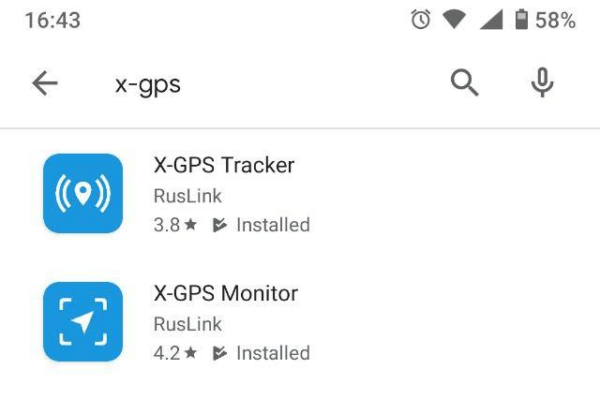
Вы можете бесплатно скачать приложение в Google Play или App Store.
Перейдите в магазин и введите X-GPS в поле поиска.
Выберите **X-GPS Monitor** и нажмите «Установить».
{% endcolumn %}
{% column %}
{% endcolumn %}
{% endcolumns %}
### Войти
{% columns %}
{% column %}
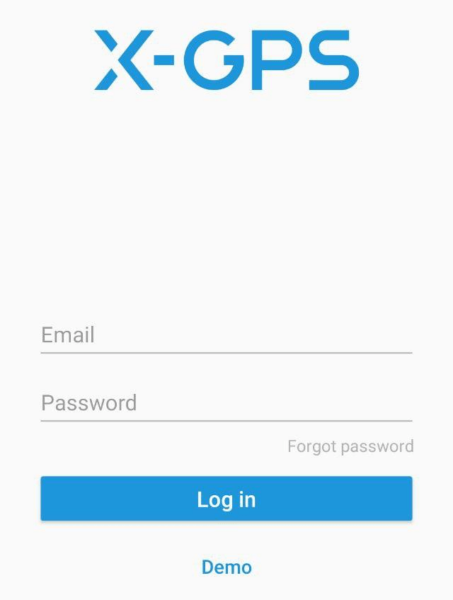
При первом запуске приложение предложит отсканировать QR-код. Чтобы получить QR-код, нажмите кнопку  под формы входа в платформе Navixy [входа](https://tracking.navixy.com/).
После сканирования QR-кода введите имя пользователя и пароль и нажмите **Войти** кнопку.
Если вы забыли пароль, нажмите соответствующую кнопку, введите адрес электронной почты и капчу. После этого вам придет письмо со ссылкой для сброса пароля.
После успешного входа вы увидите экран карты.
{% endcolumn %}
{% column %}
{% endcolumn %}
{% endcolumns %}
### Основные инструменты
{% columns %}
{% column %}
На главном экране доступны следующие элементы:
1. **Боковая панель.** Нажатие кнопки открывает меню, где можно получить доступ к информации о пользователе, балансе, списку устройств и другим элементам управления.
2. **Показать трекеры.** Нажмите, чтобы выбрать, какие трекеры отображать — все, один или группу. Также можно включить **Следить за объектом**, и карта автоматически центрируется на одном устройстве.
3. **Тип карты.** Позволяет выбрать карту из списка доступных и также включить отображение дорожной обстановки.
4. **Список уведомлений.** Отображает все непрочитанные уведомления.
5. **Показать местоположение.** Центрировать карту по текущему местоположению.
6. **Масштаб.** Вы можете изменить масштаб карты кнопками «+» и «-».
{% endcolumn %}
{% column %}

{% endcolumn %}
{% endcolumns %}
---
# Agent Instructions
This documentation is published with GitBook. GitBook is the documentation platform designed so that both humans and AI agents can read, navigate, and reason over technical content effectively. Learn more at gitbook.com.
## Querying This Documentation
If you need additional information that is not directly available in this page, you can query the documentation by asking a question.
Perform an HTTP GET request on the following URL with the `ask` and `goal` query parameters:
```
GET https://navixy.com/docs/user/ru/guide/x-gps-mobile-apps/x-gps-monitor/quick-start.md?ask=&goal=
```
`ask` is the immediate question: it should be specific, self-contained, and written in natural language.
`goal` is what the user is ultimately trying to achieve, the reason they need the answer. Sharing it helps GitBook give you a better, more relevant answer. A goal is most helpful when it describes the outcome the user wants rather than restating the question. For example, with `ask=how do I create an API token`, a goal like `automate deployments from our CI pipeline` lets GitBook tailor the answer to that use case.
The response will contain a direct answer to the question and relevant excerpts and sources from the documentation.
Use this mechanism when the answer is not explicitly present in the current page, you need clarification or additional context, or you want to retrieve related documentation sections.
под формы входа в платформе Navixy [входа](https://tracking.navixy.com/).
После сканирования QR-кода введите имя пользователя и пароль и нажмите **Войти** кнопку.
Если вы забыли пароль, нажмите соответствующую кнопку, введите адрес электронной почты и капчу. После этого вам придет письмо со ссылкой для сброса пароля.
После успешного входа вы увидите экран карты.
{% endcolumn %}
{% column %}

{% endcolumn %}
{% endcolumns %}
### Основные инструменты
{% columns %}
{% column %}
На главном экране доступны следующие элементы:
1. **Боковая панель.** Нажатие кнопки открывает меню, где можно получить доступ к информации о пользователе, балансе, списку устройств и другим элементам управления.
2. **Показать трекеры.** Нажмите, чтобы выбрать, какие трекеры отображать — все, один или группу. Также можно включить **Следить за объектом**, и карта автоматически центрируется на одном устройстве.
3. **Тип карты.** Позволяет выбрать карту из списка доступных и также включить отображение дорожной обстановки.
4. **Список уведомлений.** Отображает все непрочитанные уведомления.
5. **Показать местоположение.** Центрировать карту по текущему местоположению.
6. **Масштаб.** Вы можете изменить масштаб карты кнопками «+» и «-».
{% endcolumn %}
{% column %}

{% endcolumn %}
{% endcolumns %}
---
# Agent Instructions
This documentation is published with GitBook. GitBook is the documentation platform designed so that both humans and AI agents can read, navigate, and reason over technical content effectively. Learn more at gitbook.com.
## Querying This Documentation
If you need additional information that is not directly available in this page, you can query the documentation by asking a question.
Perform an HTTP GET request on the following URL with the `ask` and `goal` query parameters:
```
GET https://navixy.com/docs/user/ru/guide/x-gps-mobile-apps/x-gps-monitor/quick-start.md?ask=&goal=
```
`ask` is the immediate question: it should be specific, self-contained, and written in natural language.
`goal` is what the user is ultimately trying to achieve, the reason they need the answer. Sharing it helps GitBook give you a better, more relevant answer. A goal is most helpful when it describes the outcome the user wants rather than restating the question. For example, with `ask=how do I create an API token`, a goal like `automate deployments from our CI pipeline` lets GitBook tailor the answer to that use case.
The response will contain a direct answer to the question and relevant excerpts and sources from the documentation.
Use this mechanism when the answer is not explicitly present in the current page, you need clarification or additional context, or you want to retrieve related documentation sections.