Lone worker safety as part of a connected workforce strategy

AuthorBenjamin Hayes
For companies with distributed field teams, knowing where their employees are is part of everyday work. An inseparable one, actually. However, for a technician working alone at a remote facility, a security guard covering a site at night, or, say, a contractor moving between customer locations, it is also a matter of personal safety. If anything goes wrong, lone workers need a clear way to signal it and, more importantly, get the help they need in time.
In this article, we look at how personal tracking can move beyond mere location visibility and become part of a broader operational workflow, from SOS and site context to response processes, device readiness, integrations, and historical analysis. We’ll also see how the newly integrated Jimi IoT PL601 personal tracker fits into this canvas and what it can add to a lone worker safety service built with Navixy.
A worker in the field needs more than a dot on the map
Let’s take a field technician working alone across several remote customer sites. The company knows where today’s assignments are and roughly where the technician should be. But if something goes wrong on site, there may simply be no one around to notice or help.
The whereabouts part is usually solved by equipping field workers with personal trackers. But for lone worker safety, knowing where someone is is only half the job.
And adding another standalone safety tool does not necessarily solve the rest. For a company already managing field assignments, sites, dispatch, and incident response across several systems, it can simply mean another screen to monitor and another process to maintain. The more useful question is how personal safety can become part of the operation already surrounding the worker.
What a lone worker safety setup needs to cover
Before we go further, let’s briefly establish the baseline. Guidance differs by country and industry, but the basic requirements are remarkably consistent: you need to know where the worker is, give them a reliable way to call for help, make sure someone receives that call, and have a clear response procedure when something happens.
This is also pretty close to how regulators describe the job. The UK Health and Safety Executive (HSE), for example, tells employers to monitor lone workers and keep in touch with them, know where they are, provide ways to raise an alarm, and regularly test the systems and emergency procedures used to reach them.
For a practical lone worker safety setup, that leaves us with a fairly short checklist:
- Location to know where the worker is when help is needed
- A way to call for help to give the worker a direct way to raise an alarm
- Reliable connection to make sure the device can communicate throughout the assignment
- Device readiness to know that the tracker has enough battery and is ready before the worker heads out
- A response path to get the alert, together with useful context, to someone who can act on it
And this is not a niche requirement for a handful of particularly risky jobs. Berg Insight estimates that close to 2.5 million people were using lone worker safety solutions across Europe, North America, Australia, and New Zealand by the end of 2025. The technology varies, but the basic idea is the same: keep the worker connected and make sure an incident can turn into a response.
Now, to turning those requirements into something a worker can carry
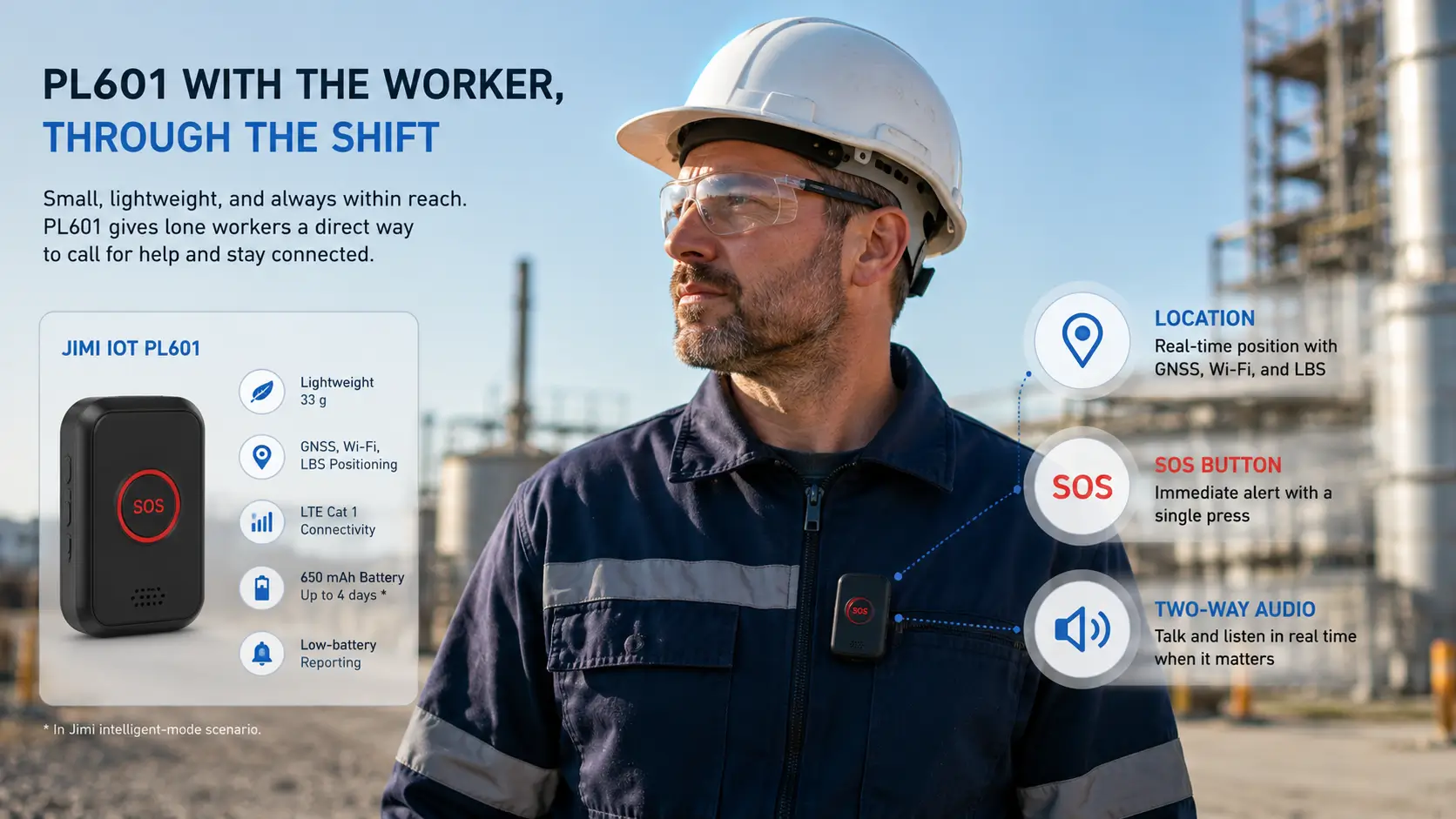
A recent addition to the Jimi IoT family already integrated with Navixy, PL601 ticks quite a few boxes on this checklist.
At just 33 g, PL601 is small enough to stay with the worker throughout the shift. It combines GNSS, Wi-Fi, and LBS positioning with LTE Cat 1 connectivity, a physical SOS button, and two-way audio, covering several items from our checklist in one device. A 650 mAh rechargeable battery provides up to four days of operation in Jimi’s stated intelligent-mode scenario, while low-battery reporting helps keep an eye on whether the tracker is ready for the next assignment.
That covers quite a bit on the worker’s side. But there is still one item on our checklist that the tracker cannot provide by itself: the response path. Once someone presses SOS, the event needs to reach the right people, with enough context for them to understand what is happening and act.
Explore all devices integrated with Navixy
Someone presses SOS. What happens next?
Let’s stay with the same technician. They are working at Site B late in the evening and press the SOS button.
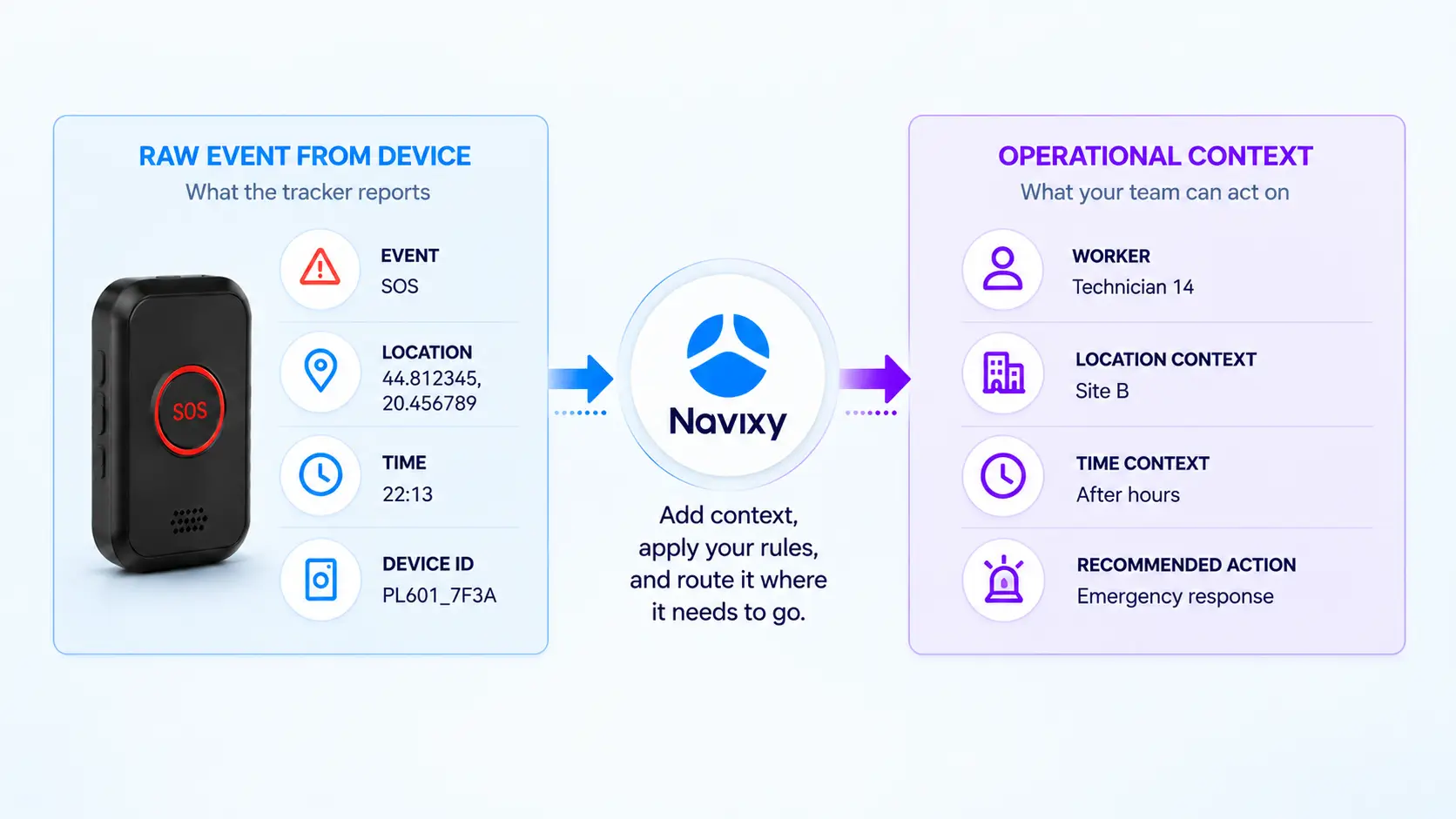
PL601 has done its job. It gives us the event and the worker’s location. From here, Navixy can add the context and logic that determine what the customer actually does with that information.
In IoT Logic, the TSP can build that response around the customer’s own safety policy. The flow takes the incoming PL601 data, adds useful attributes, evaluates several conditions together, and routes the event into the appropriate response process.
For our technician, let’s say the rule is simple. An SOS from Site B during regular hours goes through the normal process. The same SOS after hours should reach the customer’s emergency response system.
In simplified form:
PL601 SOS → Site B + after hours → emergency response
Give the device data some business context
Site B already exists in Navixy as a geofence. That means the incoming location does not have to remain just a pair of coordinates. It can be evaluated against a place that already has meaning for the customer.
Instead of working with:
SOS → 44.812... / 20.46...
the response process can deal with something closer to:
Technician 14 → SOS → Site B → 22:13
But location is only one part of our rule. We also need to know whether 22:13 counts as after hours.
An Initiate Attribute node can calculate an after_hours attribute from the event time according to the customer’s working schedule. In our example, regular working hours are Monday through Friday from 08:00 to 18:00. Anything outside that window gets after_hours = true.
The tracker itself does not need to understand Site B, the customer’s working schedule, or its escalation policy. It provides the event and telemetry. Navixy adds the operational meaning around them.
Build the customer’s response rule in IoT Logic
Now the flow has what it needs to make a decision.
For our example, the rule is essentially:
SOS + inside Site B + after_hours = true
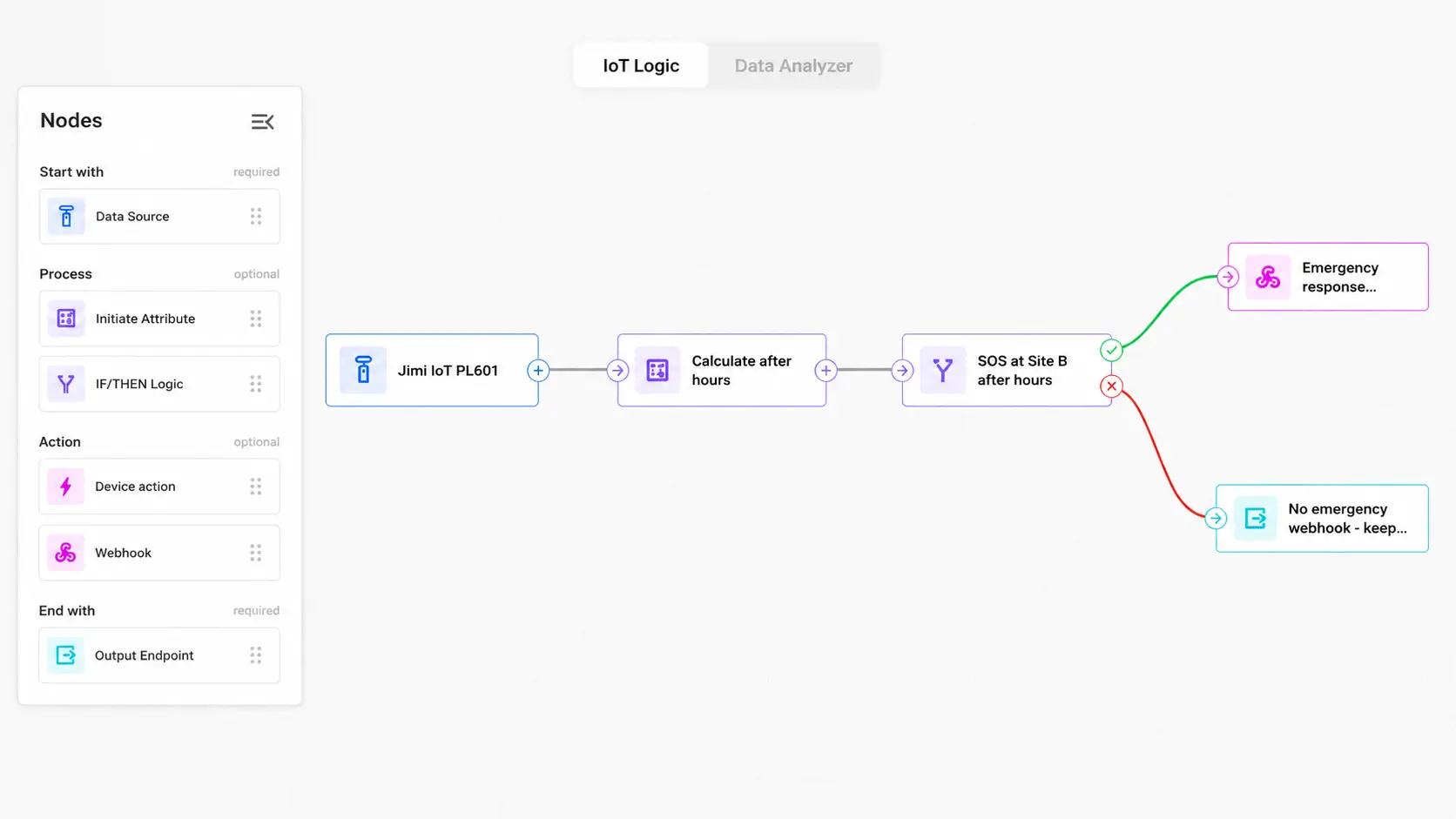
The flow starts with the PL601 Data Source. An Initiate Attribute node calculates after_hours. The Logic node then checks that attribute together with the SOS event and Site B condition.
If all three conditions are true, the THEN branch sends the event to an Emergency response Webhook. The webhook can pass the tracker identifier, event type, timestamp, coordinates, site information, and any other required context into the customer’s emergency response system.
If the conditions are not met, the ELSE branch keeps the data on its normal output path.
The whole flow is still remarkably small:
PL601 → Calculate after_hours → Check SOS + Site B + after_hours → Emergency webhook / Normal output
PL601 reports the same SOS regardless of which customer uses it. For another customer, Site B might become a construction area. Working hours might be different. The emergency webhook might point to a security platform instead of an incident-management system.
That is one of the more useful things about putting the logic in Navixy. The hardware can stay the same while the context, rules, and response path reflect the operation around it.
And you don’t have to build the starting flow node by node
A solution builder can also describe the required workflow to the Navixy AI Assistant in plain language.
For our example, we asked it to create a flow that detects a PL601 SOS, calculates whether the event happened after hours, checks whether the worker is inside Site B, and sends qualifying events to an emergency-response webhook.
From that description, the assistant created the starting structure:
PL601 Data Source → Initiate Attribute → Logic → Webhook / Normal output
The solution builder can then select the actual PL601 source, complete customer-specific conditions and endpoints, review the generated logic, and test the flow before deployment. Instead of translating the requirement into every node manually, they can start with the requirement and concentrate on validating and adapting the result.
The exact PL601 event and attribute mapping should also be confirmed against the integration before the workflow is deployed.
The SOS button does not have to be the first sign of trouble
Our first flow starts with SOS. But nothing says SOS has to be the trigger.
The same IoT Logic approach can watch for other combinations the customer has defined as worth checking. The point is not to treat every unusual location as an emergency. It is to surface the situations that matter under that customer’s operating rules.
Some exceptions are visible in the way people move
Suppose a security guard is assigned to a particular industrial site for a night shift. Leaving the geofence at 11 p.m. may be part of the job. Leaving it at 3 a.m. under conditions the customer has defined as unusual may be different.
That can become another IoT Logic rule:
Assigned-area exit + night shift → supervisor workflow
The same applies to field service. A technician may be expected to move between several customer locations during the day. If an expected site arrival never happens, or a device reports from somewhere outside the planned operating area, that event can feed into a supervisor workflow when the necessary assignment data is available.
Location alone does not tell us there is a problem. Neither does the time of day. Navixy can combine those pieces with the customer’s rules and act when the combination becomes relevant.
Navixy is not deciding that someone is in danger. It is applying the rules the customer has already defined and making unusual situations easier to surface.
Sometimes the problem starts before the shift does
Nor does every useful workflow have to deal with an incident.
If a worker is about to spend a full shift at a remote site, the state of the personal tracker matters before they leave. Where battery data is available from the integrated device, a TSP can build another simple workflow:
Battery below threshold before assignment → charging/replacement workflow
A device below the customer’s threshold can be flagged before it goes into the field.
For operations that issue trackers at the beginning of a shift and collect them afterwards, this turns device readiness into part of the safety process rather than something discovered halfway through an assignment.
The safety workflow should not live on an island
This is the other half of the connected-workforce argument.
Most enterprise customers already have systems and teams responsible for dispatch, security, field-service assignments, incident handling, or workforce management. A lone worker safety service becomes much more useful when its events can enter those processes instead of creating another isolated screen somebody has to watch.
That is why the webhook at the end of our IoT Logic flow matters.
An SOS can become an incident in the customer’s security system. An unusual site exit can enter a supervisor workflow. A low-battery condition can be passed into the process used to prepare devices before a shift.
Let the customer’s systems finish the job
The response itself will often belong outside the tracking platform. Navixy can receive the tracker data, add location and operational context, apply the customer’s conditions in IoT Logic, and send the result onward. The customer’s security, dispatch, incident-management, or workforce system then handles the next operational step.
One customer may want incidents in its ticketing system. Another may send them to a 24/7 security desk. A third may already have a workforce platform that should receive the event together with worker and site information.
For the TSP, the integration can reflect how the customer already works rather than forcing the customer to rebuild its response process around the tracker.
After a while, incidents start telling you something
One SOS is an incident. A few months of incidents and exceptions can start to show patterns.
Perhaps a particular remote site produces more unusual exits than the rest. Low-battery problems may repeatedly appear on one shift. Certain locations may generate more safety-related exceptions, or particular time windows may stand out from the rest of the operation.
Look for the places and situations that keep coming back
IoT Query gives solution developers SQL access to Navixy telematics and business data, so those patterns can be examined across devices, sites, and time periods.
A security provider might compare exceptions across sites and shifts. A field-service company could look at unusual location events by customer location. An operation that issues personal trackers daily may want to see how often devices reach a low-battery state before or during assignments.
If additional business or response data is available from the customer’s other systems, the analysis can go further. That gives the customer something useful for adjusting site procedures, staffing, operating rules, or device-management policies instead of only documenting incidents after they happen.
For a TSP, this can be more than one safety product
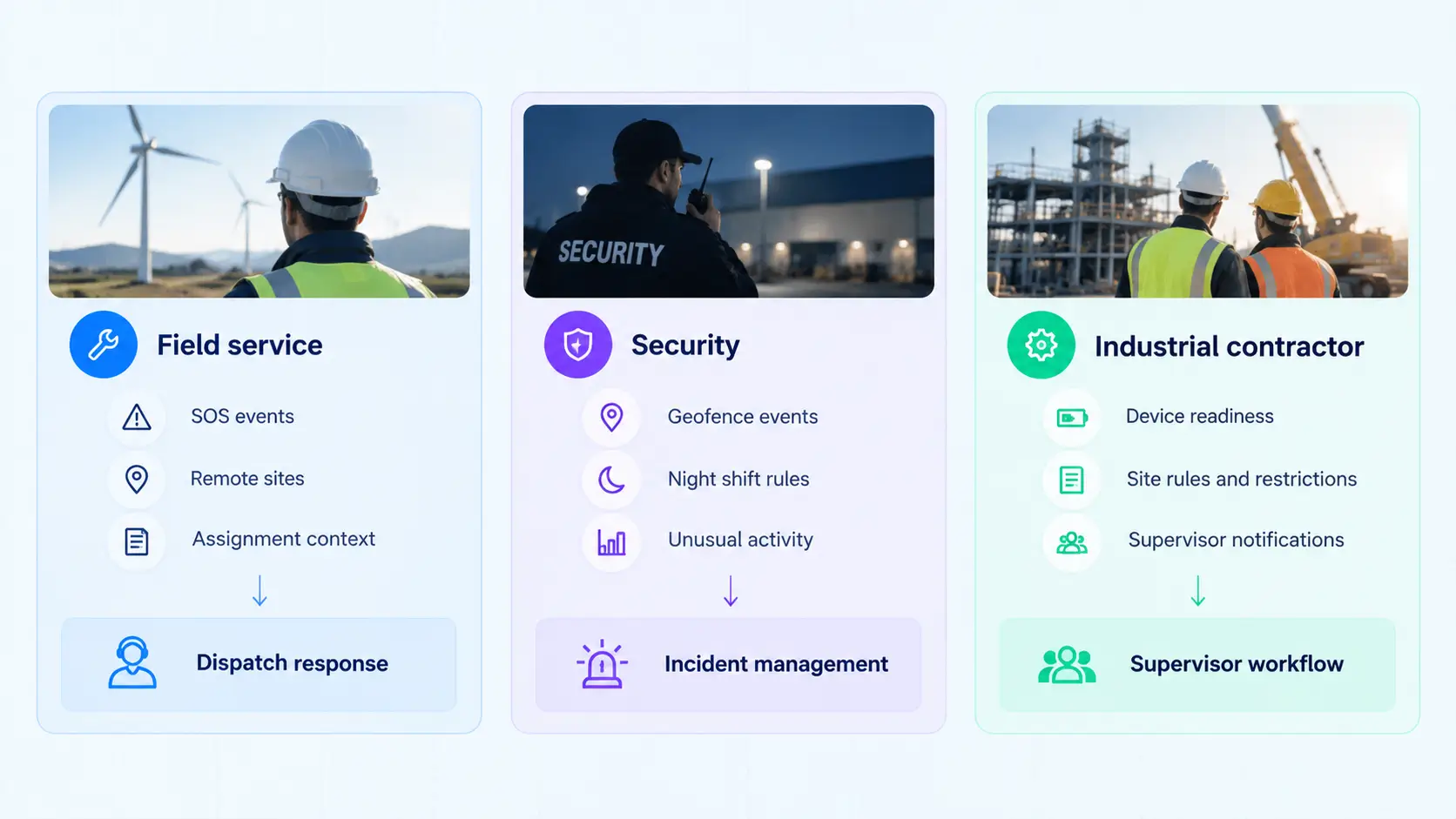
A field-service company, a security provider, and an industrial contractor may all use personal trackers, but they are unlikely to want exactly the same safety service.
One may care most about SOS from technicians at remote customer sites. Another may focus on assigned-area monitoring during night shifts. A contractor issuing trackers at the start of each shift may also care about device readiness before workers leave.
The underlying hardware and Navixy environment can remain familiar while the policy around them changes.
The differentiation does not have to live in the tracker.
A TSP can build different customer services through the location context, conditions, automations, response paths, and integrations around the same hardware foundation. The requirement might be “escalate an after-hours SOS from this site” for one customer and something quite different for the next.
That makes lone worker safety easier to treat as part of a wider connected workforce offering rather than a separate panic-button project every time.
Lone worker safety works better when it is part of the operation
A personal tracker gives someone working alone a direct connection back to the operation. The more interesting part is what can happen once that connection is there.
With Jimi IoT PL601 now integrated with Navixy, TSPs and solution integrators have another hardware option for the worker-facing part of a lone worker safety service. Navixy provides the context, automation, integrations, and historical data that allow that hardware to work within the customer’s actual operation.
If you are working on a lone worker safety project or looking to add it to an existing connected workforce service, contact us to discuss what you could build with Navixy.
On this page
- A worker in the field needs more than a dot on the map
- Someone presses SOS. What happens next?
- The SOS button does not have to be the first sign of trouble
- The safety workflow should not live on an island
- After a while, incidents start telling you something
- For a TSP, this can be more than one safety product
- Lone worker safety works better when it is part of the operation