Navixy Location Intelligence: one interface for all your telematics products

AuthorSam Ershov, Product owner, Core
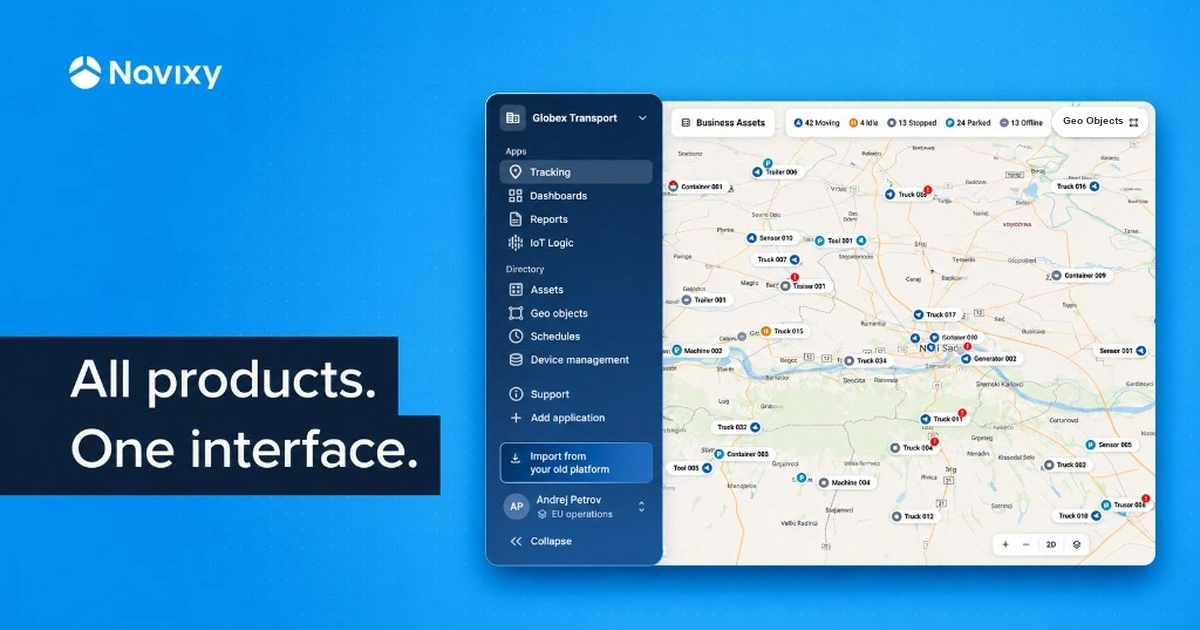
Imagine an operations manager overseeing three different operations: last-mile delivery in one region, field service teams in another, and an equipment yard in a third. Each operates independently, with its own vehicles, equipment, and staff. But when something goes wrong, the same manager is responsible for resolving it.
With Navixy Location Intelligence, that manager can oversee all three operations from a single interface. They sign in once and switch between the organizations and workspaces they have access to. Navixy IAM applies the permissions assigned to them in each one.
Tracking, device and asset management, IoT Logic and other products are all accessible through the same interface and work with the same underlying data.
Three accounts, three disconnected views
In traditional telematics platforms, managing multiple companies often means working with separate accounts.
Picture a typical morning. The manager signs into one account to check notifications, logs out, and opens another to export a report. Then it's another account switch to check what's happening at the equipment yard.
Signing in takes only a few seconds. The real challenge is maintaining a clear picture of what's happening across all three operations.
By the time they reach the third account, the situation in the first operation may already have changed. An issue flagged ten minutes ago may have escalated into a serious problem — or already been resolved. So they have to keep switching back and forth to stay up to date.
Shared logins make this worse. When several people work under one account, it is hard to say who did what.
One interface for all your enabled products
In Navixy 4, Location Intelligence provides a single interface for accessing all the Navixy products available to a user.
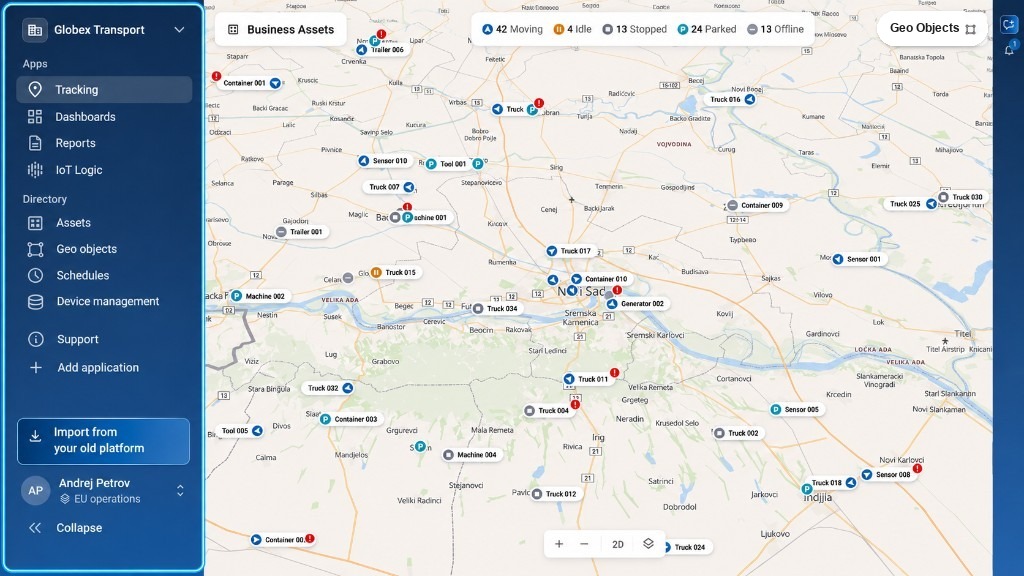
Users can access Location Intelligence in two ways. Administrators typically start in Navixy Console, where they manage organizations, workspaces, users, roles, and product availability. Other users can open Location Intelligence directly and go straight to the products they need.
All enabled products are accessible from a single menu, for instance:
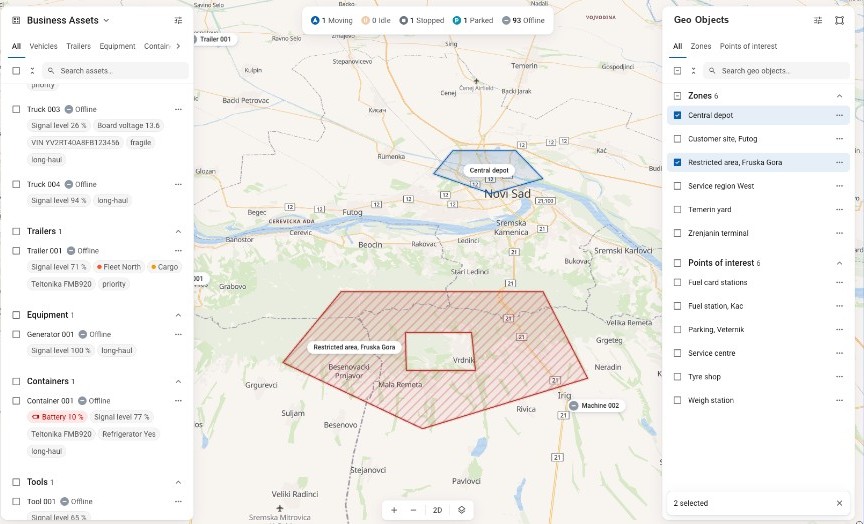
- Tracking is a live map with two panels: assets on the left, geo objects on the right.
- Device Management, Assets, Geo Objects, and Schedules provide the tools for managing devices and the essential records used in daily operations.
- IoT Logic is where you build the flows that turn device data into events and actions.
The context switcher at the top of the menu shows your current organization and workspace and lets you switch between them.
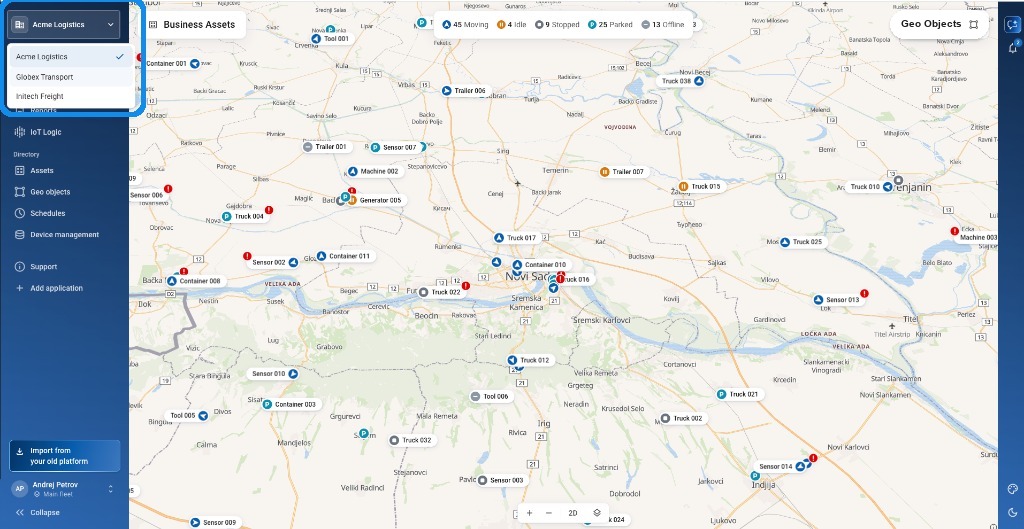
Switching between organizations and workspaces
What users see and can do in Location Intelligence depends on their access permissions.
Access is determined by five interconnected elements: the user, the organization, the workspace, the products enabled within it, and the permissions assigned to the user's role.
| Element | What it means | What changes when you switch |
|---|---|---|
| User | One Navixy identity, not tied to one organization | The account stays. No second sign-in. |
| Organization | A separate company, with its own contract, users, and roles | The role this user holds in the selected organization applies |
| Workspace | A separate data environment inside the organization | The assets, devices, and geo objects on screen change |
| Products | Products enabled for the workspace in Console | The menu shows the products available in the selected workspace |
| Permissions | Permissions assigned to the user for their role in Console | The actions the user can take change |
Each time a user switches organizations or workspaces, Navixy reevaluates their permissions. Navixy IAM identifies the user's role in the selected organization and applies the corresponding permissions.
Permissions are specific to each organization. Having full control over devices in one organization doesn't automatically grant the same permissions in another.
Each of the three lines of business is its own organization. Each can have its own legal entity, its own contract with Navixy, its own people, and its own roles.
Inside one organization you can create several workspaces, for different regions, depots, or customer projects. Each workspace has its own data and its own set of enabled products.
Tracking assets across different operations
The manager starts with the last-mile delivery operation. After selecting the organization from the top menu, they see its vehicles, other assets, and geo objects in Tracking.
The left panel displays assets organized by type, with each company defining its own asset types in its data model. A delivery operation might use Vehicle, Cargo, and Workforce. A yard might use trailers and containers.
Each row displays the asset's name, movement status, speed or stop duration, connection status, and any additional attributes the team has chosen to display.
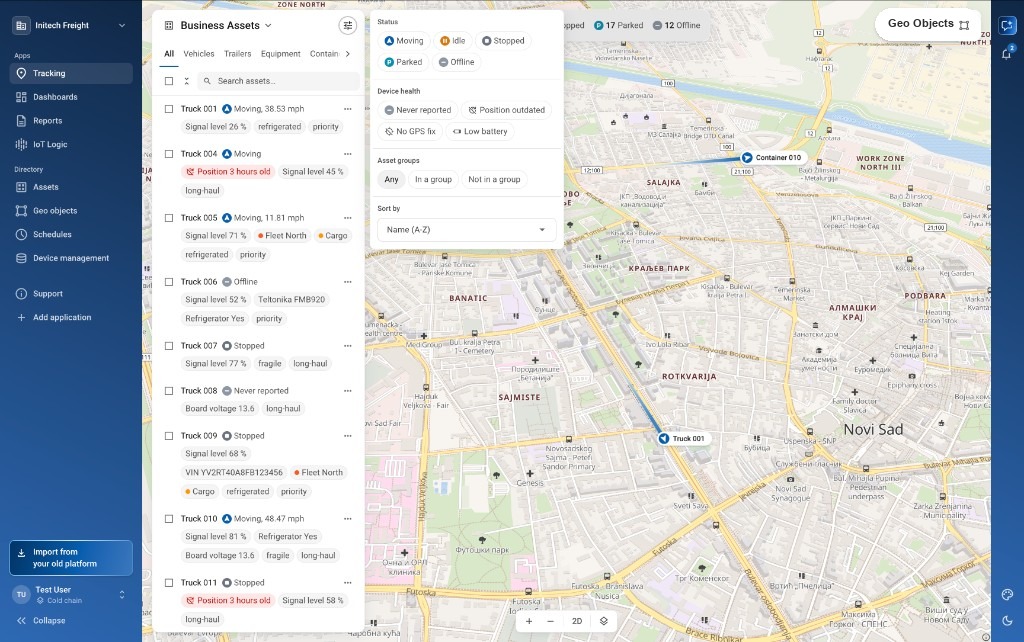
The right panel lists geo objects: depots, delivery zones, routes, and the other places the operation depends on.
Working with groups of assets
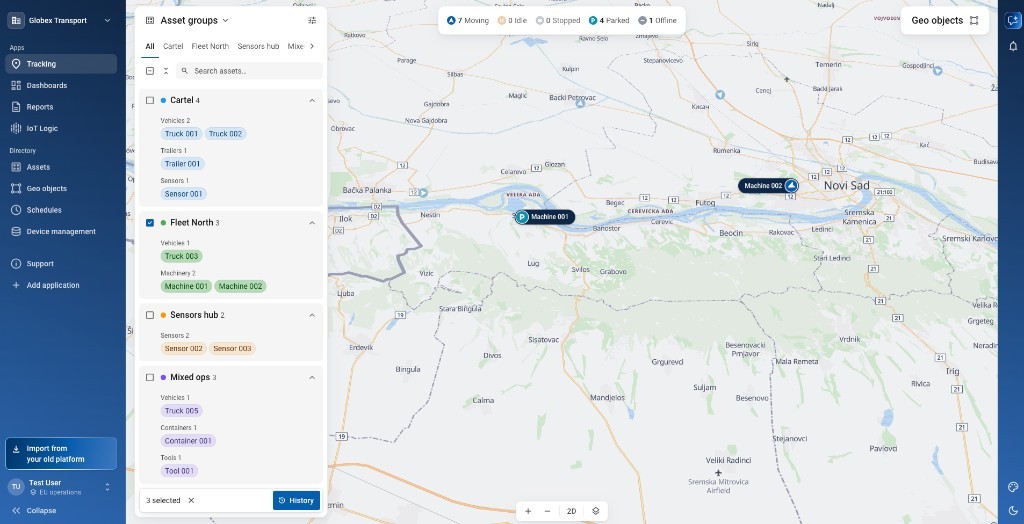
The manager needs to check the morning deliveries. They turn on grouping and select the Fleet North group. The map highlights all vans in the selected group using its assigned color and automatically adjusts to fit them into view.
Two trackers on one asset
A van is equipped with two GPS trackers: a wired primary device and a battery-powered backup. Tracking uses location data from the primary device. If the primary tracker fails, a dispatcher can manually assign the backup tracker as the new primary device.
Trip history remains associated with the asset rather than an individual tracking device. Switching the primary tracker doesn't require creating a new asset.
All asset details in one place
Open the van's asset card to view:
- key asset details, current location, and status
- the primary tracker and any connected devices or peripherals
- the groups the van belongs to
- recent events
- sensor and counter readings, including fuel, engine hours, and mileage
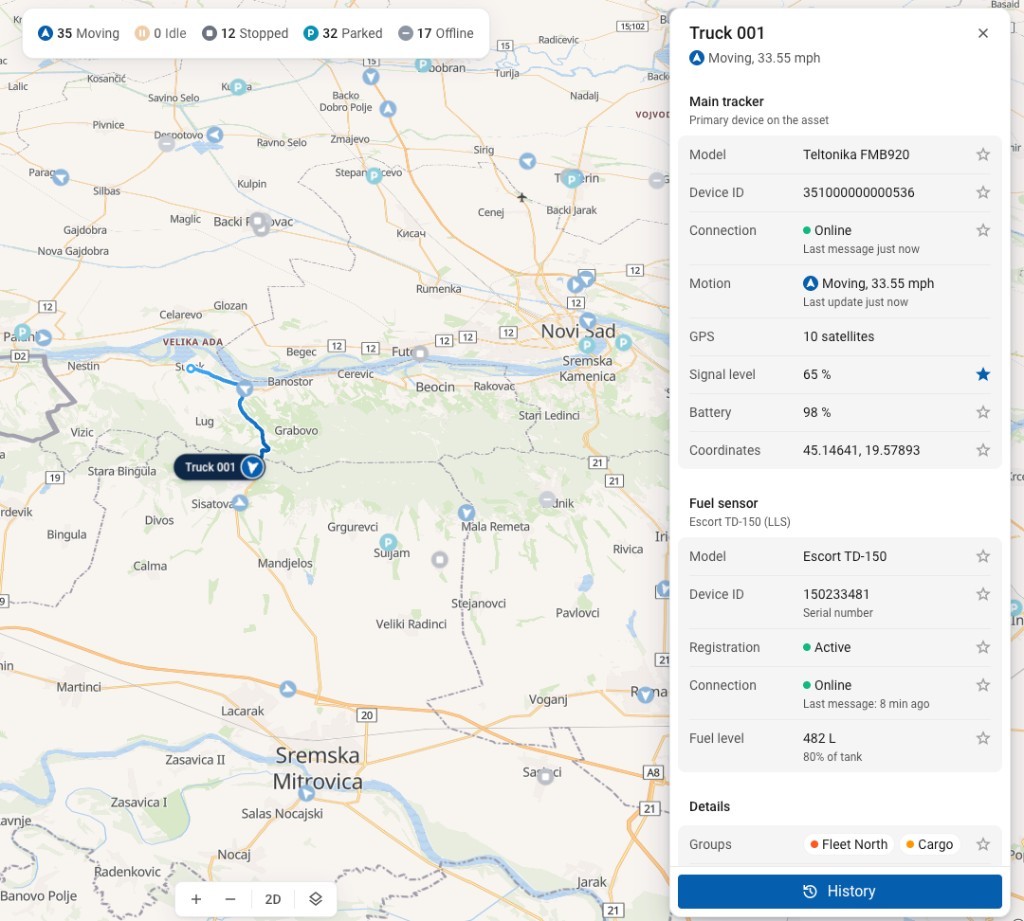
From the asset card, users will also be able to generate a Geo Link to share the van's live location or access the rules associated with it.
Trip history will also be linked to the asset. Managers will be able to review a week's worth of trips for multiple vans at once, including distance traveled, trip duration, average speed, start and end addresses, and estimated fuel consumption.
By default, trip history will show trips recorded by the primary tracker. If another device becomes the primary tracker, subsequent trips will be recorded using its data. Users will still be able to access trip data from all trackers associated with the asset.
When the delivery check is done, the manager switches to the organization that runs the field service crews. Tracking looks the same, and it now shows the other company's data. The actions available change with it, to match the role the manager holds there.
Shared data across all products
Seamless switching between organizations is only one part of what Location Intelligence offers.
A unified interface offers limited value if every product still maintains its own separate data. Navixy 4 goes further by giving products access to the same underlying records.
Assets, devices, asset groups, and geo objects live in the Business Data Repository. Every product in the workspace reads those same records.
For example, a company creates a van in Assets, defines its attributes, and links a GPS tracker through Device Management. The same van appears on the Tracking map and can be used in IoT Logic flows. There's no need to recreate the asset in each product.
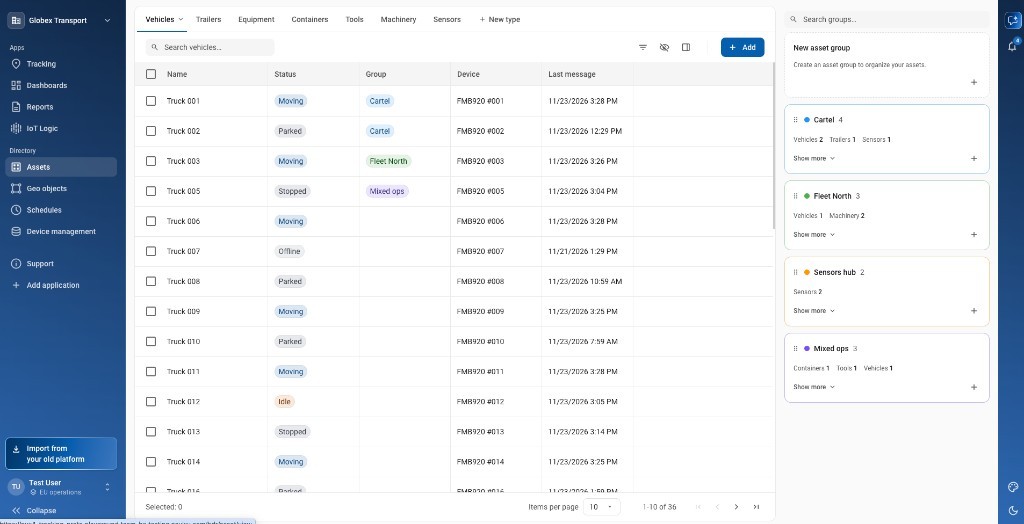
Rename the van, and the updated name appears across all products. Move it to another group, and the asset lists and map reflect the change.
When the manager switches organizations, they see a consistent view of each business, without having to reconcile data across separate systems.
One interface, different roles and permissions
Location Intelligence isn't just for managers overseeing multiple businesses. It also supports users with different responsibilities and access requirements.
The operations manager. In the last-mile delivery organization, they manage daily operations and have access to all the tools they need. In the field-service organization, their access is primarily read-only because a local manager oversees daily operations. In the equipment yard, they have full access again. They can move between all three organizations with a single login, while their permissions automatically reflect their role in each one.
The systems integrator. An integrator supporting the field-service company can access only the resources explicitly authorized by the customer. For example, they may have access to devices and IoT Logic in a specific workspace, without gaining access to other workspaces or resources. Delegated access, including a time limit on it, is covered in our post on the flexible access control model.
The field employee. A technician or driver can access only the organizations, workspaces, and resources relevant to their responsibilities. They see only the tools they're authorized to use.
Reducing the number of sign-ins is only part of the benefit. Every user gets access to the right tools and resources based on their role, while individual actions remain traceable to a specific user account.
Bring your own applications into Location Intelligence
Today, Location Intelligence brings Navixy products together in one interface. We're also working on making it possible for customers and partners to add their own applications, including those built with AI-powered development tools.
This could be a custom dispatch dashboard, an equipment inspection checklist, or a report tailored to a specific customer's requirements.
These applications will run alongside Navixy products, sharing the same authentication, organization and workspace context, IAM permissions, and data.
The goal is to give businesses one place to work with both Navixy products and their own applications, without switching between separate systems. This will make it easier to create workflows tailored to how each business operates.
Try Location Intelligence with your own data
Ready to see how Location Intelligence works with your own data? Sign up for Navixy Console, create your organization, and explore it in a few steps:
- Create two or three workspaces with different assets and devices.
- Enable the products you need, invite users, and give them different roles.
- Open Location Intelligence and switch between the workspaces.
Switch between workspaces to see how the map, available products, and access permissions adapt to each environment. Location Intelligence brings your different operations into one interface, so you can move between them without logging in and out of separate accounts.
On this page
- Three accounts, three disconnected views
- One interface for all your enabled products
- Switching between organizations and workspaces
- Tracking assets across different operations
- Shared data across all products
- One interface, different roles and permissions
- Bring your own applications into Location Intelligence
- Try Location Intelligence with your own data