Describe the rule, and AI drafts your IoT Logic flow

You already know the automation you want. Block the engine if a vehicle enters the restricted yard. Alert dispatch when a reefer drifts out of range for five minutes. Open a work order when the same engine fault repeats. What you don't always want is to stop and learn a rules engine well enough to build it.
Here is the short version. In Navixy you can now describe the outcome in plain language, and the AI Assistant drafts the flow for you in IoT Logic. But the part that matters isn't speed. Before anything is built, the assistant restates the logic it understood, and — for actions that touch the physical world — shows a safety confirmation you have to clear. The AI drafts; you approve. You review and import the result, then bind your own triggers. That is the whole point: you stay in control.
When "build me a flow" still meant "go learn the rules engine"
Automation is how a fleet turns raw telemetry into action — an alert, a command, a webhook. It's also where good intentions stall, because someone has to sit down and assemble the triggers, conditions, and actions correctly. The market has voted on the friction: Gartner expects roughly 75% of new enterprise applications to be built with low-code or no-code tools by 2026, up from under 25% in 2020.
But "easier to build" is not the same as "safe to run." The same body of research finds the failure mode plainly: about 43% of citizen-developer initiatives get scaled back or shut down, and the primary cause is governance, not technology. Automations that act on the real world fail when nobody reviews what they actually do.
So the useful question isn't "can AI build the flow faster?" It's "can AI build the flow and keep a human in the loop where it counts?"
The four checkpoints of an AI-built flow
The answer is a simple, repeatable shape. Think of an AI-built flow as four checkpoints — describe, confirm, gate, build — with a human decision at each one.
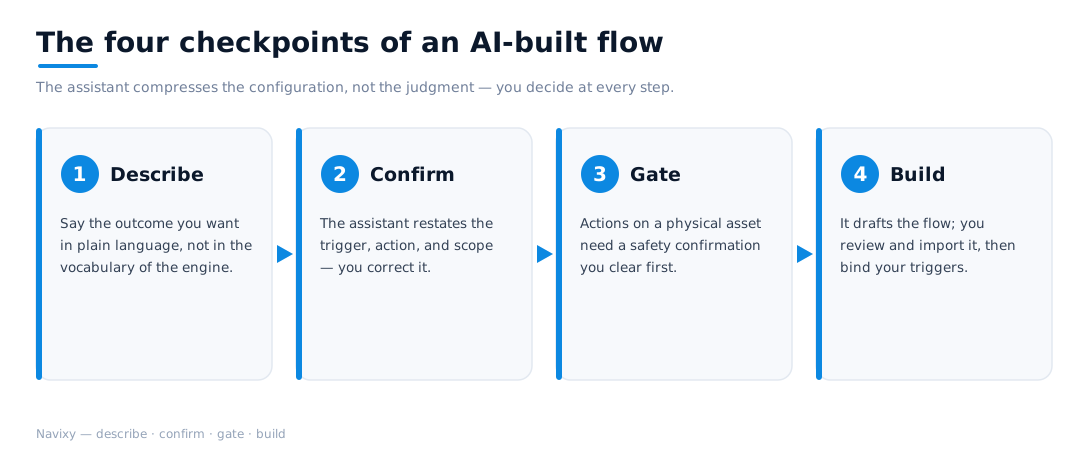
- Describe. State the outcome in business terms — "block the engine inside the yard" — not in block names. You shouldn't need the vocabulary of the rules engine to ask for the result.
- Confirm. The assistant restates the trigger, condition, action, and scope it understood, and asks you to correct it. For anything ambiguous, it asks rather than guesses.
- Gate. For actions that affect a physical asset — cutting an engine, unlocking a door — it shows a safety confirmation, and you accept that risk explicitly before it proceeds.
- Build. It drafts the flow; you review and import it into IoT Logic, then bind it to your actual triggers and assets.
The assistant compresses the configuration, not the judgment. Speed where it's safe; a gate where it isn't.
A worked example: "block the engine when the van enters the yard"
Here is one of the simplest real requests, and exactly how the four checkpoints play out.

You ask the assistant, in plain language, to build a flow that blocks the engine once a vehicle enters a geofence. It takes a moment — it isn't firing off a rule the instant you hit send. It comes back having confirmed the requirements: trigger is "vehicle enters geofence," action is "block engine," scope is "all vehicles," with the specific geofence left for you to pick.
Then the gate. Blocking an engine affects a physical vehicle, so the assistant raises a safety confirmation — you acknowledge the risk and confirm before it builds anything. With that cleared, it drafts the flow. You review and import it into IoT Logic and specify the real triggers: which geofence, which assets.
Ask for something more involved — a multi-step cold-chain escalation, say — and you'll get more questions, not fewer. That back-and-forth is the design working, not a limitation.
Why "draft, then approve" beats autopilot
There's a bigger shift underneath this. Software is moving from "humans operate tools" to "agents operate tools on behalf of humans" — and the industry has standardized on how. The Model Context Protocol, donated to the Linux Foundation's Agentic AI Foundation in late 2025, has become the de facto way to connect AI agents to tools and data, with thousands of published servers across the major AI platforms.
The naive reading of that shift is "let the agent just do it." But automation that cuts an engine or unlocks a trailer is precisely where un-reviewed autonomy is dangerous — and, per the governance data, where ungoverned building already breaks down. The durable pattern isn't a bot that acts alone; it's an assistant that drafts and a human who approves. You get the speed of describing an outcome in a sentence, with a checkpoint exactly where the stakes are real.
How Navixy does it
The AI Assistant is reachable from any page in your Navixy account, including from inside IoT Logic, so you can ask for a flow without leaving the place you'd build one. You describe the outcome; it restates and clarifies the requirements; it presents a safety confirmation for actions that affect a physical asset; it drafts the flow; and you review and import it, then bind your triggers.
It deliberately favors getting the configuration right over producing it instantly — a flow is set up once and then runs every day, so quality matters more than the few seconds saved. And the honest boundary: the assistant accelerates building the flow; it does not replace your operational judgment. The capability is live, and the team is actively watching how it behaves on real use cases to keep improving it. At every step, you stay in control.
Try it on your next automation
Don't rebuild everything you have. Take the one rule you've been putting off, open the AI Assistant inside IoT Logic, and describe the outcome you want. Confirm the logic, clear the safety gate, import the draft, and bind your triggers. You'll spend your time deciding what the fleet should do — not hunting for where the blocks live.