Rental equipment tracking that stops unbilled days and silent moves

AuthorRoman S, Product owner, Navixy IoT Logic and Integrations
A rental customer comes to you, their telematics provider, with a simple question. Can the tracker show that a dumpster sat on a job site three days longer than the invoice says, when it only checks in once an hour? Yes, and for rentals billed by the day, the precision is more than enough. In rental equipment tracking, an autonomous GPS tracker logs the moment movement starts and the time of every event, and IoT Logic in Navixy ties that data to the rental company's orders and geofences. Let's follow one dumpster with a Teltonika ATC774 through a week and watch the flow open and close the rental on its own, flag a move nobody ordered, and refuse to mistake an overnight GPS jump for a haul.
Does a GPS tracker for rental equipment send enough data?
Dumpsters, job site trailers and portable toilets have no power of their own, so non-powered asset tracking relies on autonomous trackers that check in rarely to save battery. Whatever the rental company can later prove to a customer depends on what data the tracker manages to send and when. The tracker is worth exactly as much as its data, so that's where we'll start.
What lands on the platform and why it matters
As an example, take the Teltonika ATC774, an autonomous container tracker we recently integrated into Navixy.
The Teltonika ATC774 is an autonomous GPS tracker for assets that stand still for long stretches, such as containers, trailers, generators, construction equipment and tools. It needs no wiring, its battery lasts up to ten years, and its housing is IP68. It sends only the essentials, which makes it a good test for this article. If the rental logic works on data from a tracker like this, it will work all the better on a more talkative device. The ATC774 is certified in Navixy, so its records reach IoT Logic just like data from any other supported device.
While the dumpster sits, the tracker sends one record an hour by default. Bump it, and the accelerometer catches the motion and the tracker logs a record with the event time right away. On the road, records come every five minutes. With no network, they pile up in memory and go out later, still stamped with the time the event happened rather than the time they were sent.
Here's what each record carries and why you'd care:
- coordinates from satellites or, if you set it up that way, a rough position from cell towers, which is what your site geofences run on;
- a motion flag from the accelerometer, which tells a real haul from a GPS jump;
- HDOP and time since the last satellite fix, which tell you whether to trust a given position;
- battery level, so you can schedule a swap before the tracker goes quiet;
- network and carrier data, including a roaming flag, which shows when a container crossed a border.
The ATC774 has no sensors or Bluetooth, so it won't report cargo temperature or how full a dumpster is. Let's see what this data gets you over one week of a rental.
The IoT Logic docs walk through connecting trackers to a data flow and setting up processing.
Rental equipment tracking, one dumpster at a time
What a rental company wants from tracking is answers. When did the rental start, and when did it end? Did the dumpster end up somewhere nobody agreed to? Can you trust a position when the dumpster sits between two walls of scrap metal? The answers show up when the tracker's data meets the rental company's own data, meaning orders, site addresses and rental terms. In Navixy, that happens in IoT Logic. You build the flow from nodes on a visual canvas and write conditions as short expressions, no programming involved.
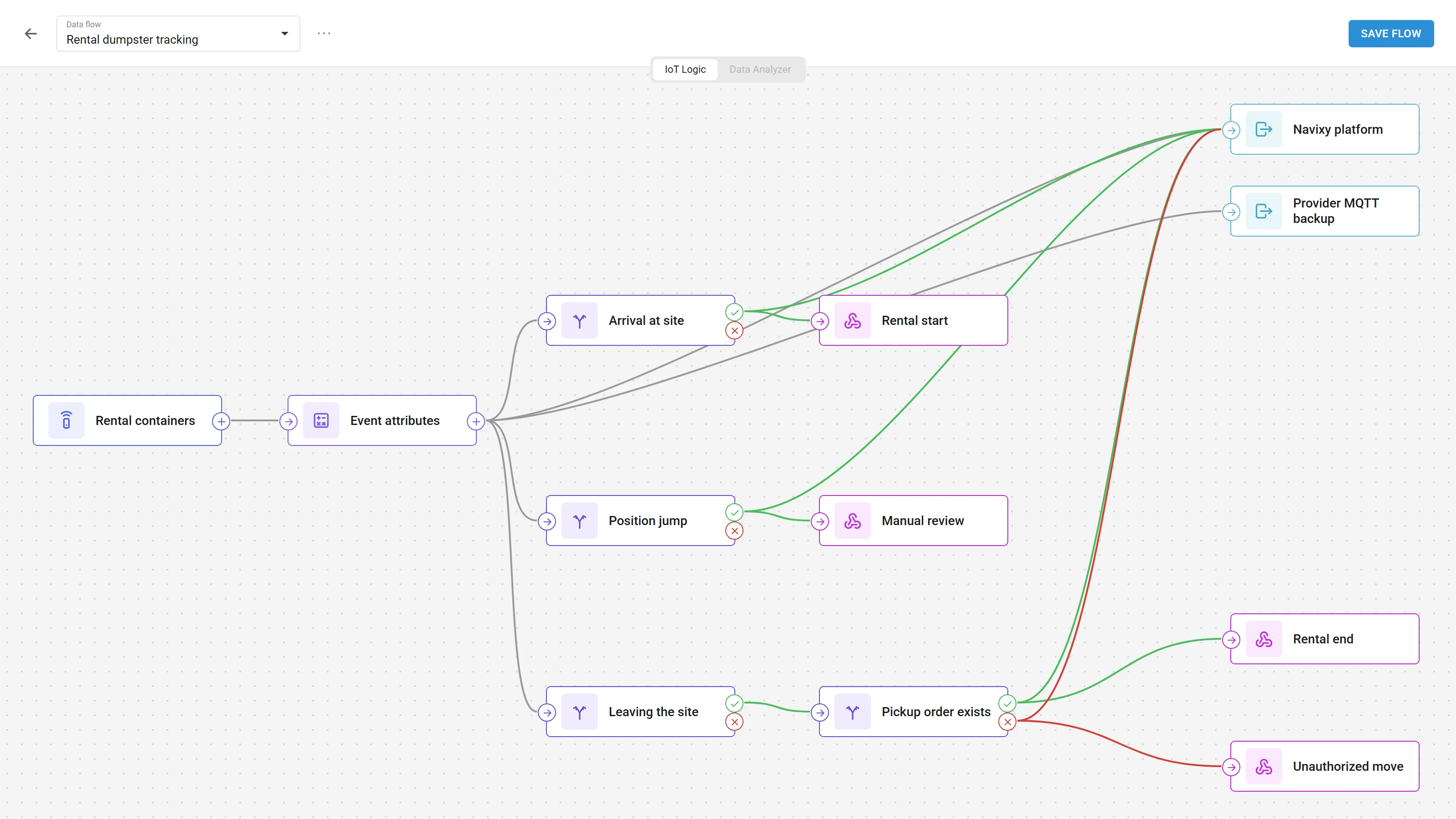
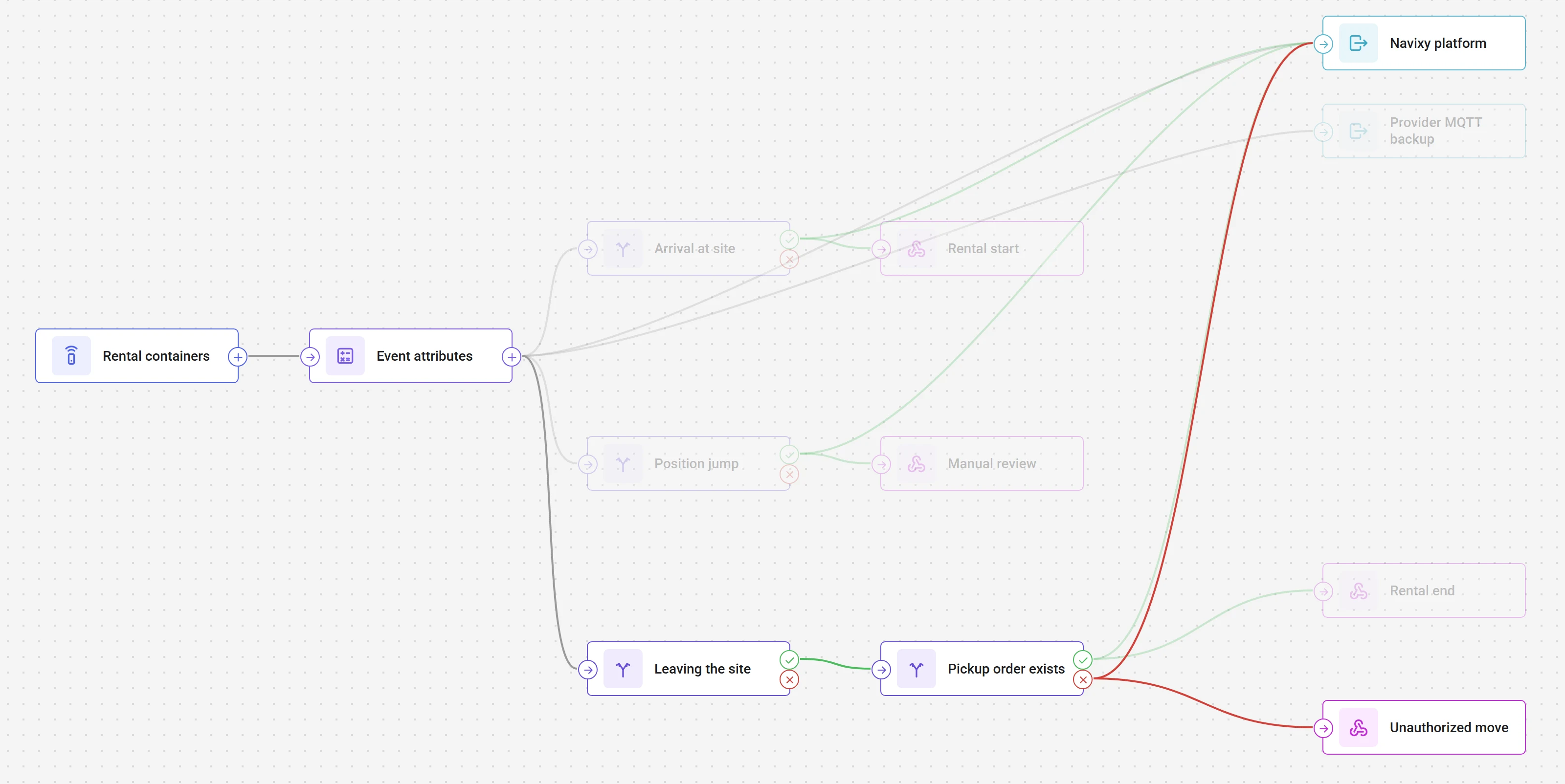
All the scenarios below run in one flow. A Data Source node with the dumpster trackers sits at the input, and an Output Endpoint node passes data on to the platform as usual. In between there's an Initiate Attribute node with calculated attributes, plus IF/THEN Logic branches that end in webhooks to the rental company's systems. Every branch that ends in a webhook also connects to the Output Endpoint, because IoT Logic won't save a flow with a branch that doesn't reach one. Here's how dumpster GPS tracking plays out over one rental, Monday through Friday on a job site.
The dumpster arrives and the rental clock starts
Monday morning, the driver drops the dumpster at the customer's job site. On the road, the tracker logged a position every five minutes, so the first record inside the site geofence trails the actual arrival by no more than that. That record opens the rental. The arrival time lands in the rental company's billing system straight from the data, not from a driver's log that gets filled out at the end of the day, if anyone remembers.
How to build it in IoT Logic
- In the Initiate Attribute node, add an
event_timeattribute with the formulagenTime('latitude', 0, 'valid'). It holds the moment the tracker created the record with the coordinates. - An IF/THEN Logic node named "Arrival at site" checks this condition
You don't redraw the geofence. You pick it from the ones already set up in Navixy, and the function drops into the field from a list.enterGeofence(51577 /* Customer site 14 */) == true - On the THEN branch, add a Webhook node named "Rental start." Give it the rental company's billing system URL, the auth headers, and a request body that pulls in attributes from the flow
{"container": "{{device_id}}", "site": "Customer site 14", "event": "rental_start", "time": "{{event_time}}"}
The position jumps overnight while the dumpster sits still
The dumpster sits in a yard between a rebar stack and the wall of the building next door, and the satellites have a hard time seeing it. In an overnight record, the position lands outside the geofence. Take it at face value, and the flow raises an alarm about a haul that never happened. After a couple of those, dispatchers stop trusting alerts.
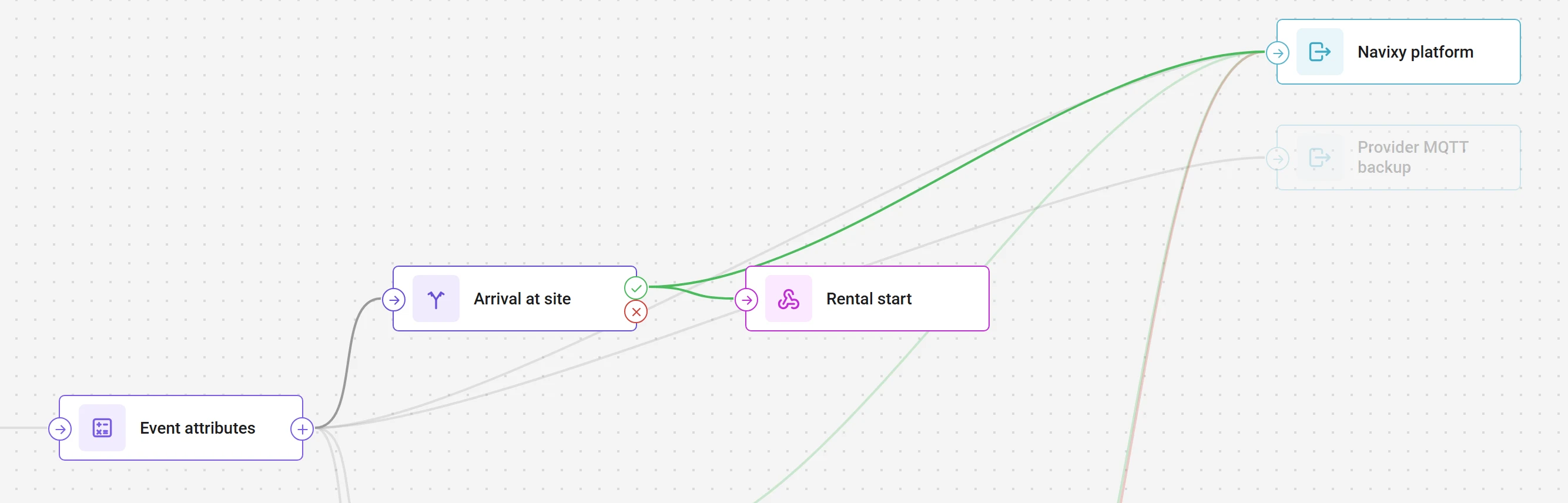
The same tracker data gives the jump away. Teltonika considers HDOP below 2 normal, and a zero time since the last fix means the position is fresh rather than a repeat of an old one. If the position crossed the line with poor accuracy, or with no motion from the accelerometer, it's far more likely a jump than a haul. That event goes to review instead of the alarm channel.
How to build it in IoT Logic
- In the same Initiate Attribute node, add a
reliable_positionattributehdop < 2 && time_from_last_fix == 0 - An IF/THEN Logic node named "Position jump" catches geofence exits you shouldn't trust
leaveGeofence(51577 /* Customer site 14 */) == true && (reliable_position != true || value('movement', 0, 'valid') == 0) - On the THEN branch, a Webhook node named "Manual review" sends the event to the dispatcher's review queue, not to alerts.
- Add
reliable_position == trueto every other rule in the flow. From this night on, they only fire on a position you can trust.
On Thursday the dumpster leaves without a pickup order
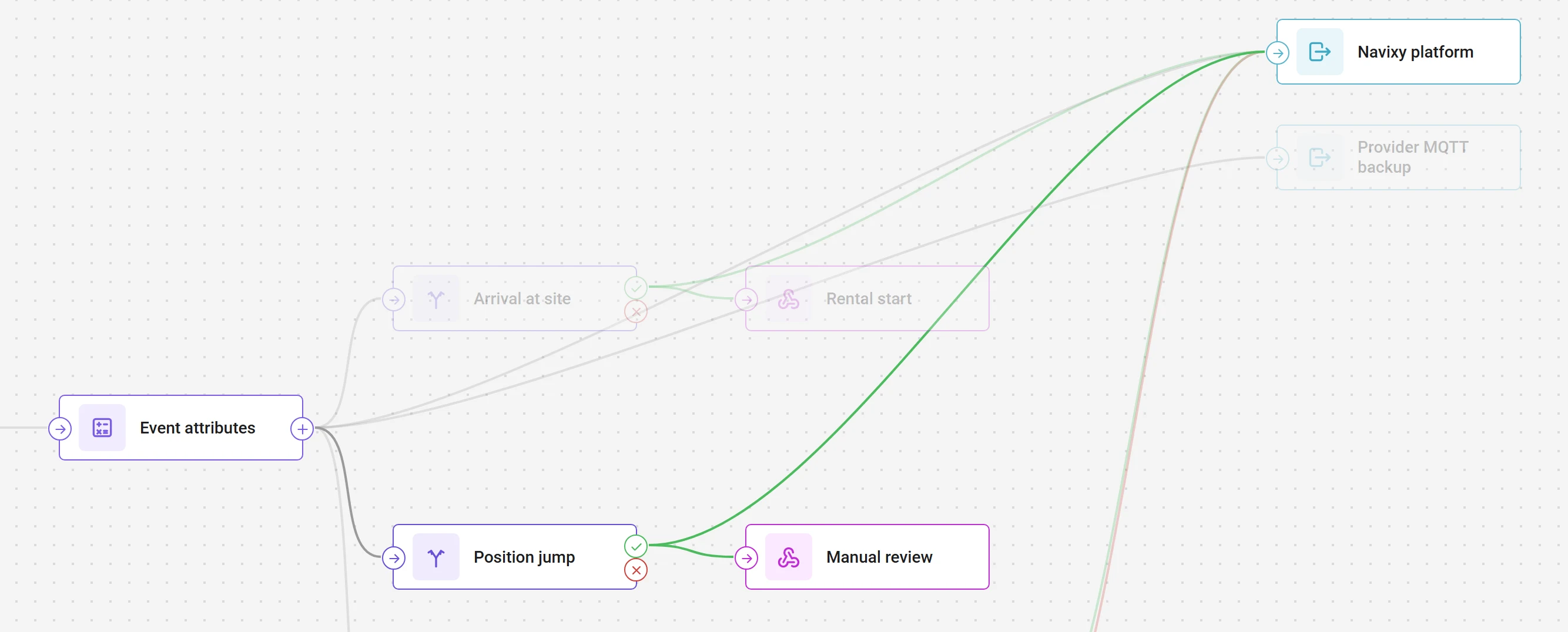
Thursday afternoon, the accelerometer picks up movement, and soon a reliable position comes in from outside the site. The rental company has no pickup order on file. The customer decided to move the dumpster to the next lot over on their own. The rental doesn't close. It goes on hold for review, and the dispatcher gets an alert with the container, the site and the time. They call the customer, the dumpster is back by evening, and the geofence entry shows up in the data again.
A word on delays. The exit record is created within five minutes of the dumpster crossing the line, but the alert goes out only when the tracker has a signal. On a site with no coverage, the dispatcher hears about it later, though the time in the data is still right.
How to build it in IoT Logic
- In the Data Source node, open the Software tab and set up HTTP push. Set a primary key that the rental company's system uses to identify each container, such as
container_id, and map every tracker to its number. Once you save the flow, the platform generates a URL. The dispatch system postspickup_order: trueto it when a pickup order is created andfalsewhen one is canceled, with anAuthorization: NVX <API key>header. The status shows up next to the tracker data as a regular attribute. - An IF/THEN Logic node named "Leaving the site" catches a real departure
leaveGeofence(51577 /* Customer site 14 */) == true && reliable_position == true && value('movement', 0, 'valid') == 1 - Its THEN branch leads to a second IF/THEN Logic node, "Pickup order exists"
Thevalue('pickup_order', 0, 'valid') == true'valid'mode takes the last known value, even if it arrived before the tracker data. You can also check when the status arrived withsrvTime('pickup_order', 0, 'valid'), so a stale order doesn't fire in place of a new one. - The ELSE branch leads to a Webhook node named "Unauthorized move" with the event
"unauthorized_move". It puts the rental on hold in the billing system and alerts the dispatcher. We'll use the THEN branch on Wednesday.
The customer disputes the pickup date
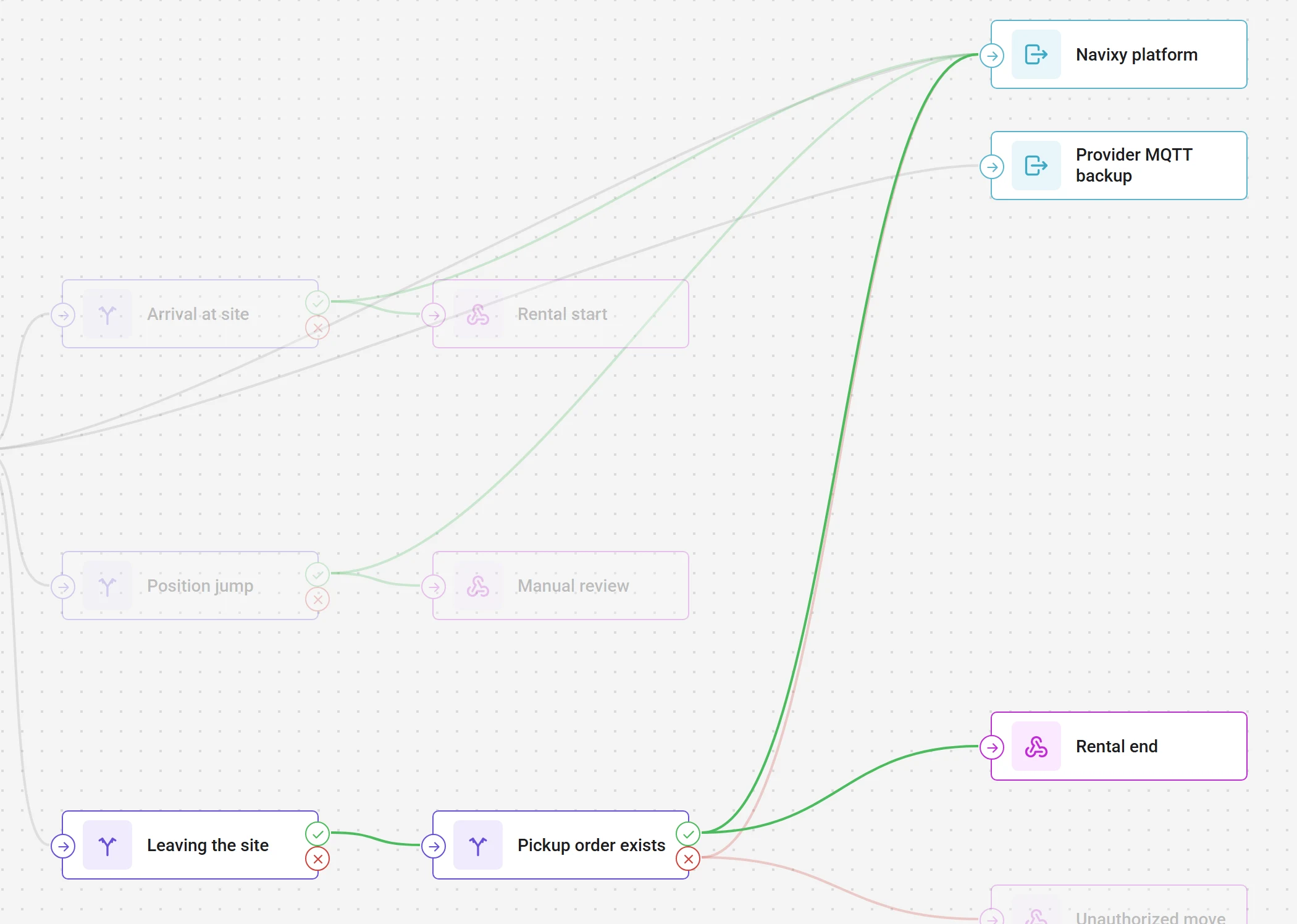
The rental gets extended, and the following week dispatch schedules a pickup for Wednesday. The customer insists the dumpster was hauled away on Monday and won't pay for two days. On Wednesday, the geofence exit matches an active pickup order, and the dumpster goes off-rent. The pickup time comes from the record the tracker made the moment movement started, not from the first position outside the line. There was no signal on site that day, and the record only reached the server in the evening, but the invoice still got the event time.
The rental company now has a chain of records: arrival, the overnight review, Thursday's move, the return, Wednesday's pickup. It isn't legal proof down to the minute, but rentals are billed by the day, and a few minutes either way won't change the invoice. The only thing left to argue about is a pickup around midnight or an event right at the geofence edge with a shaky position. A person makes that call, but now with the data in front of them.
How to build it in IoT Logic
- On the THEN branch of "Pickup order exists," add a Webhook node named "Rental end" with the event
"rental_end". - Take the pickup time from the record where movement started. It's among the recent values of the motion flag, and
genTime()with the right index returns the moment the tracker created it. Add this as adeparture_timeattribute in the same Initiate Attribute node and pass it in the webhook body. - A webhook doesn't retry if the billing system doesn't respond. For data that invoices depend on, it's worth also sending the stream through a second Output Endpoint node over MQTT to the provider's own system, so any event can be recovered.
The quieter the tracker, the more the logic is worth
In a week and change, the tracker sent a handful of records, and not one of them said "rental." The billing dates, the unauthorized move and the false alarm that got filtered out all came from the logic on top of the data. That's why what a provider really sells in rental equipment tracking is control over the rental: dates nobody has to argue about, a call to the customer right after an unordered move, and fewer disputed invoices. The more basic the device, the bigger the share of that value that comes from the logic rather than the hardware. And as the flow above shows, IoT Logic fits all of it into a dozen nodes.
Working with a device that isn't on our list yet, or a scenario that doesn't fit standard reports? Tell us about it. We keep adding new devices and work through unusual cases together with our partners.